

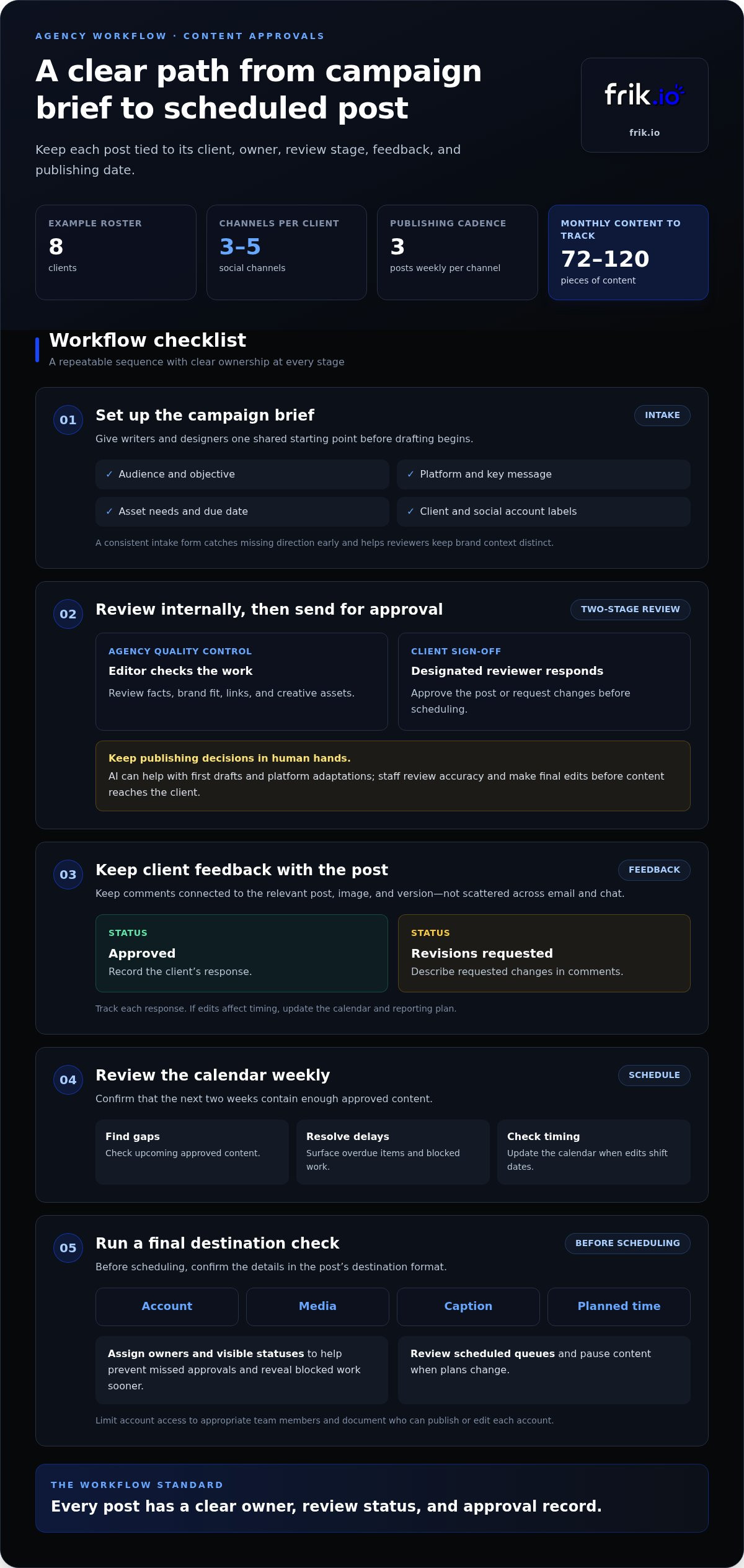
The best agency social media management workflow combines client-specific workspaces, clear approval stages, and a shared publishing calendar. For eight clients with three to five channels each and three posts weekly per channel, that means tracking 72 to 120 pieces of content per month. Choose tools that keep drafts, feedback, approvals, and scheduling connected without taking final brand and publishing decisions away from people.
It’s easy to focus on calendars and scheduling posts. But agency teams also need a reliable way to manage revisions, keep clients informed, and keep each brand’s work distinct. A clear workflow reduces manual follow-up and makes the process easier to repeat as the client roster grows.
This guide explains which project management features matter, how approval workflows move content from draft to scheduled post, and how to assess tools against real agency tasks. You’ll also find a practical way to compare options based on your team’s workflow, client reviews, and reporting needs.
Key Takeaways
- Build a repeatable path from content brief to human review, client approval, and scheduling, with clear ownership at each stage.
- Use AI to draft and adapt posts, then keep brand fit, accuracy, and publishing decisions in human hands.
- Prioritize project management features that connect client workspaces, calendars, feedback, and reporting instead of scattering tasks across tools.
- Compare platforms with a real client week, a complete approval cycle, and a reporting export to see how each fits your team.
Customizable content creation and approval workflows
Build the calendar by assigning each campaign a brief, owner, review stage, and publishing date. A consistent posting schedule across multiple clients and channels can create a substantial volume of content to track.
Content Intake and Review
Use a consistent intake form for each campaign, covering the audience, objective, platform, key message, asset needs, and due date. This gives writers and designers a shared brief before drafting begins. Intake also catches missing direction early. Label each item by client and social media account so reviewers can filter work without mixing brand context.
Internal Review and Client Approvals
Separate agency quality control from client approval. First, an editor checks facts, brand fit, links, and creative assets. Then the designated client reviewer approves the post or requests changes. This two-stage process clarifies ownership while keeping publishing decisions in human hands. AI can help with first drafts and platform adaptations, but staff should review accuracy and make final edits before content reaches the client.
Client Feedback and Approval
Keep feedback attached to the relevant post, image, and version instead of scattering it across email and chat. Ask clients to choose a clear status, such as approved or revisions requested, and describe changes in comments. This lets the client confirm campaign intent and brand fit. Track each response, then update the calendar and reporting plan if edits affect timing.
Review the calendar weekly and confirm that the next two weeks contain enough approved content. Compare workflow options by where they place responsibility and feedback:
| Workflow option | Primary criterion | Best use |
|---|---|---|
| Shared intake brief | Completeness | Collecting campaign requirements |
| Internal review then client approval | Quality control | Separating agency edits from sign-off |
| Post-level comments and status | Feedback tracking | Keeping revisions tied to each asset |
Choose a sequence that gives every post a clear owner, review status, and approval record.
What is a social media agency workflow?
An agency social media management workflow is the repeatable process for planning, preparing, scheduling, and publishing posts across client accounts. Follow applicable laws and each platform’s policies, including rules on account access, content rights, and disclosures.
Multi-Client Cross-Platform Publishing
Multi-client publishing coordinates each brand’s content across its chosen social platforms. A shared media management tool helps team members view assignments, account-specific drafts, and scheduled posts in one place. The workflow stays consistent whether an agency manages 3 clients or 30, while each client’s calendar and platform requirements remain distinct. For example, adapt a campaign post for LinkedIn rather than copying identical text everywhere.
Platform integrations can reduce manual publishing steps, but teams still need to review each post in its destination format. Before scheduling, check the account, media, caption, and planned time.
Bulk Publishing and Auto-Scheduling
Bulk publishing lets a team prepare several posts together and upload or schedule them as a batch. It works well for approved content with predictable timing, while auto-scheduling places posts into available publishing slots. Assign an editor to review captions and destinations before release. US agencies may charge retainers, per-platform or per-account fees, or project-based rates. Costs depend on deliverables, channels, and responsibilities.
Use bulk tools for routine campaign content, not posts that need timely context. Assign a team member to review scheduled queues and pause content when plans change.
Multi-Account Calendars
A multi-account calendar displays planned posts across client profiles, making conflicts and gaps easier to spot. Filter by client, platform, campaign, or status so team members can focus on assigned work. Unlike bulk publishing, a calendar helps coordinate the overall schedule rather than upload posts in batches. Use a shared view for oversight and account-specific views for detailed editing.
For a B2B SaaS client, the example cadence is LinkedIn three times per week and X twice per week. Set each account’s schedule separately, then review the combined calendar for workload and timing.
Agency Workflow Risks and Bottlenecks
Missed approvals, incorrect account selection, and outdated scheduled posts can disrupt publishing. Prevent these bottlenecks with named owners, visible status labels, and a final destination check before scheduling. Limit access to the appropriate team members and document who can publish or edit each account. These controls reduce reliance on memory and reveal blocked work sooner.
Review the upcoming calendar weekly, resolve overdue items, and confirm that the next two weeks have enough approved content. A structured workflow helps teams spot risks before posts reach social media accounts.
What features do social media teams need from their project management software?
Choose software that connects channel performance to reporting and the next strategic decision. Hours per client depend on channel count, publishing frequency, content production, approval complexity, and reporting scope. Estimate the workload by tracking those tasks separately across the client’s calendar.
Analytics and Social Listening
Analytics show how published content performs; social listening tracks conversations, mentions, and recurring audience concerns. Use both to explain what happened and identify what needs attention next. For example, compare TikTok video views with comments about a campaign topic, then flag repeated questions for the content team. A useful dashboard separates clients and channels, helping team members spot patterns without blending accounts.
Goal-Matched Reporting Metrics
Choose report metrics based on the client’s strategy, not just the figures a dashboard displays first. For awareness, review reach and impressions; for engagement, examine comments, shares, and saves. If the goal is site traffic, include link clicks and connect them to the relevant campaign. Record the selected measures beside the calendar so the team can interpret results against planned content and explain changes clearly.
Automated and Client-Facing Reports
Automated reports reduce repetitive exports, while client-facing reports should explain results in plain language. Use a consistent template with the reporting period, channel results, notable content, and next actions. White-label formatting can keep agency branding consistent, but clear context matters more than a polished cover. Add a brief interpretation beside each key metric, such as why a post sparked discussion or what the team will test next.
Before sharing reports, verify the date range, account selection, and metric definitions. Compare each channel against its own goal rather than treating TikTok and other platforms as identical. Then use the findings to adjust the strategy and calendar, documenting the change so the next report can show whether it helped.
Comparing social media workflow tools for agencies
Compare tools by how well they manage the work between a draft and a published post. A feature list shows what a management tool can do; a practical test shows whether your team can use it across clients, channels, and review stages.
Recreate a real client’s week of content, complete an approval cycle, and export a report. Test an Instagram post and a YouTube video separately, checking how each platform’s format, assets, and publishing steps appear. Track handoffs, version control, client feedback, and whether approved content reaches the correct account. Test draft-generation tools only if your team can review and edit their output before publication.
| Tool type | Workflow strength | Compare for |
|---|---|---|
| Social media management suite | Planning and publishing | Account coverage |
| Project management platform | Task ownership | Client-specific workspaces |
| Content calendar | Schedule visibility | Cross-channel views |
| Spreadsheet | Flexible tracking | Manual status updates |
| Approval portal | Client review | Comments and sign-off |
| Analytics dashboard | Performance summaries | Exportable reports |
| Social listening platform | Conversation monitoring | Relevant audience signals |
| All-in-one platform | Connected workflows | Handoffs between features |
These options serve different workflow needs: a spreadsheet offers flexible tracking, while a listening platform focuses on audience conversations. Integrated management tools aim to connect more steps, but assess whether their setup fits your agency’s process. During the test, note duplicate data entry, unclear ownership, and any point where a post leaves the shared workflow.
Choose the tool that handles your real content week, approval cycle, and reporting needs with the fewest disconnected steps. Explore an integrated social media workflow to see how connected creation, review, and scheduling can fit agency operations.
Frik.io: AI Social Media Management Platform
frik.io brings social content creation, scheduling, publishing, and approvals into one workspace. Its AI social media management platform helps agencies coordinate posts across multiple networks while keeping each brand’s workflow organized.
Use Brand-True AI Content Generation to draft captions in a brand’s voice and tailor posts for different platforms. Teams can train the AI on their style guide, then review drafts and retain control over edits and publishing decisions. The Client Approval Portal gives clients a dedicated place to review content and provide feedback, connecting collaboration with the publishing process.
Consider frik.io when separate tools make content handoffs and client reviews harder to manage. Visit frik.io to explore the platform.
Make your next workflow decision with confidence
Turn your agency social media management workflow into a practical test. Choose a real client project and map how your team will move from idea to approved, published content. Note where people switch tools, repeat updates, or lose context. Those friction points reveal which capabilities matter most for your operation.
For a connected workspace, frik.io brings together an AI social media management platform, Brand-True AI Content Generation, and a Client Approval Portal. Consider how these capabilities fit your existing process, while keeping your team responsible for review and publishing decisions. The right system should support the way your agency works, not force a complicated process around the software.
Ready to explore how the platform could fit your workflow? Talk to frik.io about your workflow. Take the next step toward a clearer, more manageable process for your team.
Frequently Asked Questions
What is a typical social media management workflow for an agency?
A typical agency social media management workflow gives each client’s work an owner, status, and next action. After planning, the team prepares content, checks assets and copy, obtains sign-off, publishes, and reviews performance. Add a handoff note whenever responsibility changes. For example, mark a post as blocked if its product details need client input instead of leaving it in a general draft queue.
What steps are included in an agency social media workflow, from onboarding to reporting?
Start onboarding by documenting the client’s audience, goals, brand guidelines, account access, and escalation contacts. Turn those details into a content plan, then assign creation and review responsibilities. Once posts are live, capture results alongside campaign context. Close the reporting cycle with a short review that records what to continue, change, or stop, so the next planning session builds on decisions rather than disconnected observations.
What tools do social media agencies use for scheduling, collaboration, and analytics?
Agencies typically combine a publishing calendar, collaboration space, and analytics dashboards, either in one platform or across connected tools. A project board can track tasks, while a shared asset library keeps approved logos and images accessible. For example, connect a calendar post to its creative brief and performance report. This makes it easier to trace an outcome back to the content and process behind it.
How do agencies manage client approvals and revisions efficiently?
Make revisions clearer by asking clients to comment on a specific post version and identify the requested change. Separate factual corrections from preference edits, then assign one person to consolidate feedback before updating the copy or creative. Keep an approval record with the final version. For example, a changed offer date should prompt a review of the caption, graphic, and scheduled publishing details together.
What social media metrics should agencies include in client reports?
Choose metrics that show progress toward the client’s goal, then pair the results with an explanation. A campaign focused on website visits might report link clicks and relevant landing-page actions; a community-building effort could track comments and shares. Include the reporting period and platforms covered. Note unusual context, such as a campaign launch, so clients can interpret changes without treating every post as directly comparable.
How do agencies manage community engagement, comments, and customer inquiries?
Set response guidelines before monitoring begins: define the brand’s tone, routine answers, and issues that require client escalation. Route product complaints, account concerns, and sensitive requests to the authorized contact instead of improvising a public response. For example, a team member can acknowledge a delivery question and move private account details to an appropriate channel. Log recurring questions so content planning can address common audience needs.


