

A client report earns its place when it turns social media activity into clear next steps. A social media reporting for clients template should bring together performance metrics, audience insights, and strategic recommendations, with a concise explanation of what the results mean. Focus it on the goals that matter to the client, not a long list of numbers without context.
Collecting reach, engagement, clicks, and follower growth is straightforward. The harder part is showing how those results connect to business objectives and what to do next. A useful report makes that connection clear, so clients can understand progress without interpreting every metric themselves.
This guide explains what to include, which metrics to gather, and how to share reports in a format clients can use. You’ll also learn how to compare performance, explain standout results, and turn analysis into practical recommendations for the next reporting period.
Key Takeaways
- Build reports around the client’s goals, pairing key performance metrics with audience insights and recommendations.
- Choose metrics that connect social activity to business outcomes, then explain what the results mean rather than listing numbers alone.
- Set up a sharing workflow that gives clients clear access to reports and reduces repetitive manual reporting tasks.
- Separate paid and organic results when their goals differ, while bringing them together to show the full picture of performance.
- Use concise executive summaries and specific next steps to turn findings into an actionable plan for the next reporting period.
What is a social media report?
A social media report summarizes a channel’s performance over a selected period. It combines metrics, audience insights, and recommendations, then explains how the results relate to business goals. A Facebook report, for example, can show whether posts reached the intended audience and prompted useful action. A social media reporting for clients template gives these insights a repeatable structure.
Start with metrics tied to the strategy instead of collecting every available number. Core measures show visibility, engagement, growth, and content performance:
- Visibility: Reach counts people who saw content; impressions count how often it appeared.
- Engagement: Track reactions, comments, shares, saves, and engagement rate to assess response.
- Growth: Compare follower changes and audience characteristics across platforms.
- Content: Identify posts with stronger results, such as higher shares or video views.
- Outcomes: Include link clicks, leads, email sign-ups, or conversions when they match campaign goals.
How much do social media reporting tools cost? Pricing depends on the tool’s features, connected channels, users, and reporting needs. The cost of social media reporting tools can depend on the features and reporting needs involved.
Use tools suited to each task. Meta Business Suite provides Facebook and Instagram insights, while Google Analytics helps connect social referrals with website activity. A spreadsheet can organize exported figures and calculate comparisons. These tools show what happened; analysis helps explain why. Compare results with the previous reporting period and note relevant context, such as a campaign launch or creator mention. A follower spike on the day of an influencer mention, for example, may help explain account growth.
Profile insights add context beyond individual post metrics. Review audience age range, location, and gender on each platform, then compare those details with the intended audience. Check when followers are most active to inform posting schedules. If Facebook engagement rises while link clicks fall, distinguish attention from traffic in the report. Add a brief observation beside each notable change to explain its possible relevance.
For paid social, separate ad results from organic performance before drawing conclusions. Report spend alongside impressions, reach, clicks, conversions, and cost per action when those measures fit the campaign. CPM means cost per 1,000 impressions, making it useful for assessing paid visibility. Keep the selected reporting period consistent across campaign metrics. That makes comparisons clearer and prevents paid delivery from obscuring how unpaid content performed.
Formal, comprehensive reports are typically created monthly, while quarterly reporting can reveal longer-term trends across larger data sets. Choose a period that matches the client’s objectives and use it consistently. End with the strongest finding, its likely explanation, and the next action. This turns platform metrics into a practical account of performance.
Gathering engagement, reach, impression, and ROI metrics
What should a social media report for clients include? Include goal-linked key performance indicators, audience insights, platform results, top content, and recommendations. State the reporting period and define metrics so clients can interpret results consistently.
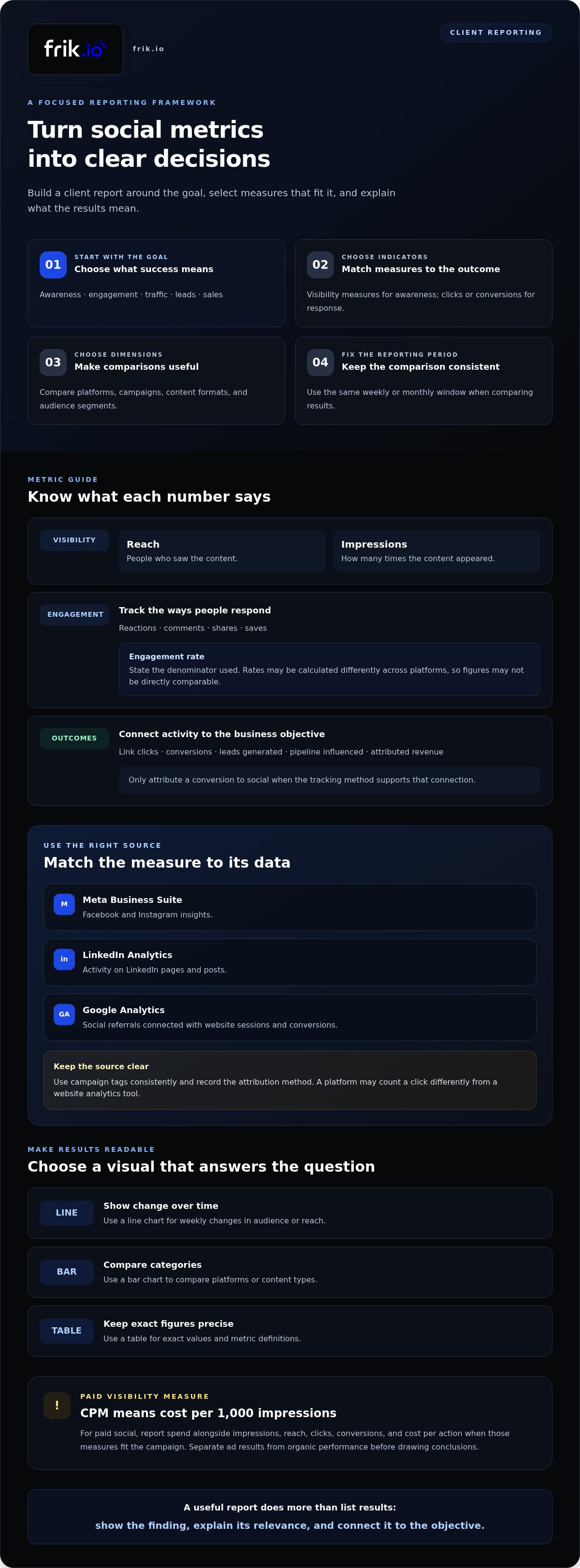
Build the metric set around the desired outcome. A brand seeking awareness needs visibility measures, while a lead-generation campaign needs actions that show intent. Use this sequence to keep reporting focused:
- Set the objective: Clarify whether the priority is awareness, engagement, traffic, leads, or sales.
- Select indicators: Match reach and impressions to awareness, and clicks or conversions to response.
- Choose dimensions: Compare platforms, campaigns, content formats, and audience segments.
- Record the period: Use the same weekly or monthly window when comparing results.
Define each measure beside its result. Reach counts people who saw content; impressions count how many times it appeared. Engagement can include reactions, comments, shares, and saves. Engagement rate helps compare response with the audience or exposure base, but specify the denominator you use. Otherwise, Facebook and LinkedIn figures may seem comparable even when calculated differently.
Pull figures from the platform or analytics source that records the action. Meta Business Suite provides Facebook and Instagram insights, while LinkedIn Analytics reports activity on LinkedIn pages and posts. Google Analytics can connect tagged social links with website sessions and conversions. Use campaign tags consistently and record the attribution method. A social platform may count a click differently from a website analytics tool, so identify the source behind each result.
To report ROI, connect social activity with business outcomes such as leads generated, pipeline influenced, or attributed revenue. Pair outcomes with relevant campaign results, including link clicks, conversions, or cost per action. Keep paid costs separate from organic activity, then show how the measures relate to the stated objective. Don’t attribute a conversion to social unless the tracking method supports that connection.
Choose charts that make comparisons clear. A line chart can show weekly changes in audience or reach; a bar chart can compare platforms or content types. A table works well for exact values and definitions. Keep the display selective: metrics that don’t guide a decision add noise. If impressions rise while clicks stay flat, investigate the creative, call to action, and landing-page match before recommending a change.
End each metric group with a concise interpretation. State what changed, which audience or platform contributed, and what action the result suggests. For example, stronger LinkedIn engagement on employee-focused posts could justify testing more of that format. This connects the data to a decision instead of leaving clients with disconnected figures.
Automating, exporting, and sharing reports
Build a repeatable workflow so every report uses the same dates, metrics, and delivery method. First, set the reporting period and data sources. Next, collect platform results, check tracking, and add analysis before sharing. Automation can reduce repetitive collection, but review the figures before they reach clients. Consider automated reporting when manual data collection takes more than 2 hours per reporting cycle. Teams managing 10+ channels across multiple brands should also consider automation.
How often should agencies send social media reports to clients? Agree on a consistent weekly, monthly, or quarterly schedule that matches the client’s goals. Formal, comprehensive reports are typically created monthly, while quarterly reports can reveal longer-term trends.
Choose a delivery format based on how the client will use the report. A PDF preserves a polished layout for presentations and archived records. A shareable link supports interactive charts and easier updates. A scheduled email can deliver reports regularly, while controlled permissions help limit who can view or edit them. Include the reporting period in the subject line or file name, such as “April social report,” so recipients can find the right version.
Match the tool to the workflow. Meta Business Suite provides Facebook and Instagram insights. Google Sheets helps organize exported figures and add notes or calculations. Looker Studio can present connected data in a visual dashboard. Use platform exports for a fixed snapshot and a dashboard when stakeholders need to explore results. Keep the data source and date range visible, especially when follower counts or campaign totals change after export.
- Email: Send a brief summary and attach a PDF when the client needs a fixed, presentation-ready copy.
- Shared link: Provide dashboard access when the client needs to review charts or explore detail.
- Download: Offer a PDF or spreadsheet when recipients need an offline record or working file.
Ask for specific feedback. Invite the client to comment on a result, interpretation, or recommendation rather than the report as a whole. For example, ask whether a rise in link clicks aligns with a current campaign. In a shared document, use comments for questions and clearly mark approved recommendations. This keeps a useful record without mixing feedback with data from the next reporting cycle.
Before sending, check that links open for the intended audience, charts use the same dates, and tracking labels are consistent. Confirm that paid and organic results are easy to distinguish. Then write a short email stating the main finding and the decision needed. A clear handoff helps clients act on the report without searching through files to understand its purpose.
Should paid and organic appear in the same report?
Yes. Include paid and organic results in one report when they support the same business objective. Keep their figures distinct, then add a combined summary showing how each contributed. For example, organic posts may build discussion while paid campaigns drive a targeted conversion. Clear labels prevent ad spend from being mistaken for organic performance.
Give community and customer-care findings their own section. Track response time, resolution rate, and sentiment alongside satisfaction scores. These measures show whether social channels are serving customers, not just attracting attention. A post may have modest engagement but prompt quick, helpful answers to customer questions. Note recurring concerns, such as delivery questions, so the client can see what the team should address.
Where can I find a free social media client report template? Start with a blank spreadsheet or presentation document and build a reusable layout around the client’s goals. Include sections for a summary, paid results, organic performance, customer-care findings, and next steps.
Customize the format for the person who will use it. A marketing lead may want campaign details, while an executive needs a concise view of conversions and business impact. Use a dashboard for ongoing exploration and a document or slide deck for a fixed reporting snapshot. Looker Studio can display connected data in dashboards, Google Sheets can organize figures, and Google Slides can structure a presentation.
White-labeling means adapting a report’s appearance to the agency or client brand. Apply consistent colors, typography, and logo placement, while keeping chart labels and metric definitions readable. Don’t alter visual elements in ways that obscure a result’s source or meaning. A branded chart should still identify whether its conversion figure comes from paid campaigns, organic posts, or both.
- Executive summary: Show the headline result, the key business implication, and the next decision.
- Organic section: Present content performance, audience response, and community themes.
- Paid section: Display campaign results, spend-related measures, and conversions.
- Customer-care section: Summarize response time, resolution rate, sentiment, and satisfaction.
Use a master template, then tailor its sections to each client’s objective. A local retailer may need campaign conversions and product questions, while a service brand may prioritize leads and response quality. Keep the reporting period and chart styles consistent across versions. This makes month-to-month comparisons easier without forcing every client into the same reporting priorities.
Before sharing, check that each chart has a clear title, period, and data label. Make paid and organic performance easy to distinguish in the dashboard and downloaded document. The final summary should connect findings to an action, such as adjusting campaign creative or preparing answers to recurring customer questions.
Executive summaries and actionable analysis
Give executives the decision first, then show the evidence behind it. Keep the summary readable in ninety seconds: state the result, explain its business relevance, and name the next action. If campaign link clicks increased but conversions did not, for example, recommend reviewing the landing page before increasing distribution. This makes analysis useful to leaders who need implications, not a data dump.
Use charts and screenshots to make patterns easy to verify. A line graph can show month-to-month engagement rate, while a bar chart compares campaigns or platforms. Add screenshots of standout posts so readers can connect results with the actual content. Caption each visual with the reporting period and takeaway. A screenshot of a post with strong shares, for instance, can support a recommendation to test its topic or format again.
Assess high-performing and weak content using the same criteria. Compare the objective, format, audience response, and resulting action. A post with high reach but few clicks may have attracted attention without advancing the campaign goal. A post with fewer impressions but more saves or shares may signal relevance. Explain these differences instead of simply labeling content “good” or “bad.”
- Top posts: Identify the strongest result and the factor that may explain it, such as format or topic.
- Underperforming posts: Note the gap between the intended outcome and actual response.
- Next test: Recommend a specific adjustment, then name the measure that will assess it.
Compare current performance with past campaigns using consistent dates and definitions. Month-over-month and year-over-year comparisons can reveal whether a change is sustained or seasonal. Competitor benchmarking can add context: 5% growth, for example, is easier to interpret when compared with relevant competitor performance. Treat comparisons as context, not proof of why a result occurred, and explain differences in audience, content, or campaign objective.
Close with a short action plan. Connect each recommendation to a finding, assign an owner, and identify the outcome to review in the next report. For example, test a revised call to action and track link clicks alongside conversions. Keep the executive summary focused, then place supporting charts and post screenshots deeper in the report. Avoid giving clients 25 pages of analysis for every platform every month when a concise decision-focused view will serve them better.
Turn approved findings into consistent content tests with a shared content review workflow.
Frik.io: AI Social Media Management Platform
frik.io helps teams coordinate social content when manual workflows make client approvals and publishing difficult to manage. Its AI Social Media Management Platform brings content creation, scheduling, and publishing across multiple networks into one workspace.
Brand-True AI Content Generation can draft captions in your brand’s voice and tailor posts for different platforms. The Client Approval Portal gives clients a dedicated way to review content, keeping feedback connected to the publishing workflow. Together, these tools support consistent execution of the strategy your reports evaluate. They don’t replace performance analysis, but they can help organize the work behind it.
If you’re ready to simplify your social content workflow, visit frik.io.
Turn reporting into a stronger operating rhythm
Use your social media reporting for clients template as a working tool, not a fixed document. As priorities shift, adjust the questions it answers and the decisions it supports. This keeps reporting connected to the work ahead instead of turning it into a record of activity alone.
For teams connecting reporting with content operations, frik.io offers an AI Social Media Management Platform, Brand-True AI Content Generation, and a Client Approval Portal. These tools support coordinated content creation and client review, while your team remains responsible for interpreting performance and choosing next steps.
Make the next move practical: identify one workflow step that slows down publishing or feedback, then decide how you want to improve it. Contact frik.io about your reporting workflow to explore whether its platform fits your process. A clearer workflow gives your team more room to turn useful analysis into thoughtful action.
Frequently Asked Questions
Can I use this template for an Instagram analytics report?
Yes. Adapt the layout to Instagram’s account and content insights, then separate results by format, such as Reels, Stories, and feed posts. For a product campaign, compare which format prompted more profile visits or link actions, and include screenshots of representative content. Use the same reporting period across formats to make changes easier to interpret. Note if a result reflects a specific promotion or collaboration.
What social media metrics should agencies report to clients?
Choose metrics based on the client’s objective and the action the report should inform. For community building, engagement rate and shares may be useful; for lead generation, track qualified actions such as form submissions alongside social clicks. A customer-care account may need response time and resolution rate. Keep the set focused, define custom measures, and explain how each metric helps assess the agreed goal.
How to customize a social media report template for each client?
Start with the client’s business objective, then tailor the report’s labels, examples, and comparison points. A retailer may need campaign and product-category views, while a professional services firm may prioritize inquiries and lead quality. Add a brief glossary if the client uses different terms for outcomes. Keep a shared core layout for consistency, but remove sections that don’t support the client’s decisions.
What is the best format for client social media reports: PDF, spreadsheet, or dashboard?
Choose the format according to how the client will review and use the information. A PDF suits a finalized meeting update, a spreadsheet supports detailed review of individual posts, and a dashboard helps stakeholders explore ongoing performance. For example, send a concise PDF before a leadership presentation, then keep a spreadsheet for campaign-level questions. Whichever format you select, make the reporting dates visible.
How to report social media ROI and conversions to clients?
Connect tracked social activity to a clearly defined business outcome, then explain the attribution method. For example, identify which tagged campaign link led to a completed form and whether the conversion is credited to a first or later interaction. Separate attributed results from broader changes during the same period. This helps clients assess the evidence without treating correlation as proof of causation.
Which tools generate automated social media reports for clients?
Platform analytics, reporting dashboards, and social management workspaces can reduce recurring data collection. Meta Business Suite and LinkedIn Analytics provide network-specific insights, while Looker Studio can present connected data in dashboards. frik.io offers a unified analytics dashboard for reach, engagement, and post performance across networks. Match the tool to the client’s channels, and review source data before sharing an automated summary.
What are best practices for explaining social media performance to clients?
Separate measured results from your interpretation, and make the decision clear. Report that clicks rose, for example, then explain whether the increase aligned with the campaign objective and what you recommend testing next. If an unusual event may have influenced results, present it as context, not a proven cause. Define unfamiliar terms plainly, and invite feedback on the proposed action.


