

Your social feed should support your work, not keep pulling you back into it. Reducing social media management time starts with curating what you see: unfollow accounts that add noise, keep those that offer useful ideas or updates, and check your feeds in three 20-minute sessions instead of dipping in all day. That gives you a clear limit and a more focused stream to manage.
Reducing social media management time starts with changing how you use social media, not simply checking it more quickly. An overloaded feed can make it harder to spot relevant trends, plan content, and return to your work. A few deliberate changes can help you spend less time scrolling while staying focused on what matters to your business.
This guide explains how to identify which accounts belong in your feed, unfollow or mute the ones that distract you, and create a simple routine for checking social media. You’ll also learn how to connect feed curation to a more efficient content workflow, so your time goes toward useful insights and planned posts instead of endless browsing.
Key Takeaways
- Trim your feeds to prioritize accounts that provide useful insights, and reduce distractions from content that pulls you off task.
- Batch content creation and plan posts on a calendar to replace scattered work with a more focused workflow.
- Automate repeatable publishing tasks, while keeping human review for brand voice, accuracy, and sensitive interactions.
- Adapt strong ideas for each platform instead of starting every post from scratch.
- Use a social media management platform when coordinating content, approvals, and publishing across networks becomes difficult to manage manually.
Benefits of spending less time on social media
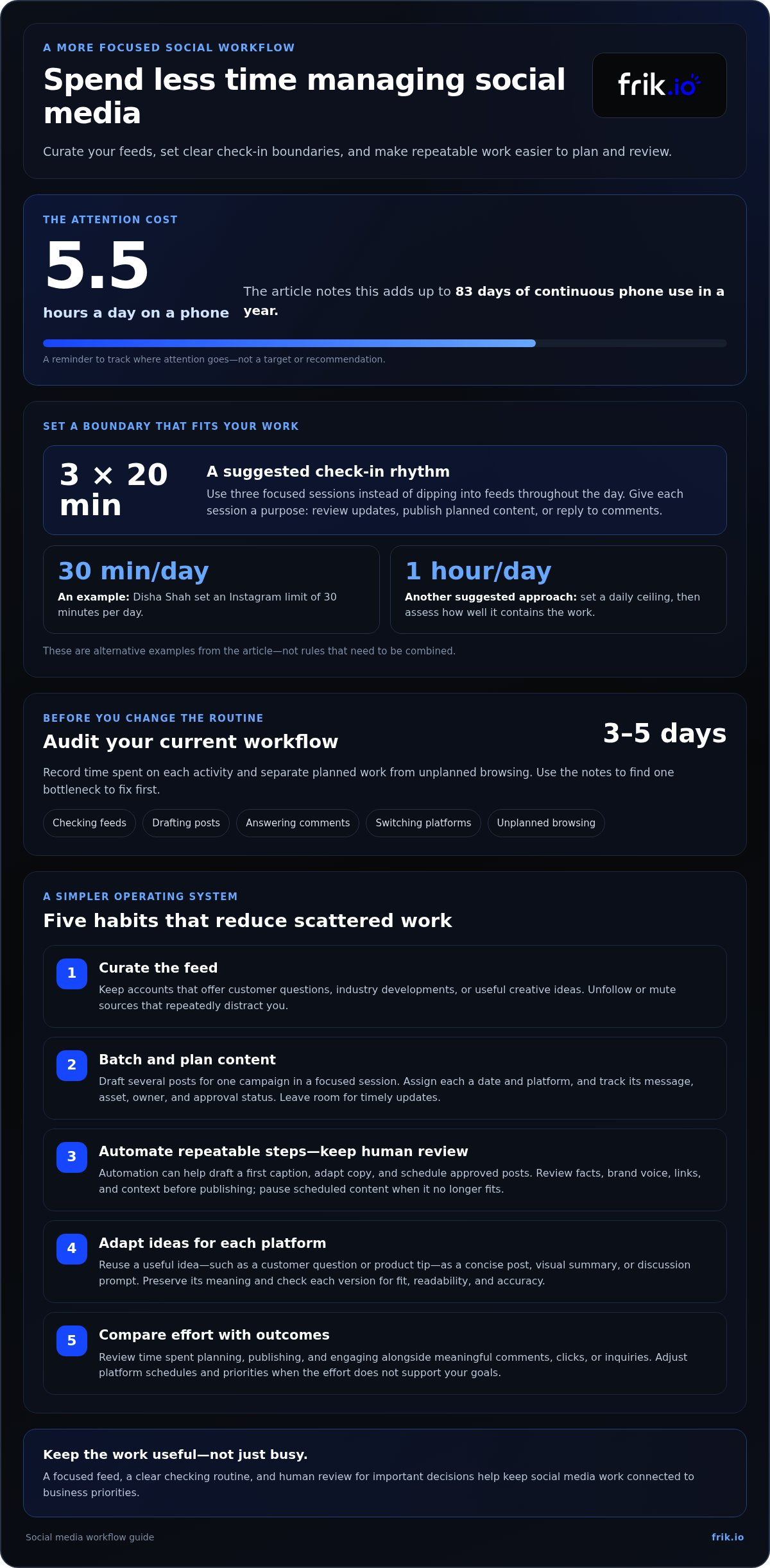
Reduce unplanned scrolling and routine content work to reclaim attention for higher-value tasks. Spending 5.5 hours a day on a phone adds up to 83 days of continuous phone use in a year.
Use reusable briefs and caption templates for recurring posts. For example, a template can prompt the writer to specify the audience, key message, call to action, and platform before drafting.
Track the time spent planning, publishing, and engaging, then compare it with outcomes such as clicks or inquiries. Review the effort and results together so a busy workflow isn’t mistaken for an effective one.
Too much automation can publish outdated information or miss the context behind a sensitive comment. Keep human review in the process for claims, tone, timely updates, and replies that need judgment.
-
Batch Content and Plan Calendars
Set aside a focused session to draft several posts for one campaign, then assign each post a calendar date and platform. Use a shared template with fields for the message, asset, owner, and approval status. Before scheduling, confirm that each post still supports current priorities. Leave room for timely updates instead of filling every calendar slot in advance.
-
Automate Tasks and Retain Human Review
Automate repeatable steps such as drafting a first caption, adapting copy for a platform, and scheduling approved posts. Then have someone review the facts, brand voice, links, and context before publication. Use automation to reduce repetitive work, not to publish without oversight. Pause scheduled content when circumstances make a prepared post inappropriate.
-
Set Posting Schedules by Platform
Set a posting rhythm for each platform based on audience response, available material, and the time your team can devote to engagement. Track publishing effort alongside meaningful outcomes, then adjust the calendar if a channel demands more work than it returns. Avoid using the same schedule everywhere: a format that suits one audience may feel out of place on another platform.
-
Reuse and Repurpose Content
Start with one useful idea, such as a customer question or product tip, and reshape it for each platform. Turn a longer explanation into a concise post, visual summary, or discussion prompt while preserving its meaning. Check each version for platform fit, readability, and accuracy. Reuse the insight, not necessarily the exact wording or format.
What are the best ways to reduce time spent managing social media?
- Track your current workflow before changing it. For 3-5 days, note time spent checking feeds, drafting posts, answering comments, and switching platforms. Separate planned work from unplanned browsing. This shows where attention goes and which tasks support your goals. A practical approach to reducing social media management time starts with fixing one bottleneck, such as repeated caption writing or frequent app checks.
- Set a clear boundary for social media sessions. Disha Shah set an Instagram limit of 30 minutes per day, while another suggested approach is three 20-minute sessions. Give each session a purpose, such as reviewing relevant updates, publishing planned content, or replying to comments. Keep unrelated browsing outside those blocks. If that structure doesn’t fit your work, try one hour a day and assess how well it contains the task.
- Reduce the number of feeds competing for your attention. Unfollow accounts that repeatedly distract you and keep sources that offer customer questions, industry developments, or useful creative ideas. A small business, for example, might prioritize customer feedback and product updates while muting unrelated entertainment accounts. Open social media with a clear work purpose; a curated feed makes each review more focused and easier to finish.
- Standardize repeatable work with templates and a review routine. Create a caption outline with fields for the key message, audience, supporting detail, and call to action. Add a checklist for links, spelling, platform fit, and approval. If several people contribute, assign one owner to each post and make its status visible. A social media management platform can bring drafting, scheduling, and approvals into one workspace when manual handoffs slow the workflow.
- Compare effort with results, then cut low-value tasks. Measure the time spent on each platform alongside outcomes such as meaningful comments, link clicks, or inquiries. If a channel takes substantial work but contributes little to your goals, adjust its schedule and content priorities. For businesses focused on reducing social media management time, the aim is to protect valuable audience relationships without keeping every task out of habit.
Keep the boundary practical rather than treating it as a rule for every day. One suggested social media limit is one hour per day, which can serve as a defined ceiling for checking, publishing, and responding. If work regularly spills beyond that, review which activities genuinely need the owner’s attention and which can be simplified or handed off. Keep decisions about the business’s voice and priorities, while making routine tasks easier to delegate with clear instructions and an approval process.
If a business owner feels unable to stop using social media, outsourcing social media management may help. Before delegating, clarify the goals, audience, tone, and approval expectations, then agree on what the owner still needs to review. This connects the work to business priorities instead of simply passing on a busy workload. Reduce routine involvement while retaining oversight of important messages and customer interactions. Revisit responsibilities when the owner’s role or the business’s needs change, so saved time isn’t lost to confusion.
How can content batching and calendar planning streamline social media management?
Batching turns scattered drafting into a repeatable production process. A calendar then connects each asset to a platform, owner, and publishing purpose.
- Start with audience questions and business priorities. Gather recurring customer questions, product updates, seasonal themes, and campaign messages in one idea bank. Group related ideas into content pillars, such as education, product guidance, and customer stories. This gives each drafting session a clear scope and helps prevent the calendar from filling with posts that lack an audience or purpose.
- Choose a campaign theme before drafting individual posts. For a new service announcement, for example, prepare an explainer, a response to a common question, and a short reminder. Give each asset a distinct role instead of repeating the announcement. Record the core message, supporting detail, and intended action in a brief. A shared brief keeps posts aligned while allowing each one to offer something new.
- Batch similar production tasks together. Draft captions in one session, prepare visual concepts in another, then review copy and assets together. This reduces the mental effort of switching between research, writing, design, and approval. Use a template with fields for the audience, platform, message, asset, and call to action. Keep facts and links that need verification clearly marked.
- Build a calendar that shows more than publishing dates. Record the platform, content pillar, owner, asset status, approval status, and planned action for every post. For example, label an item “drafting,” “ready for review,” or “approved.” These labels reveal stalled work before a publishing date arrives. Leave space for timely updates so scheduled content doesn’t block a relevant response.
- Review the calendar against your team’s capacity and audience response. Check that each planned post has a finished asset, a responsible owner, and enough time for review. After publishing, note which topics prompted useful comments, clicks, or customer questions. Use those observations to plan the next batch instead of repeating posts simply because they were easy to produce. A calendar works best as an active planning tool, not a fixed archive.
- Keep templates consistent while allowing platform-specific edits. One core message can become a concise text post, a visual explanation, or a discussion prompt. Adjust the opening, format, and call to action for each channel. Before scheduling, compare every version with the brief and remove repeated wording. This final review protects clarity while preserving the efficiency of batch production.
What social media tasks can be automated safely, and what still needs human review?
Automate predictable work with clear inputs and repeatable outputs. Keep a person responsible for accuracy, context, and consequential decisions.
- Start with routine tasks that follow an established process. Scheduling approved posts, organizing draft assets, and preparing recurring performance reports can reduce manual work. For example, a weekly product tip can follow the same drafting, approval, and scheduling stages each time. First define the required inputs, such as approved copy, platform, date, and asset. Automation works best when instructions are clear and the result is predictable.
- Use automation to prepare content, not bypass approval. A drafting tool can suggest captions from a campaign brief or adapt wording for different platforms. A team member should check each draft against the source message, audience, and brand voice. Review names, claims, links, and calls to action before scheduling. A fluent caption can still misrepresent a product or leave out an important detail.
- Schedule posts only after confirming their timing and context. Evergreen content, such as a general onboarding tip, can be queued ahead of time. Posts about a live event, current availability, or a developing issue need closer attention. Assign an owner to each scheduled item and set a process for pausing publication. This safeguard helps prevent outdated content from appearing after circumstances change.
- Keep human judgment in conversations and sensitive situations. Automated replies may help acknowledge a common question, but complaints, personal concerns, and unusual requests need a thoughtful response. For example, a customer reporting a billing problem shouldn’t receive a generic promotional message. Set clear escalation rules so the person monitoring comments knows when to take over, gather context, and respond in the right tone.
- Build review checkpoints into the workflow. Before publishing, assign someone to confirm facts, tone, formatting, and platform fit. After publication, have a person assess replies that automation may misread, such as sarcasm or urgent requests. Track recurring errors, including incorrect links or inconsistent product names, and update templates accordingly. Use automation for repeatable execution while people remain responsible for decisions that affect trust.
Apply the same caution when a conversation touches on wellbeing. A review examined more than 30 studies on excessive social media use, sleep, and mental health. That scope does not establish what any individual user is experiencing, so automated tools should not diagnose, infer a personal condition, or treat a brief message as enough context. If a user raises distress, sleep, or concern about their own social media use, limit automation to a neutral acknowledgment and route the exchange to a person who can respond with care. Keep the handoff discreet, and avoid turning a sensitive disclosure into a marketing opportunity.
Review the process as well as the reply. Make sure account monitors can recognize when a routine interaction becomes personal or urgent, and give them a clear way to pause automated responses. Check that suggested language leaves room for individual circumstances rather than forcing a canned answer. When the right response is uncertain, defer to a person instead of guessing. This keeps automation useful for routine work without letting it make judgments about someone’s wellbeing.
How can social media managers reuse and repurpose content across platforms
Start with one strong idea, then reshape it for each audience and format. Reuse the insight, not a copy-and-paste version of the original post.
- Choose a source asset with a clear, lasting message. A customer question, product guide, webinar, or case study can each support several distinct posts. For example, a guide to preparing for a product launch may contain tips, common mistakes, and a checklist. Confirm the original facts first, then record the main takeaway and supporting details before adapting the material.
- Break the source into smaller content units. Pull one practical tip, one audience question, and one supporting example from a longer guide. A webinar transcript might become a short quote, a myth-and-fact post, and a concise summary. Give each unit one purpose. This makes content easier to scan and avoids squeezing unrelated messages into one caption.
- Adapt each idea to the platform’s audience and format. Turn a detailed explanation into a short caption, visual sequence, or discussion prompt. For example, a LinkedIn post can explain the reasoning behind a workflow, while an Instagram carousel can show its steps visually. Keep the core message consistent, but adjust the opening, level of detail, and call to action.
- Match the asset to how people will consume it. Turn a written checklist into a simple graphic, or use a short video excerpt to highlight one point from a longer presentation. Add clear labels and readable text to visual assets. Before publishing, confirm that each format suits its platform and communicates the idea without requiring people to find the original source.
- Refresh older material before reusing it. Check dates, product names, examples, links, and advice against current business information. Replace details that no longer apply, then add a fresh perspective or useful detail. For example, a refreshed customer-question post can answer a concern more clearly after your team learns which follow-up questions people ask most often.
- Track each adaptation separately to learn what resonates. Compare audience responses to the short summary, visual explainer, and discussion prompt, then use those signals to shape future edits. Keep a record of the source asset and its adapted versions, so another team member can reuse them accurately. Streamline cross-platform publishing by organizing tailored content and preparing posts for review.
Frik.io: AI Social Media Management Platform
frik.io brings social content creation, scheduling, and publishing across multiple networks into one workspace. Use Brand-True AI Content Generation to draft campaign captions in your brand voice, training the AI on your style guide. The platform can also tailor posts for each network, reducing repetitive edits while leaving your team in control of final review.
Use the Client Approval Portal to organize feedback and approvals when clients or teammates need to review content before it goes live. It’s a practical way to replace slow, separate tools and manual handoffs. Visit frik.io to explore how its social media management platform fits your process.
Make your next workflow change deliberate
Choose one friction point in your current process and improve it before changing everything. If approvals stall, clarify who reviews each post. If drafting takes too long, standardize the inputs for each caption. If your feed keeps pulling you off task, define its purpose and remove distractions. This makes reducing social media management time part of a sustainable workflow, not a short-lived productivity push.
When you’re ready to bring more of your workflow together, frik.io offers an AI Social Media Management Platform, Brand-True AI Content Generation, and a Client Approval Portal. These tools support content creation and review while your team remains responsible for final decisions. Choose the next step that addresses your actual bottleneck, whether it’s drafting, coordination, or approvals.
Contact frik.io to discuss your social media needs and explore a more organized way to manage your content. Start with one improvement, build on what works, and make room for the work your audience values.
Frequently Asked Questions
Which social media scheduling tools save the most time, and how much do they cost?
Useful social media schedulers combine a visual calendar, bulk planning, and approval workflows suited to your team. Costs vary with factors such as connected accounts, users, collaboration features, and analytics, so compare plans against your workflow rather than choosing by feature count alone. A solo creator, for example, may prioritize a calendar, while an agency may need separate client workspaces and review steps.
How can AI tools automate social media captions, scheduling, and replies?
AI tools can draft captions from a content brief, adapt copy for different platforms, and organize approved posts for scheduling. They can also suggest replies to routine questions, such as where to find a product guide. Treat those replies as drafts and review them before sending, especially if a message involves a complaint, sensitive information, or a changing event. Human oversight helps keep automated content accurate and appropriate.


