

Stop treating social publishing as a string of disconnected tasks. Social media workflow automation brings drafting, platform-specific edits, scheduling, publishing, and team approvals into one coordinated process. AI can help tailor posts for each network, while people retain control of the final review.
Automation can reduce repetitive work, but it shouldn’t make every post sound identical or publish content without the right checks. The key is deciding which tasks can run automatically and where human judgment still matters, especially for brand voice, sensitive replies, and approval decisions.
This guide explains what social media automation tools do and how to assess their workflows. You’ll learn how scheduling and publishing work, what to consider when comparing tool pricing, how teams can structure approvals, and how AI-generated posts can be tailored to different platforms. The goal is a practical system that reduces handoffs without losing consistency or control.
Key Takeaways
- Map repetitive publishing tasks before automating them, and keep human judgment in the steps that depend on context.
- Compare pricing models by the limits and capabilities that matter to your workflow, not by the headline plan alone.
- Set clear approval roles and handoffs so content moves forward without losing review or accountability.
- Use AI to adapt content for each platform, then refine the result to preserve brand voice and relevance.
- Choose a workflow that brings drafting, scheduling, publishing, and review into a manageable process as your needs grow.
1. What is a social media automation tool?
A social media automation tool coordinates repeatable tasks across a brand’s channels. It can organize a content calendar, prepare posts, schedule publishing, and route drafts for review. Social media workflow automation works best when it handles routine steps while people make decisions that need context, such as responding to a customer complaint.
Start by mapping a post’s path: idea, draft, channel edits, approval, scheduling, and publishing. A workflow flowchart can reveal duplicate data entries and show which steps should remain manual, according to the Centers for Disease Control and Prevention. For example, a team might automate calendar reminders but keep final approval with its editor.
Tailor each post to its platform instead of copying one caption everywhere. A LinkedIn update might explain a business lesson in a few paragraphs; an Instagram version could lead with a visual and a shorter caption. For a short-form video channel, the same campaign idea may need a spoken opening and on-screen text. Adapt the format, length, and call to action to each channel, then review the versions together in the calendar.
AI-assisted research can turn a topic into draft angles, caption options, and questions for a content brief. Give it a clear audience, brand voice, and purpose, then check names, claims, and tone before publishing. AI tools may estimate a post’s potential performance, but that assessment should inform a human decision, not replace one.
Recycling extends the useful life of evergreen content. A tool can reshare a guide or product tip after its first posting, while an expiration rule can remove time-sensitive content from the queue. Conditional posting adds a decision point: publish a campaign post only while its offer is active, or pause a scheduled item when a related announcement changes. Check dates and context before each repeat.
Automation risks include exposing account credentials, granting excessive access, or publishing inaccurate content at scale. Use individual permissions, protect login details, and require human review for sensitive posts and replies to partners, leads, or major customers.
Measure return on investment by comparing time saved and workflow costs with outcomes such as completed posts, engagement, and leads attributed to social content. Track the same measures before and after automation to identify which steps create value.
In the United States, document who owns each step, limit account access to the people who need it, and review platform-specific drafts before they publish. Keep sensitive replies and founder thought-leadership content under human control for accuracy and credibility.
2. Automating social media scheduling and publishing
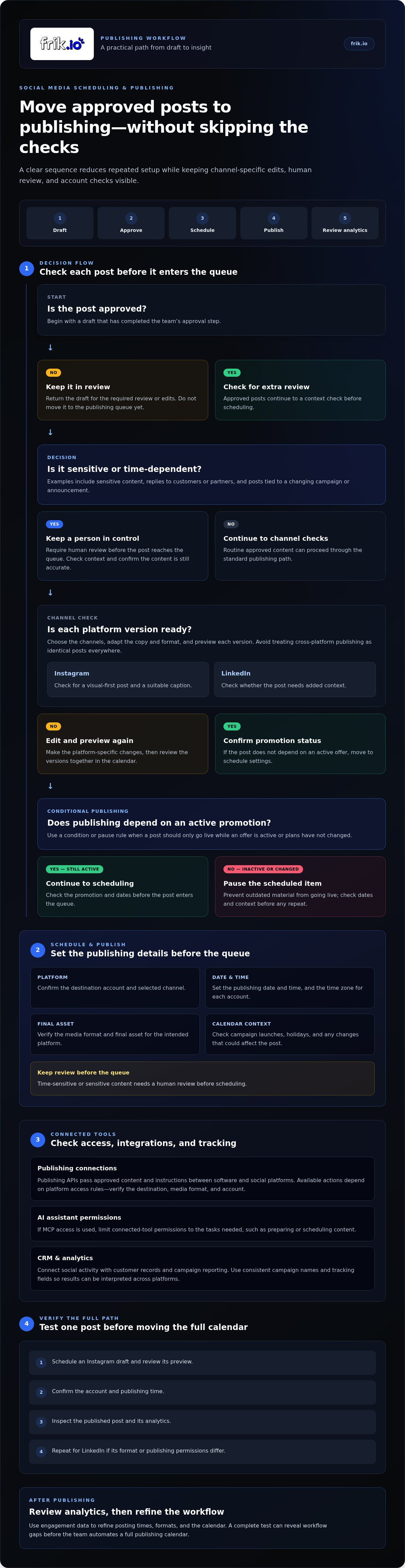
Scheduling software moves approved posts from a content calendar to a publishing queue. Set the platform, date, time, and final asset for each post. A Tuesday product update, for example, can be prepared for Instagram and LinkedIn without asking a teammate to publish each version manually. Keep a human review before the queue for time-sensitive or sensitive content.
Automated cross-platform publishing reduces repeated setup, but it shouldn’t mean identical posts everywhere. Choose the channels, tailor each post’s format and copy, then preview the platform versions before scheduling. Instagram may need a visual-first caption, while LinkedIn may call for added context. Social media automation can also help teams use engagement data to refine posting times, formats, and their calendar.
Build a clear publishing sequence: draft, approve, schedule, publish, then review analytics. Set a time zone for each account and check dates around campaign launches or holidays. If a post depends on an active promotion, make its publishing conditional on the promotion still running. A pause rule can prevent outdated material from going live when plans change.
Publishing APIs connect software with social platforms so approved content and publishing instructions can pass between systems. Available actions depend on the platform and its access rules, so verify the destination, media format, and account before a post enters the queue. MCP access can provide another way for an AI assistant to interact with connected tools; limit its permissions to the tasks it needs, such as preparing or scheduling content.
CRM and analytics integrations connect social activity with customer records and campaign reporting. For example, a tagged campaign post can be associated with a lead source in a CRM, while analytics help compare publishing times and engagement. Use consistent campaign names and tracking fields so teams can interpret results across platforms.
Before selecting an automation tool, test one complete publishing path. Schedule an Instagram draft, review its preview, confirm the account and time, then inspect the published post and its analytics. Repeat the test for LinkedIn if its format or publishing permissions differ. This practical test can expose workflow gaps before the team moves a full calendar into automated publishing.
Teams ready to consolidate scheduling and publishing can explore an automated social media scheduling workflow as a practical next step. The right setup keeps channel-specific review visible while reducing manual handoffs between drafting and publishing.
3. Social media automation tool pricing models
Social media management tools use different pricing structures, so compare what each plan includes before comparing totals. A subscription may be organized by user seats, connected social accounts, publishing volume, or features. For example, one plan might suit a solo marketer managing a few channels, while a team plan may include shared approvals and reporting.
Per-seat pricing ties the bill to the number of teammates who need access. Per-account pricing instead follows the number of profiles connected, which can matter for a business managing separate accounts. Usage-based plans may count scheduled posts, AI-generated content, or data volume. Identify which resource is likely to grow first, then estimate the workflow you expect to run.
Feature-based tiers can bundle publishing with reporting, audience insights, or social listening. A lower tier may cover scheduling, while a higher tier may add competitor monitoring or deeper analytics. Map each feature to a task your team performs. If your team needs social listening to track customer questions, include that capability in your comparison rather than treating every plan as equivalent.
How much do social media automation platforms cost? The price depends on the case and is given after a quote request; key factors include account count, users, publishing needs, reporting, and included features. Compare the total cost against the manual work the software replaces, not just the monthly plan label.
Free trials and free plans serve different purposes. A trial may let a team test paid features for a limited period, while a free plan may keep usage or integrations constrained. Use a trial to run one real campaign: draft a post, route it for approval, schedule it, and review the resulting analytics. Check whether trial terms include the functions your workflow actually requires.
Before choosing, make a comparison sheet with rows for users, accounts, channels, post limits, approval steps, reporting, and social listening. Record the billing period and any extra charges stated in the terms. Then test a representative format, such as a LinkedIn post and an Instagram caption, to see whether the software handles your content process cleanly.
Finally, estimate value using a repeatable method. Track the time spent preparing, reviewing, and publishing content manually, then compare it with the time required using the tool. Pair that measure with engagement and reporting needs. A plan is a better fit when its features support your audience and workflow without charging for capabilities your team won’t use.
4. Team collaboration and approval workflows
A clear approval workflow shows who drafts, reviews, edits, and releases each post. Assign roles by responsibility: a writer prepares the caption, a brand lead checks the voice, and an account owner approves publishing. This keeps feedback attached to the content instead of scattered across messages, documents, and social accounts.
Set review rules before content enters the calendar. A routine event reminder might need one editor, while a product announcement could require both brand and legal review. An approval workflow can include a double-approval process connected to Gmail, giving reviewers a familiar place to receive and respond to requests. Define who resolves conflicting edits.
Email-based approval customization helps teams fit the process to their existing habits. For example, an approval message can include the draft, target platform, scheduled date, and a clear action request. Keep the current version easy to identify, and capture edits in one shared workspace. That prevents someone from approving an outdated attachment.
Use status labels such as draft, needs edits, approved, and scheduled. An automated workflow can move a post forward after approval, while a buffer between approval and publishing gives the team time to catch late changes. For a campaign across several accounts, track each platform’s approval separately instead of assuming one sign-off covers every version.
Human review remains essential for content that relies on judgment. Don’t automate personal replies to customer complaints, messages from key partners, crisis updates, or founder thought leadership. These situations need context, empathy, and accurate details. Automation can route a message to the right teammate, but a person should shape the response and decide when it’s ready.
Make reviews specific. Ask an editor to check factual accuracy, a brand lead to assess tone, and the account owner to confirm platform details. Reviewers should be able to approve, request edits, or flag a concern. Clear choices prevent vague comments like “looks good” from leaving uncertainty about whether a post is cleared to publish.
Protect account access by giving teammates only the permissions their roles require. Someone preparing drafts doesn’t necessarily need publishing access. Review permissions when team responsibilities change, and keep an approval record with the final copy and decision. These steps create accountability without unnecessary handoffs.
Start with one campaign and map its path from draft to published post. Note where feedback stalls, messages are duplicated, and approvals add meaningful control. Then adjust the workflow, keeping the steps that protect quality and removing handoffs that don’t change the decision.
5. AI-generated, platform-specific social posts
AI creates more value when it adapts a campaign idea to each channel instead of repeating one generic caption. A workflow can use GPT-4 or Gemini to generate platform-specific social media posts, then give a human editor the final say. The key is to provide a clear brief: audience, campaign goal, core message, brand voice, and platform.
Set different instructions for each destination. For LinkedIn, ask for a practical business insight and a clear professional takeaway. For TikTok, request a concise spoken hook, a visual concept, and on-screen wording. An Instagram draft might lead with an image and a short caption. Keep the campaign’s central message consistent while letting the format fit each channel.
Specific prompts improve the first draft. Instead of “write a post about our launch,” provide the launch details, intended audience, desired action, and words to avoid. Ask the model to generate several opening lines or calls to action. Then check claims against approved campaign materials before scheduling. AI can draft quickly, but it can also miss context or invent details.
Use listening to ground content in real audience interests. Review recurring questions, comments, and themes in social conversations, then turn a relevant pattern into a post brief. For example, if customers repeatedly ask how a feature works, create a short explainer and adapt it for each platform. Don’t treat a comment as proof of a broad trend; check its context and relevance first.
Build review into the generation workflow. A writer can check facts and clarity, while a brand reviewer checks tone and platform fit. For a sensitive campaign, include a subject-matter reviewer before approval. Compare the AI draft with the brand’s style guide, remove unsupported claims, and make sure each version gives people a useful reason to engage.
Measure quality beyond how quickly the tool produces copy. Compare platform-specific engagement, saves, meaningful comments, and campaign actions against the post’s goal. If a TikTok video earns views but few relevant responses, revise its hook or audience framing. Use those observations to improve the next brief, not to force every future post into one formula.
Ready to turn campaign briefs into tailored drafts? Generate platform-specific AI social posts and keep human review in the publishing workflow.
Frik.io: AI Social Media Management Platform
frik.io brings content creation, scheduling, publishing, and approvals into one workspace. Use your style guide to train Brand Voice AI, then adapt drafts for different social platforms. The Client Approval Portal helps organize review with clients or teammates before posts go live.
It’s a practical next step when coordinating drafts across channels creates repeated work or brand consistency needs a clearer workflow. The AI Social Media Management Platform supports teams managing content across multiple networks, while the SVG Converter Tool helps prepare SVG assets for visual content.
Explore the platform and its workflow features, or visit frik.io.
Make your next publishing cycle more intentional
Your next step is to choose one recurring campaign and define what a better workflow should change. Decide where your team loses momentum, which decisions need human judgment, and how you’ll recognize a useful improvement. That gives you a clear starting point for refining social media workflow automation without changing every process at once.
When drafting and approvals are the sticking points, frik.io’s AI Social Media Management Platform brings those tasks into a shared workflow. Brand-True AI Content Generation helps shape posts around your brand voice, while the Client Approval Portal gives reviewers a place to provide feedback. Keep your team’s standards in view as you decide which steps to automate and which deserve a personal touch.
Build from a workflow your team can manage, then refine it as your publishing needs evolve. Contact frik.io to discuss your workflow and explore a practical next step for your content process.
Frequently Asked Questions
What is a social media automation tool?
A social media automation tool is software that handles repeatable steps in managing social accounts. Beyond scheduling, it can organize content requests, apply approval rules, or flag posts that need attention. For example, a workflow might send a draft to an editor when its status changes, then notify the publisher after approval. The team still sets the rules and checks work that requires judgment.
How does AI in marketing automation work?
AI in marketing automation uses instructions and information supplied by a team to produce or organize marketing work. A marketer might provide a campaign goal, audience description, and approved product details, then ask AI to draft copy variations. Review the output for accuracy, tone, and relevance before using it. Clear inputs and specific boundaries make the output easier to assess and refine.
Can automation help you repurpose long-form content into social posts effectively?
Yes, automation can help turn a long article, webinar, or podcast into smaller content pieces. Start by identifying one central idea, then extract a useful quote, a practical tip, and a question for discussion. Give each piece its own purpose and format rather than dividing the source into arbitrary chunks. Check quotes against the original material and add context so each post stands on its own.
Can automation tools improve engagement?
Automation tools can support engagement by helping teams publish consistently and notice audience activity sooner. Use analytics to identify posts that prompt meaningful discussion, then explore what made them relevant. Keep replies personal when a message involves a customer concern or an individual’s circumstances. Measure outcomes that match the goal, such as thoughtful comments for community building, instead of treating every interaction as equally valuable.
What makes the best AI social media management software?
The best fit combines useful AI controls with clear workflow oversight. Check whether the tool can follow brand guidance, adapt content for intended channels, and let teammates review drafts before publishing. Also assess account permissions, supported platforms, reporting, and how easily the team can manage mistakes or changing plans. Testing an actual campaign brief can reveal whether the software fits daily work.
What problem does this solve?
Social media automation solves the coordination burden created by scattered drafts, repeated manual posting, and unclear ownership. For example, a small marketing team preparing a product launch can keep copy, review status, and publishing dates visible in one process. That makes handoffs easier to track and reduces the risk of teammates working from different versions. It doesn’t replace decisions that depend on customer context or brand judgment.
What is social media workflow automation?
Social media workflow automation connects the steps that move content from an idea to a published post and later review. It can route a request to a writer, assign an editor, and trigger a notification when approval is needed. Unlike automating a single task, it coordinates a sequence with defined owners and statuses. The team decides which transitions happen automatically and where a person must act.
Which social media workflow automation tools are best for businesses?
The right tool depends on the platforms, team roles, and approval needs of the business. frik.io supports Instagram, Facebook, X/Twitter, LinkedIn, TikTok, YouTube, Threads, Google Business Profile, and Pinterest. Compare these channels with the accounts your business uses, then consider how teammates will review drafts and assess results. frik.io’s shared calendar, AI tailored to your brand voice, and client approval workflow can bring those steps together.


