

Social media burnout isn’t just about scrolling too much. It can come from feeling pressured to check, respond, compare, or keep up. These avoid social media burnout tips can help you set clear time limits, shape a less draining feed, and make room for connection away from your screen. The goal is to make social media feel more intentional, not like another demand on your attention.
If notifications or pressure to keep up leave you overwhelmed, that reaction makes sense. Burnout can stem from shifting algorithms, negative comments, or fear of missing important news, not only from time spent online. This guide explains common causes and signs, then offers practical avoid social media burnout tips for setting boundaries, curating your feed, and reconnecting with friends offline.
Key Takeaways
- Set practical boundaries around scrolling, notifications, and phone-free moments to make room for focused time offline.
- Curate your feed by muting or unfollowing accounts that leave you feeling drained, and follow content that supports your interests.
- Make time for face-to-face friendships and activities that help you reconnect beyond the screen.
- Recognize how algorithm changes, negative interactions, and fear of missing out can contribute to burnout, then shape your habits around what you can control.
1. Limiting time online and reducing screen time
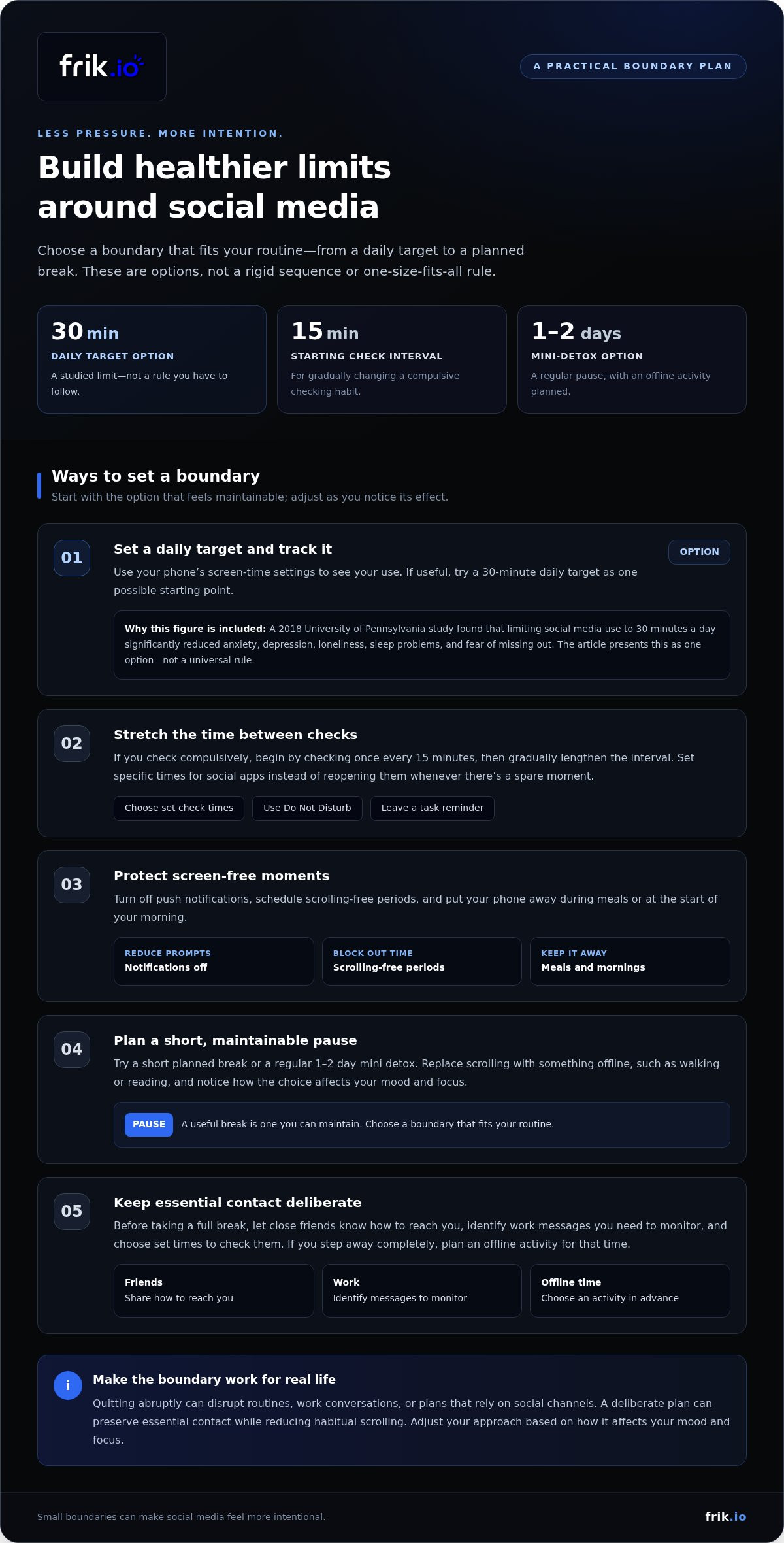
Set a daily limit, then use your phone’s screen-time settings to track your use. For a practical starting point, the avoid social media burnout tips here include trying a 30-minute daily target. A 2018 University of Pennsylvania study found that limiting social media use to 30 minutes a day significantly reduced anxiety, depression, loneliness, sleep problems, and fear of missing out. Treat that as one option, not a rule. Turn off push notifications, schedule scrolling-free periods, and keep your phone away during meals or the start of your morning.
Social media breaks can support well-being, and a useful break is one you can maintain. Try a short planned pause or a regular 1-2 day mini detox, replacing scrolling with an activity such as walking or reading. The 30-minute daily limit studied at the University of Pennsylvania offers another structured approach. Notice how each option affects your mood and focus, then choose a boundary that fits your routine.
If you check your phone compulsively, reduce the habit in stages. One of these avoid social media burnout tips is to begin by checking once every 15 minutes, then gradually lengthen the interval. Choose set times for social apps instead of reopening them whenever you have a spare moment. Use Do Not Disturb to protect those intervals, and leave a reminder of the task you want to return to.
Quitting abruptly can disrupt routines, work conversations, or plans that rely on social channels. A gradual change can preserve essential contact while reducing habitual scrolling. Before taking a full break, tell close friends how to reach you, identify work messages you need to monitor, and choose set times to check them. If you step away completely, plan an offline activity for that time. A deliberate plan is easier to sustain than relying on willpower alone.
2. Cleaning up and moderating personal feeds
Audit your feed by noticing which posts leave you tense, distracted, or comparing yourself with others. On Instagram, mute or unfollow accounts that repeatedly trigger those reactions, even if you know the people behind them. You can make the change quietly, without turning it into a confrontation. Keep accounts that inform, inspire, or entertain you in ways you genuinely value.
Look for patterns, not just individual posts. If several accounts share upsetting news, hostile arguments, or idealized lifestyle content, reduce how often those topics appear. Mute an account when you want a temporary boundary; unfollow one when you no longer want its posts in your feed. For example, keep a useful news account and remove repetitive updates that leave you checking for more.
Add accounts with intention. Follow creators, friends, and communities connected to interests you want to explore, such as cooking, music, or hiking. Your feed doesn’t need to cover every topic or viewpoint to be useful, but it should reflect more than one narrow interest. Notice which posts you choose to engage with, and skip content you don’t want to see more often.
Make feed moderation a simple routine: review recent posts, mute or unfollow accounts that consistently drain your attention, and keep those that add value. If a conversation becomes stressful, step away rather than replying while irritated. Revisit your choices when your interests change; a feed that suited you months ago may no longer fit. Small edits give you more control over what you encounter without requiring you to leave social media altogether.
3. Spending more time with offline friends
Replace one scrolling session with a specific plan involving someone you trust. Invite a friend for coffee, cook dinner together, or meet at a park. Face-to-face time shifts your attention to conversation, shared activities, and the people around you. Put the plan on your calendar so it has a place in your week instead of remaining a vague intention.
During a break from social media, try an offline activity that gives your attention somewhere else to go. Meet a friend for a meal, play a board game, or take a class together. Walking and reading are also options when you want a quieter pause. Choose something restorative rather than replacing online pressure with another obligation.
Be more present by putting your phone away during the conversation. Ask your friend about a current project, listen without checking notifications, and share what’s happening in your own life. If meeting in person isn’t practical, arrange a phone call and give it your attention. The aim is meaningful contact, not a perfect schedule or a particular kind of meetup.
Small steps can make offline connection easier to sustain. Message a friend to suggest an activity, then choose a time and place together. If you’re part of a group chat, use it to arrange a gathering rather than relying on messages alone. Notice how you feel afterward: a relaxed conversation may leave you more grounded than another stretch of scrolling. Build on the plans you enjoy, and let friends know when you’d like more time together away from screens.
4. Common causes of social media burnout
Burnout often builds when several pressures overlap. Changing algorithms can make creators and everyday users feel they must constantly adapt. Negative comments and cyberbullying can turn routine browsing into a source of tension. Fear of missing out adds another pull: you may keep checking for news, events, or conversations you worry you’ve missed. Notice which pressure drains you most; naming it can help you choose a response that fits.
Signs that social media is affecting your mental health can include feeling irritated or overwhelmed, losing motivation to create or engage, and struggling to concentrate. Notice whether you’re neglecting personal needs or priorities, such as meals, rest, or time with people you care about. A pattern matters more than one difficult session. Write down what happened before and after using an app to spot recurring triggers.
For a clearer picture, connect each trigger to its effect. A hostile comment thread might leave you distracted long after you close the app; constant algorithm changes might make creating feel like an endless catch-up task. Fear of missing news can keep you checking even when updates increase stress. Once you spot the pattern, choose a specific boundary or feed change to address it instead of blaming yourself for feeling worn out.
Seek professional help when anxiety or exhaustion persists, worsens, or interferes with daily responsibilities, relationships, sleep, or work. A licensed mental health professional can help you understand what you’re experiencing and discuss support options. If you feel at risk of harming yourself, contact emergency services or a crisis support service in your area now.
For social media teams, separate creative work from constant platform monitoring by organizing content tasks in a clearer workflow. Explore a more organized social media workflow to structure content creation and review.
Frik.io: AI Social Media Management Platform
frik.io brings social content creation, scheduling, and publishing into one workspace, helping teams organize the work behind their social presence. Its Brand-True AI Content Generation drafts captions in your brand’s voice and tailors posts for different platforms. The Client Approval Portal provides a structured review workflow, so feedback doesn’t get scattered across conversations.
Planning content in advance can help teams avoid treating every post as an urgent task. These tools don’t replace personal boundaries or offline time, but they can make content operations easier to organize. If drafting, approvals, and scheduling feel fragmented, frik.io brings those tasks together in one platform.
Visit frik.io to explore the platform.
Build a social routine that works for you
Make your next step a personal attention plan, not a perfect streak. Decide what you want social media to do for you, then set a signal for when it stops serving that purpose. If checking updates leaves you tense, for example, pause and return later with a specific reason to open the app. Review your plan when work, relationships, or priorities shift.
The most effective tips for avoiding social media burnout are flexible enough to fit real life. Keep the boundaries that help, adjust those that don’t, and make room for moments that don’t need to be shared online. Progress can be as simple as choosing your attention deliberately today, then refining that choice tomorrow.
If your team also wants a more organized way to manage social content, contact frik.io to discuss your needs. Take the next step at a pace that feels right, and build a healthier relationship with social media one intentional choice at a time.
Frequently Asked Questions
What is social media burnout?
Social media burnout is mental and emotional exhaustion linked to ongoing platform use or pressure. It can show up as dread before opening an app, difficulty concentrating after scrolling, or feeling unable to keep up with messages and updates. Unlike ordinary boredom, burnout can affect how you approach work, relationships, and rest. Consider how social media fits into your day, not just your screen-time total.
What are practical ways to prevent social media burnout?
Make your social media use intentional by deciding what you want to do before opening an app. For example, log in to reply to a specific message, then leave when you’re done. For work, separate tasks such as drafting posts from checking audience responses. A brief weekly review of what felt useful or draining can help you adjust your habits before frustration becomes part of the routine.
How do I reduce social media screen time on iPhone and Android?
Use built-in app controls to set limits and see how you spend your time. On iPhone, open Settings, choose Screen Time, then App Limits. On Android, open Settings, select Digital Wellbeing & parental controls, then use the dashboard to set app timers. Start with the social apps you open automatically, and review your usage after a few days to see whether your limit suits your routine.
How can I curate my feed to reduce stress and comparison?
Choose accounts based on how their content affects your perspective, not just how often you interact with them. A polished travel photo or career announcement shows one moment, not someone’s full life. Balance those posts with accounts focused on skills, hobbies, or practical information. If a topic repeatedly prompts comparison, hide it from your recommendations and seek content that supports your own interests.
How can I stop compulsive social media checking?
Interrupt automatic habits instead of relying on willpower alone. Move social apps off your home screen, log out after use, or keep your phone in another room during focused tasks. When the urge to check appears, name the trigger, such as boredom or an unfinished task, then choose a specific alternative. Briefly noting the trigger and your response can reveal patterns and help you plan around them.


