

The fastest scheduler isn’t automatically the best fit. A social media scheduler helps you plan, organize, and publish posts across networks from one place. This comparison covers eight tools to help you find the best tools for scheduling social media posts for your workflow.
A tidy calendar is only part of the decision. The right tool should also support how your team creates content, reviews drafts, manages multiple profiles, and publishes without adding friction.
Learn what schedulers do and how to compare collaboration and approval workflows, bulk scheduling, pricing, platform support, and reporting. The goal is a practical shortlist based on how you work, not a feature checklist that leaves you guessing.
Key Takeaways
- Map your review process before comparing schedulers so you can prioritize approvals, roles, and feedback in the right workflow.
- Assess how the calendar handles high-volume publishing across multiple profiles, not just a small batch of posts.
- Compare plan limits and trial access against the features your team will actually use to understand how costs may scale.
- Check platform and post-type support, then weigh content creation and reporting tools against your day-to-day needs.
Team collaboration and approval workflows
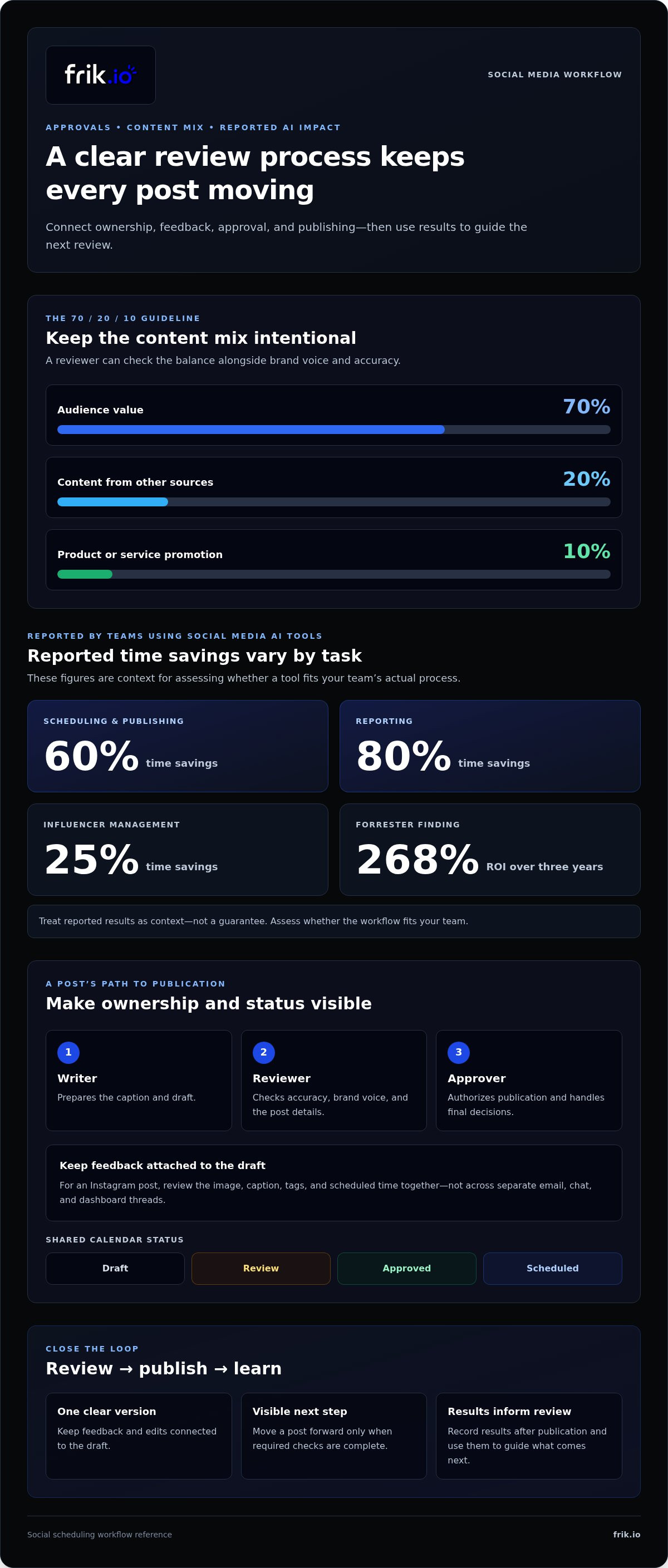
An approval workflow keeps drafts, feedback, and publishing decisions connected to each post. Start by assigning clear roles: a writer prepares the caption, a reviewer checks accuracy, and an approver authorizes publication. For an Instagram post, the reviewer can check the image, caption, tags, and scheduled time together. A shared calendar then shows which posts are drafts, awaiting approval, or ready to publish.
Build review steps around the content’s purpose. The 70/20/10 guideline recommends that 70% of content offer audience value, 20% come from other sources, and 10% promote a product or service. A reviewer can check that balance alongside brand voice and accuracy. Keep feedback attached to the draft, rather than scattered across email, chat, and a separate dashboard. That gives each teammate one clear version to review.
- Assign ownership: Name a creator and final approver for each account, including who handles edits when the approver requests changes.
- Set status rules: Use stages such as draft, review, approved, and scheduled. Move a post forward only when its required checks are complete.
- Close the loop: After publication, record results in reporting and use them to guide the next review. Keep competitor references separate from claims about your own audience.
When comparing eight schedulers, test whether permissions, comments, and approval status are visible in one workflow. That matters when multiple people handle a post before it goes live. AI can also reduce repetitive work: teams using social media AI tools report 60% time savings on scheduling and publishing, 80% on reporting, and 25% on influencer management. Forrester found 268% ROI over three years for social media AI tools. Treat those figures as context, then assess whether the review process fits your actual team. A useful dashboard should make the next action clear, not simply display more activity.
Bulk scheduling across multiple profiles
Scheduling tools organize posts across platforms, but queued content still needs oversight. Watch for outdated posts, platform-specific formatting errors, and unanswered audience responses. A calendar can’t react to breaking news or replace live engagement, so review the queue and monitor comments after publishing.
Bulk scheduling becomes useful when a team plans campaigns across several accounts. Testing criteria include whether a calendar remains usable for 100 or more posts per month across several accounts. One respondent reported needing a scheduler for more than 60 profiles. These demands make filters, clear account labels, and a consolidated view practical necessities, not extras.
Before loading a batch, build a platform-specific publishing routine:
- Group drafts by campaign and destination, such as Facebook, LinkedIn, and Instagram.
- Adapt each post to the network’s format, audience, and publishing context rather than duplicating identical copy.
- Review dates, account selection, and approvals in the calendar before scheduling the batch.
- After publishing, check comments and engagement, then use social listening to spot relevant conversations.
This process helps teams coordinate social media without treating every network as interchangeable. A product announcement, for example, might share its core message on Facebook and LinkedIn while using a different opening line and visual treatment on each. One calendar can reveal overlapping campaigns or gaps between posts, but someone still needs to respond when a conversation changes direction.
When comparing the best tools for scheduling social media posts, test bulk editing and profile filters with a realistic batch. Check whether approvals remain visible across accounts and whether scheduled items are easy to move when priorities shift. If a set-it-and-review workflow suits your team, explore autopilot scheduling as one way to coordinate planned publishing.
Does pricing scale transparently?
Compare plan limits with your posting strategy, profiles, and team workflow. Clear pricing makes it easier to see how a plan fits as those needs grow.
Tool Pricing
Look beyond the plan name. Compare what each tier includes for connected profiles, publishing capacity, analytics, custom reporting, and collaboration. A scheduler may work well for solo posting but become restrictive when teammates need shared access or approval steps. List the features your team uses now, then identify limits that could affect its next stage.
Check how each tool defines plan limits and upgrades. Note whether adding profiles or needing more analytics affects the plan you choose. Compare those terms with your expected workflow, not just another tool’s feature list. This clarifies the trade-offs without assuming the lowest tier is the best fit.
Free Plans
A free plan can help you test basic scheduling, but its limits matter. Review supported profiles, posting capacity, analytics access, and collaboration tools before building a workflow around it. A solo marketer scheduling occasional posts has different needs from a team coordinating accounts and approvals. Match the plan’s boundaries to the work you actually publish.
One respondent recommends trying a scheduler’s free trial to assess usability and cautions that free software may not be the best fit. Test real tasks: draft a post, schedule it, review analytics, and invite a teammate if collaboration matters. This can reveal friction that a feature list won’t.
Before choosing, assess how the tool handles your routine, from planning through reporting. Check whether key functions are accessible and whether plan limits interrupt posting or collaboration. A trial is most useful when you test the profiles, content types, and analytics your strategy depends on, rather than browsing the dashboard without a specific task.
Social media scheduling tool features
In 2026, this comparison covers eight schedulers, but no single option suits every team. Compare supported platforms, post types, analytics, and approval workflows against your publishing needs.
Some scheduling tools publish automatically, while others require a final action. Support for Reels, Stories, and short-form video depends on the platform connection and post type.
Feature depth matters more than a long checklist. A visual calendar should make campaign timing easy to scan, and the scheduler should show each post’s destination and publishing status. Confirm that it supports the networks and formats your team uses, such as TikTok videos or Instagram Stories. This helps prevent a polished plan from running into a format mismatch at publishing time.
Assess each feature through a real task. Draft a campaign post, adapt it for another platform, route it for approval, then review the reporting. This shows whether the tool connects planning with execution or simply queues content. Performance data and report generation can also help teams decide which posts deserve follow-up.
- Platform and format support: Match supported networks and post types to your actual publishing mix.
- Visual planning: Use the calendar to spot gaps, overlaps, and campaign timing issues.
- Review controls: Check that approval workflows keep edits and publishing status clear.
- Reporting: Look for useful performance statistics that inform the next content decision.
Choose features that solve workflow friction, not ones that merely look impressive in a demo. For example, a small team may value fast content adaptation, while a multi-account operation may prioritize approvals and reporting. A tool that supports every network but lacks the post format you need creates extra manual work. Test a representative campaign from draft through scheduled publishing, then explore an AI-powered publishing workflow to see how content creation and scheduling can fit together.
There is no single best option for every team. Choose a tool that supports your networks and post formats, fits your planning and approval workflow, and provides reporting to guide future content decisions.
Frik.io: AI Social Media Management Platform
frik.io brings content creation, scheduling, and publishing into one workspace for teams managing social media across networks. Consider it when separate tools make it harder to maintain a consistent brand voice or coordinate draft reviews. Brand-True AI Content Generation creates captions in your style and tailors posts for each platform. The Client Approval Portal gives reviewers a focused place to review content before publication.
The platform connects planning with execution, helping teams move from drafts to scheduled content in a shared workflow. Its SVG Converter Tool also converts SVG files as part of your creative process. These features suit teams that want content production and approvals closer to social scheduling, rather than coordinating every step across disconnected systems.
Visit frik.io to explore the platform and see how it fits your workflow.
Make your next workflow easier to run
Choosing among the best tools for scheduling social media posts is a chance to shape how your team works, not just where it queues content. Before deciding, map a campaign from first draft to final review. Notice where teammates lose context, repeat edits, or switch between systems. Those friction points can guide your decision better than an oversized feature checklist.
For teams connecting content creation and review, frik.io offers an AI Social Media Management Platform, Brand-True AI Content Generation, and a Client Approval Portal. These capabilities keep brand-aligned drafts and approvals connected to social publishing. Choose a setup that fits your current process and gives your team room to refine it as needs change.
Contact frik.io about social scheduling to explore the platform for your workflow. A more coordinated process starts with one clear next step.
Frequently Asked Questions
What is a social media scheduler?
A social media scheduler is software for preparing posts and arranging publication across connected social accounts. It can bring captions, media, dates, and publishing status together in one workspace. For example, a marketing team can draft a product announcement, adapt the copy for different networks, and schedule each version to publish later. Some schedulers also offer content calendars, collaboration features, or performance analytics.
How often should you schedule posts?
Schedule posts at a pace your team can sustain while keeping each platform’s audience engaged. Start with your content strategy and the formats you can produce consistently, then review engagement and reports to see what resonates. If a weekly campaign prompts useful comments, for example, plan follow-up content around those questions. Adjust the calendar as audience interests or campaign priorities change.
Can I schedule one post to multiple platforms at once?
Yes, many schedulers let you prepare one post and share it across multiple connected platforms. Review each version before scheduling, because character limits, media formats, and audience expectations can differ. Keep the campaign’s core message consistent, for example, while changing the opening line or call to action for LinkedIn and Instagram. Confirm the selected accounts and publishing times before queuing.
Can the calendar stay functional when you’re managing 100+ posts?
It can, if the calendar offers useful filters, clear status labels, and account-level organization. A practical test is loading a realistic batch of 100+ posts per month across several accounts, then finding one draft, changing its date, and identifying anything awaiting approval. If that workflow becomes difficult to scan, stronger search and filtering matter more than extra calendar views.
What is Best Time to Post?
Best Time to Post is a scheduling recommendation based on audience activity or past post performance. Treat it as a planning input, not a substitute for reviewing results. Compare engagement on posts published at different times, then adjust your calendar to reflect patterns that suit your audience. Campaign deadlines and timely conversations may still call for different posting choices.
Which platforms does each social media scheduler support?
Platform support varies by scheduler, so compare the networks and post formats your workflow requires. frik.io supports Instagram, Facebook, X/Twitter, LinkedIn, TikTok, YouTube, Threads, Google Business Profile, and Pinterest. Check whether a tool connects to the right account type and supports the specific publishing task, such as uploading a video or scheduling a platform-specific post.


