

Is your agency’s growth stalled by the friction of manual workflows? Most managers believe scaling requires hiring more hands, but in 2026, it's actually about upgrading your operating system. You’re likely tired of the relentless context switching between brand accounts and the bottlenecks of manual client approvals. It’s draining to maintain a unique voice for every industry when you're stuck in spreadsheet chaos. You want to grow, but the operational weight of your current process makes every new contract feel like a burden rather than a win.
This guide reveals exactly how to scale social media management for multiple clients without sacrificing your team's sanity or content quality. You'll master a framework for managing dozens of accounts with surgical precision using AI-driven workflows and automated systems. We’ll show you how to build a unified workspace that replaces fragmented tools. You will learn to deploy automated content drafting that requires minimal editing and implement collaborative portals that eliminate email chains. It's time to move from being a manual creator to operating an efficient command center that delivers predictable, scalable growth.
Key Takeaways
- Identify the symptoms of the "Scaling Wall" and understand why manual workflows lead to diminishing quality as your agency expands.
- Discover how to scale social media management for multiple clients by adopting an "Efficient Command Center" model built on standardized content pillars.
- Learn to train AI on specific client style guides to generate brand-true content that maintains a unique, authentic voice at any scale.
- Eliminate operational friction by moving approvals out of chaotic email chains and into a professional, centralized client portal.
- Shift your focus from manual data entry to automated analytics that prioritize agency-level KPIs, client satisfaction, and predictable growth.
The Scaling Wall: Why Manual Social Media Management Fails
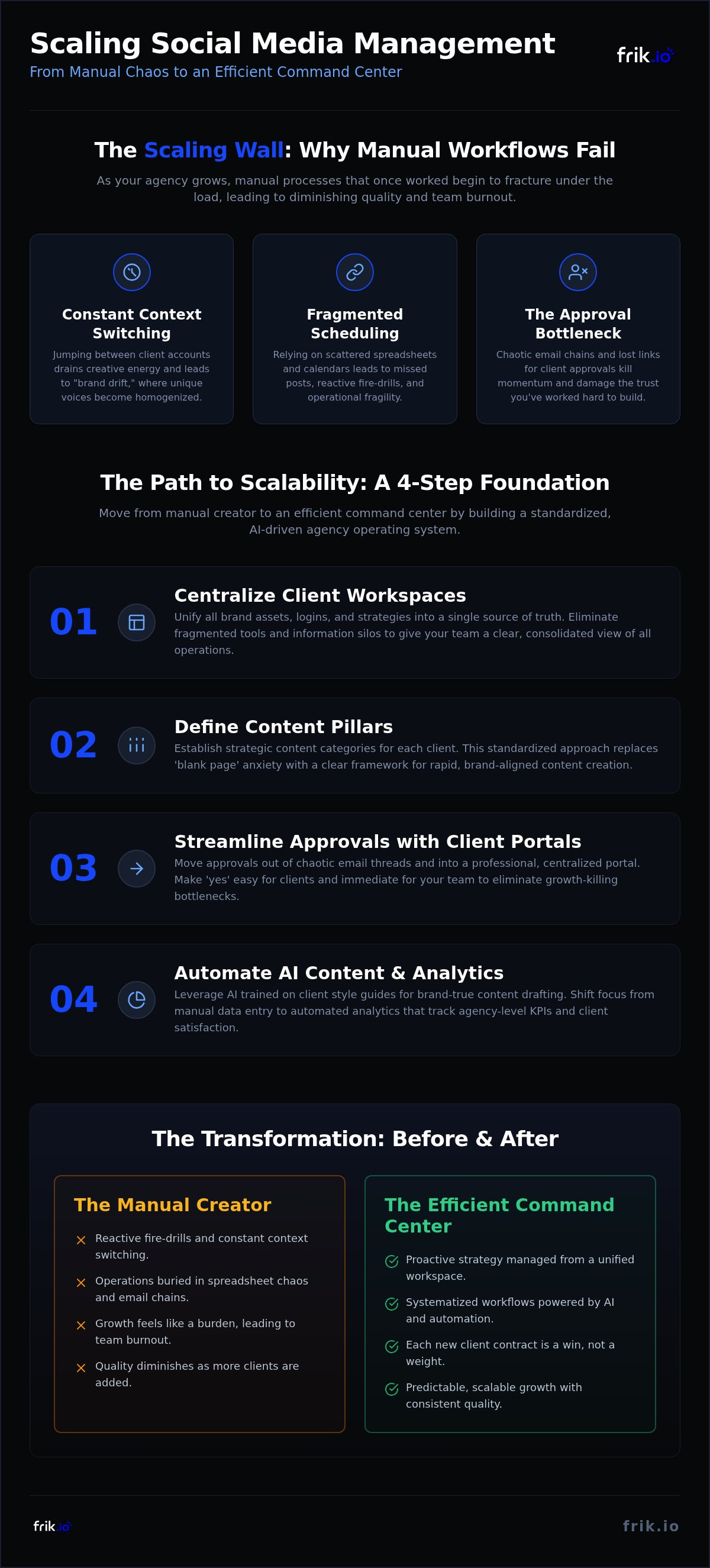
In 2026, scaling is the ultimate goal, yet most agencies hit a structural ceiling they can't break through. This is the "Scaling Wall." It happens when manual processes, which worked for three clients, begin to fracture under the weight of ten or twenty. You're likely experiencing the Law of Diminishing Quality, where each new client added reduces the value provided to existing ones. Managing 20+ social profiles manually creates "Tab Fatigue" and operational fragility. Common symptoms of this wall include:
- Constant context switching that drains creative energy.
- Missed posts due to fragmented scheduling.
- Brand drift as unique voices become homogenized.
Learning how to scale social media management for multiple clients requires moving beyond the "Freelancer Mindset." You need a robust agency infrastructure that handles the heavy lifting, moving you from a manual creator to an efficient command center.
The Hidden Cost of Context Switching
Jumping between a B2B tech firm’s LinkedIn presence and a lifestyle brand’s Instagram feed creates a massive cognitive load. Your brain requires time to reset for every new brand voice. This mental friction leads to "brand drift," where content starts sounding generic rather than tailored. Beyond creativity, manual logins are a security nightmare. Frequent account switches increase the risk of security breaches and platform-mandated account locks. You lose hours every week simply navigating platform interfaces and double-checking social media analytics across fragmented dashboards. This isn't productive work; it's operational waste that eats your margins.
The Approval Bottleneck: Where Growth Goes to Die
Growth stops when your workflow depends on email chains and spreadsheets. These manual approval loops are where momentum disappears. A client misses an email, a spreadsheet link breaks, or feedback gets buried in a thread. These delays disrupt optimal posting schedules and force your team into reactive fire-drills. Disorganized feedback loops don't just slow you down; they damage client trust. When you're trying to figure out how to scale social media management for multiple clients, you must solve the approval bottleneck first. A professional agency can't afford to wait 48 hours for a "looks good" email. Transitioning to a dedicated Client Approval Portal makes "yes" easy for the client and immediate for your team.
Standardizing Your Agency Workflow: The 4-Step Scaling Foundation
Scaling isn’t a matter of hiring more hands; it’s a matter of architecture. The "Efficient Command Center" model treats your agency as a single, high-velocity engine rather than a collection of scattered freelancers. This foundation allows you to maintain surgical precision even as your roster doubles. Research into managing multiple social media accounts highlights that organization is the primary differentiator between growth and burnout. By standardizing the strategic layer, you ensure that quality remains high while your manual effort decreases.
Step 1: Centralizing Client Workspaces
Fragmented tools create information silos that kill productivity. To master how to scale social media management for multiple clients, you need a single source of truth for every brand asset, login, and strategy document. Utilizing a unified ai social media management platform reduces operational overhead by eliminating the need to toggle between twenty different tabs. This centralization creates a foundational layer where all operations are visible and manageable.
Actionable rule: If a final draft or asset isn't in the central workspace, it does not exist for the team. This eliminates the "where is that file?" Slack messages that derail your day. By moving your operations to a platform like frik.io, you create a hub that supports rapid expansion.
Step 2: Defining Cross-Platform Content Pillars
Most agencies struggle because they start every week with a blank page. You must establish what is a content pillar for every client as a non-negotiable starting point. These pillars map brand goals to specific categories, allowing for rapid ideation and consistent messaging. When you build a "Pillar Library," you provide the necessary training data for your AI to generate high-quality drafts without losing the brand's unique DNA.
- Map core brand values to 3-5 evergreen content themes.
- Reuse core themes across LinkedIn, Instagram, and X by adapting the hook and format.
- Store high-performing past posts within each pillar to serve as style guides.
This systematic approach ensures you can scale content production without sounding repetitive. Once the pillars are set, you can implement a repeatable "Onboarding Sprint" for every new client. This 48-hour process involves setting up the workspace, defining pillars, and training the AI. A predictable system ensures that adding a new client doesn't disrupt your existing workflow; it simply plugs into the machine you've built.
Leveraging AI for Multi-Brand Content Creation Without Losing Authenticity
Generic AI prompts are the enemy of agency growth. When you use basic tools, every client starts sounding like the same lukewarm chatbot. This "Brand Voice Drift" is a primary reason why manual agencies fail to scale. To maintain authenticity, you need Brand-True AI Content Generation. This involves moving beyond simple instructions and instead feeding the AI a client’s specific DNA. By following best practices for managing multiple social media accounts, you can build a repository of successful past posts to guide future creation. This ensures your output remains consistent with the client's established identity.
Training AI on Your Clients Unique Brand Voice
You can't scale if you're writing every caption from scratch. Training your AI starts with inputting granular brand values, tone descriptors, and specific vocabulary preferences. Does the client use emojis? Do they prefer industry jargon or plain English? Once these parameters are set, you can use the system to generate 30 days of captions in minutes. Brand-True AI is the foundational layer that allows you to maintain surgical precision across dozens of accounts. You simply implement a "Draft-Review-Refine" workflow. The AI does the heavy lifting, while your team provides the final human polish to ensure quality control. This process lets you master how to scale social media management for multiple clients without losing the personal touch that clients pay for.
Automating Platform-Specific Optimization
A LinkedIn post shouldn't look like an Instagram caption. Each platform has its own unspoken rules, character limits, and hashtag etiquette. Learning how to scale social media management for multiple clients involves automating these tedious adjustments. One-click tailoring allows you to take a core message and instantly reformat it for different audiences. The AI automatically adjusts call-to-actions and generates platform-native hooks that grab attention. This ensures your B2B tech client sounds professional on LinkedIn while your lifestyle brand feels casual on X. You aren't just posting; you're optimizing for engagement at scale. This automation eliminates the manual drudgery of re-typing the same message four different ways. It empowers your team to focus on high-level strategy while the system handles the formatting logistics with absolute consistency.
Eliminating Friction with a Collaborative Client Approval Portal
Email is where scaling goes to die. If you’re still relying on buried threads or shared spreadsheets for approvals, you’ve reached the structural limit of your growth. These manual methods are prone to version control errors and lack the visual context clients need to feel secure. A dedicated Client Approval Portal is the secret weapon for agencies that want to grow without adding more account managers. It moves the conversation out of a cluttered inbox and into a professional, centralized workspace. This transition is essential when learning how to scale social media management for multiple clients because it provides the transparency and surgical precision required to manage dozens of accounts simultaneously.
Building a Professional Client Review Experience
Visual "What-You-See-Is-What-You-Get" (WYSIWYG) previews are non-negotiable for client confidence. Most clients suffer from "Approval Anxiety" when they can't visualize how a post will look in the wild. By showing them exactly how an Instagram carousel or a LinkedIn post will appear on the feed, you eliminate the guesswork and the need for back-and-forth explanations. This professional experience doesn't just save time; it directly impacts client retention. When your review process feels like a high-end software experience rather than a messy email chain, you position your agency as an indispensable partner. You move from being a vendor they manage to a sophisticated solution they trust.
Automating the Feedback-to-Publishing Loop
The real magic happens when you connect approvals directly to execution. You can configure specific status updates, such as Draft, Pending, and Approved, to trigger automatic scheduling workflows. Once the client hits the approve button, the system initiates Autopilot Scheduling without any manual intervention from your team. This eliminates the "Manual Move" where a team member has to copy-paste content between different tools. It also ensures strict version control; unapproved drafts stay locked in the portal, and only final, approved versions ever go live. By streamlining the feedback loop with inline comments, you keep all communication tied to the specific asset. This replaces the chaos of external messaging apps where feedback often gets lost or misunderstood.
This automated bridge between approval and publishing is the foundation of a scalable agency. To start streamlining your own feedback loops and reclaiming your time, explore the Client Approval Portal and move your operations into a unified workspace.
Measuring ROI and Optimizing the Scaled Workflow
Optimization is the final stage of the scaling journey. Once your AI workflows and approval portals are live, you must shift your focus from execution to measurement. Scaling isn't just about doing more work; it's about knowing exactly what delivers results without spending hours in fragmented dashboards. You need to transition from manual data entry to automated multi-platform analytics to maintain a high-level view of your entire roster. This is where you truly master how to scale social media management for multiple clients. By focusing on "Agency-Level KPIs," such as operational efficiency, client satisfaction scores, and predictable account growth, you ensure your agency remains profitable as it expands.
Automated Reporting for Multi-Brand Management
Manual reporting is a massive time sink that prevents you from focusing on high-level strategy. You need unified reports that summarize performance across every social network in a single view. Clients don't want to see raw data; they want to see Engagement, Reach, and Conversions mapped to their business goals. Use your centralized workspace to schedule automated report delivery. This keeps your clients informed with surgical precision while requiring zero manual labor from your team. Automated reporting provides the transparency needed to build long-term trust, making your agency's value self-evident every month. It’s the difference between being a vendor they question and a partner they can't live without.
Iterative Scaling: Refining the Command Center
Data should do more than just prove your worth; it should refine your engine. Use monthly performance data to update your AI Brand Voice profiles and tweak your content pillars for the upcoming cycle. If a specific hook or format performs exceptionally well for one client, identify the pattern and test it across similar niches. This iterative approach turns your agency into a sophisticated learning machine that gets faster and more accurate with every post. You're no longer just managing accounts; you're operating an efficient command center that offers a high-end "secret weapon" to your clients.
The ultimate goal is passing the "Scale Test." Can you onboard five new clients this afternoon without your team hitting a breaking point? If your systems are truly automated, adding more volume should only increase your margins, not your stress levels. You've successfully moved from a manual creator to a strategic brand partner, delivering predictable, scalable growth for every brand in your portfolio. Mastering how to scale social media management for multiple clients means building a system that thrives on volume rather than being crushed by it.
Building Your Agency Command Center
Scaling your agency in 2026 requires a fundamental shift from manual execution to systemic automation. You've seen how standardizing your workflow through content pillars and centralizing client assets eliminates the friction that stalls growth. By moving away from generic prompts and adopting AI Brand-True Content Generation, you maintain authenticity across dozens of unique voices without the cognitive drain of context switching. Centralizing feedback within Unified Client Approval Portals ensures that unvetted drafts never go live while keeping your clients empowered and informed.
Mastering how to scale social media management for multiple clients is about building a foundation that thrives on volume. When you implement Multi-Platform Autopilot Scheduling, you reclaim the hours previously lost to manual logistics. This efficiency transforms your operation into a high-velocity engine ready for any number of new contracts. Stop fighting the scaling wall and start operating from a position of quiet authority and surgical precision.
Ready to scale? Start your frik.io trial and build your Efficient Command Center today.
Your agency's potential is no longer limited by your manual capacity. With the right systems in place, predictable and sustainable growth is finally within your reach.
Frequently Asked Questions
How many clients can one social media manager realistically handle?
A social media manager using manual methods typically hits a ceiling at 5 clients before quality drops. By implementing an AI-powered platform, a single manager can realistically handle 15 to 20 accounts with surgical precision. The key is removing manual drafting and approval friction. Transitioning to a system that automates the heavy lifting allows your team to focus on high-level strategy rather than administrative drudgery.
Is AI social media management safe for high-stakes brand accounts?
AI is highly secure for high-stakes brands when it's built on a Brand-True framework rather than generic prompts. You maintain control by keeping humans in the loop for final refinement. Training the AI on a client’s specific style guide and successful past posts ensures the output stays authentic. This structured approach prevents brand drift and allows for rapid content production without sacrificing the unique voice your clients expect.
What is the best way to keep client assets organized at scale?
Centralizing all brand assets into a unified, accessible digital library is the most effective strategy. You must move away from fragmented folders and shared drives that create information silos. A dedicated workspace within your management platform serves as the single source of truth for every login, brand asset, and strategy document. This organization eliminates the constant context switching and "Tab Fatigue" that often stops agencies from growing.
How do I handle client feedback without getting stuck in email chains?
You move approvals out of the inbox and into a dedicated Client Approval Portal. This system allows clients to leave inline comments directly on post previews, keeping all feedback tied to the specific asset. By using clear status updates like Pending or Approved, you eliminate the need for back-and-forth email threads. This professional transparency builds trust and ensures that unvetted content never reaches the live feed accidentally.
Can AI really replicate a specific brand voice for multiple clients?
Modern AI can replicate specific brand voices by being trained on granular data points like tone descriptors, vocabulary preferences, and core values. You provide the AI with the brand’s DNA, and it generates content that sounds like the client, not a generic bot. This capability is essential for anyone looking at how to scale social media management for multiple clients across diverse industries while maintaining a unique, authentic presence.
What features should I look for in a social media management platform for agencies?
Agencies should prioritize platforms that offer Brand-True AI content generation, collaborative approval portals, and multi-platform autopilot scheduling. Look for features that allow one-click tailoring for different networks like LinkedIn and Instagram. A unified workspace that combines creation, scheduling, and analytics into one hub is vital. These tools move your agency from a creator mindset to an efficient command center, allowing for predictable and sustainable growth.
How do I scale my social media agency without hiring more people?
You scale by upgrading your infrastructure rather than just your headcount. Implementing AI-driven workflows allows your current team to manage dozens of accounts with the same effort they previously used for five. By automating content drafting and using a centralized portal for approvals, you remove the primary bottlenecks of manual management. This systemic approach is the most effective way to learn how to scale social media management for multiple clients without increasing overhead.
What is the difference between a social media scheduler and a management platform?
A social media scheduler is a simple tool designed only to queue and publish posts at specific times. In contrast, a management platform like frik.io handles the entire operational lifecycle, including AI content generation, client approval workflows, and multi-platform analytics. While a scheduler helps with timing, a platform provides the foundational layer for your agency’s entire workflow. It’s the difference between a single tool and a complete command center.


