

What if your next LinkedIn post started with your expertise, not a blank page? The right AI content generator for LinkedIn posts can help shape your ideas into a useful first draft, but it shouldn’t flatten your voice into generic advice. If you’ve spent more time editing an AI draft than writing one yourself, you already know the difference.
A strong tool should make drafting faster while keeping you in control of what gets published. Look beyond the first output: Can the tool use your style guidance? Can your team review and refine drafts? Does the workflow fit how you plan and publish content?
This 2026 buyer’s guide will help you compare LinkedIn AI writing tools by writing quality, voice controls, review features, and publishing workflow. You’ll learn what to prioritize as an individual or team, which trade-offs to watch for, and how to choose a tool that turns your experience into stronger posts without handing over editorial control.
Key Takeaways
- Assess an AI content generator for LinkedIn posts by how well it turns your expertise into a useful draft, not just how quickly it produces text.
- Compare shortlisted tools using the same brief and voice reference to see which drafts need the least substantive editing.
- Check for practical voice guidance, team review controls, and platform adaptation before choosing a tool.
- Build a repeatable workflow with a human owner responsible for fact-checking, tone, audience fit, and final approval.
- Match essential features to your role and publishing process. Treat extras like analytics as optional until you need them.
What an AI content generator for LinkedIn posts should actually do
An AI content generator for LinkedIn posts is software that turns a prompt, expertise, or source material into a draft. It can help you move from a topic to a structured post, but it doesn’t supply your lived experience or decide what you should say. Treat it as a drafting aid, not an authority on your subject.
These tools use Natural Language Generation (NLG) to produce text from instructions and context. The result depends on what you provide. Specific information, a clear audience, and useful voice guidance create a stronger starting point than a vague prompt. Even a polished draft needs human review for accuracy, intent, and fit.
Scope matters, too. A standalone generator focuses on ideas and writing. A broader social media platform may also include content adaptation, approvals, scheduling, or analytics in the same workflow. These features can help teams coordinate, but they don’t replace editorial judgment. Check which capabilities are included and confirm any LinkedIn-specific connection or publishing features before relying on them.
From prompt to LinkedIn-ready draft
Give the tool a topic, audience, point of view, and objective. For example, a product lead might share a lesson from a launch with other product teams, aiming to prompt discussion. With enough context, the tool can shape the material into an opening hook, a body that develops the idea, and a closing question or prompt. The author still needs to confirm that the post reflects real knowledge and says what they intended.
Voice guidance can help narrow the gap between a generic draft and a recognizable style. A short style guide might describe preferred phrasing, tone, and words to avoid. Use it as direction, then edit the draft so it sounds natural and supports your point.
Who benefits from a LinkedIn post generator?
Professionals with useful ideas but little time to draft consistently can use a generator to get past the blank page. Marketers can turn source material into draft options, while teams can use shared voice guidance and review steps to coordinate contributions from multiple people.
A writing generator isn’t a complete content operation. Buyers who need strategic planning or community management should assess those needs separately. Teams coordinating drafts and client feedback may benefit from a broader platform, provided its features match their actual process.
How to judge LinkedIn AI writing quality, voice, and usefulness
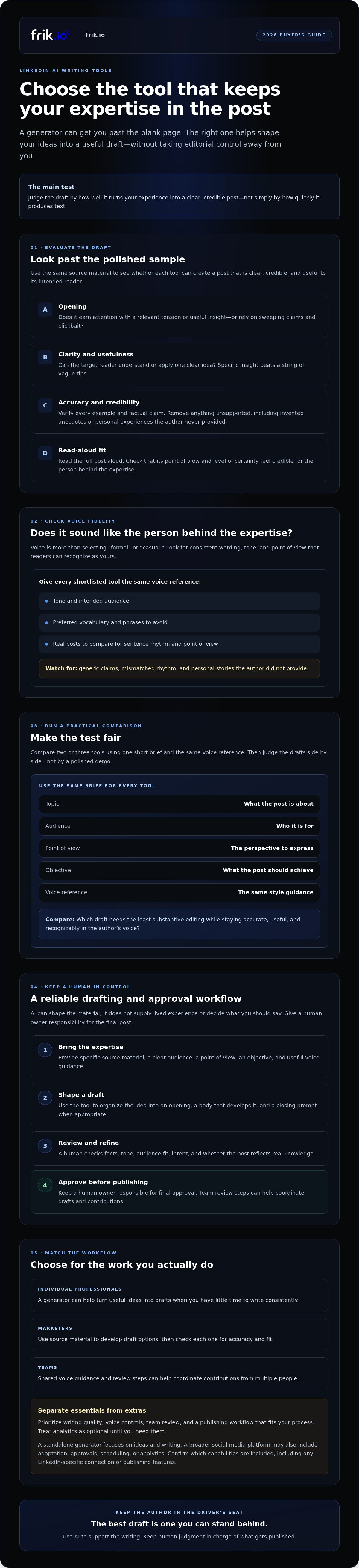
Don’t judge an AI content generator for LinkedIn posts by its smoothest sample. Test whether it can turn the same source material into a clear, credible post that sounds like its author. Compare two or three tools using one short brief with the same topic, audience, point of view, objective, and voice reference. This gives you a fair basis for comparing drafts instead of relying on a polished demo.
Read each opening on its own. Does it earn attention by raising a relevant tension or sharing a useful insight, or does it lean on sweeping claims and clickbait? Then assess the full post for clarity, factual accuracy, usefulness, and credibility when read aloud. The discussion of how AI is shaping marketing offers helpful context: AI can support content creation, but the author still needs to guide and evaluate the output.
Voice fidelity means consistent wording, tone, and point of view that readers can recognize as yours. It’s more than choosing a formal or casual setting. A draft may use the right vocabulary yet still miss your sentence rhythm, level of certainty, or way of explaining a complex idea.
Does the draft sound like the person behind the expertise?
Give each tool a short style guide covering tone, intended audience, preferred vocabulary, and phrases to avoid. Compare the output with several real posts, not just one, and look for a familiar sentence rhythm and point of view. Flag generic claims, invented anecdotes, and first-person experiences the author never provided. A style-matched draft should sound more like the person, not manufacture a personal history for them.
Does the post give the reader something useful?
Look for one clear idea the target reader can understand or apply. A post that strings together vague tips may look complete but offer little substance. Ask the author to verify every example and factual claim, then remove anything that can’t be supported. Prefer a specific insight for a defined audience over promises of reach or virality that the draft can’t substantiate.
For a quick evaluation, rate each draft against the same criteria:
- Opening: Relevant and compelling without exaggeration.
- Voice: Consistent with the author’s real posts and guidance.
- Substance: One useful idea supported by verifiable details.
- Readability: Clear, natural, and credible when read aloud.
- Editing: Note what must change before it’s ready to publish.
That last point matters. The best result isn’t necessarily the draft with the fewest words changed. It’s the tool that helps preserve expertise while making revision manageable. If brand voice is a key requirement, explore brand-voice content drafting as one workflow to evaluate.
Compare AI content generators for LinkedIn posts with a practical test
Feature lists tell you what a tool claims to do. A side-by-side test shows whether it fits your workflow. Shortlist two or three AI content generators for LinkedIn posts, then give each the same brief and voice reference. Compare the output and the work required to make it publishable, not just the features listed on the product page.
A five-point scorecard for shortlisting tools
Use the same criteria for every tool. Rate each one against your needs, and record examples rather than relying on a general impression.
| Criterion | What to assess |
|---|---|
| Voice guidance | Can you provide a style guide or writing examples to shape the draft? |
| Useful first drafts | Does the post develop one clear idea for its intended audience? |
| Editing control | Can you revise the draft easily and keep a human in control of the final wording? |
| Collaboration | Can contributors review or approve content in a way that suits your process? |
| Workflow fit | How much setup does it take, and does it support the platform adaptation or scheduling steps you need? |
For every draft, note how much human editing it needs before publication. Separate small changes, such as trimming a sentence, from substantive rewrites to fix voice, logic, or unsupported claims. Also check current LinkedIn account connection, scheduling, and publishing support in the tool’s official documentation. Don’t assume those capabilities are available just because a platform supports social publishing.
Run a fair side-by-side draft test
Keep the test controlled. Give each shortlisted tool the same audience, subject, point of view, objective, and length guidance. Provide identical voice examples, and explicitly prohibit unsupported statistics and personal anecdotes. Ask the intended author to review the results and identify which draft needs the least substantive rewriting to sound credible and reflect their expertise.
AI can reduce the effort of getting started, but it can’t replace the author’s knowledge or fact-checking. The person behind the post must confirm the claims, examples, and intent before approval. A draft that reads smoothly may still be inaccurate or unlike the author.
Use your findings to choose a workflow, not a supposed universal winner. If drafting, adaptation, and review need to work together, explore the frik.io content workflow as one option. Confirm that any LinkedIn-specific features you need are supported before building them into your process.
Build a reliable LinkedIn AI drafting and approval workflow
A useful LinkedIn workflow gives AI a defined role and keeps a person responsible for the final post. Move each idea through clear stages: capture expertise, generate a draft, edit for accuracy and voice, approve, then schedule. This keeps drafting efficient without treating automation as a substitute for judgment.
Turn expertise into a draft without losing authorship
Start with something real: a professional opinion, a customer question, a lesson learned, or a source document. Give the AI content generator for LinkedIn posts that material along with the audience and the point you want readers to take away. Use AI to organize and refine the idea, not invent the experience behind it. Before a post enters the publishing queue, its author should review the wording, claims, and intent.
A consistent voice also benefits from clear guidance. A short style guide can help contributors and AI drafts stay aligned on tone, vocabulary, and phrasing. For a deeper look at building that guidance, see AI Brand Voice Tool: The 2026 Guide to Scaling Authentic Content.
Add team review without creating approval bottlenecks
Define ownership before the first draft arrives. The writer prepares the post; a subject-matter owner checks facts and audience fit; an editor or approver confirms the final wording. Set practical feedback windows and agree on who resolves conflicting comments. Naming one final approver helps prevent a draft from circulating indefinitely.
When multiple contributors or clients are involved, an approval portal or shared workflow can make feedback easier to track. Keep comments focused, record the decision, and return the post to the writer for any required changes. For more guidance on structuring those handoffs, consult Reducing Friction with a Client Approval Portal.
- Capture: Save the original idea or source material.
- Draft: Use AI to structure the post with the right audience and objective in mind.
- Edit: Check facts, voice, clarity, and platform fit.
- Approve: Assign one person final responsibility for sign-off.
- Schedule: Add the approved post to the publishing workflow.
Scheduling and adapting content for multiple platforms can streamline operations, but treat them as tool-selection criteria, not proof of LinkedIn support. Confirm current LinkedIn account connection, scheduling, and publishing capabilities in official product documentation before building them into your process.
For a connected approach to drafting, review, and scheduling, explore frik.io’s content workflow and verify that its current LinkedIn capabilities match your requirements.
Choose a LinkedIn AI content tool that fits your team and workflow
The best fit depends on where content gets stuck. A solo professional may need help shaping ideas into drafts. An in-house marketer may need consistent voice guidance across contributors. An agency or team with multiple contributors may need clear client review and approval steps alongside content creation.
Separate must-haves from nice-to-haves before comparing options. Voice guidance, editing control, and a useful drafting process may be essential. Review workflows matter more as the number of contributors grows. Scheduling, platform adaptation, and analytics are valuable when they solve a real need in your publishing process.
When a focused writing tool may be enough
If one author drafts and edits independently, a focused AI content generator for LinkedIn posts may be all you need. Prioritize a straightforward prompt-to-draft flow that helps turn your ideas into workable copy. If you don’t need team approvals or cross-platform workflows, a wider toolset may add complexity without removing a real bottleneck.
When a shared content workspace is the better fit
A shared workspace is worth considering when multiple people create, review, or approve content, especially for client accounts. Look for style-guide input to support consistent voice and platform adaptation when content needs to work across networks. frik.io is a broader social content workspace with AI drafting informed by user-provided style guidance, platform-specific adaptation, and collaborative client review. Confirm which capabilities are included in the plan you’re evaluating.
Before deciding, verify current LinkedIn account connection, publishing, and scheduling support in the provider’s official documentation. Don’t assume that multi-network publishing means LinkedIn is supported in the way you need. Check plan availability for the features that matter, including AI generation, client review, team collaboration, or analytics.
Make the choice against your actual workflow: who creates the draft, who approves it, and what needs to happen before publication? Choose the simplest tool that reliably supports those steps, with room to accommodate your team’s real requirements.
Explore frik.io for your social content workflow and assess whether its drafting, adaptation, and review capabilities fit your team. Verify current LinkedIn support and plan inclusion before making a decision.
Choose a tool that keeps your expertise in the lead
The right AI content generator for LinkedIn posts should make drafting easier without taking authorship away from you. Compare tools with the same brief, check whether the output reflects your voice and expertise, and track how much editing it needs before it’s ready to publish.
Fit matters as much as writing quality. Solo professionals may need a simple drafting tool, while teams can benefit from shared review steps, style guidance, and a more connected content workflow. Keep a human responsible for accuracy, audience fit, and final approval. Confirm any LinkedIn-specific connection or publishing capabilities before relying on them.
frik.io brings AI drafting informed by your style guide together with platform-specific content adaptation and collaborative client review portals. Consider whether that broader workflow fits your needs, and verify which features are available for your use case.
Explore frik.io’s AI-powered social content workflow and assess whether its drafting, adaptation, and review features fit your process.
Frequently Asked Questions
What is an AI content generator for LinkedIn posts?
An AI content generator for LinkedIn posts uses prompts, source material, or style guidance to help create a draft. It can organize an idea, suggest an opening, or refine wording, but it can’t provide your real expertise or guarantee accuracy. Before publishing, check every factual claim, confirm the post reflects your perspective, and make sure it suits your audience and LinkedIn format. Treat the output as a starting point for editorial review.
Can AI write LinkedIn posts that sound like me?
AI can draft closer to your voice if you provide clear guidance and examples of your writing. Share your preferred tone, audience, vocabulary, and point of view, then compare the result with several posts you’ve written. Voice matching isn’t proof of authenticity. Remove generic language and invented details, and revise the draft until it accurately reflects what you think and know. Keep final approval with the person whose name is on the post.
How do I choose the best AI tool for LinkedIn posts?
Start with the capabilities your workflow needs: voice guidance, useful drafts, editing control, collaboration, and publishing support. Test shortlisted tools using the same brief and writing examples so their results are easier to compare. Track how much substantive editing each draft requires, not just how polished it sounds. Before choosing, confirm current LinkedIn account connection, scheduling, and publishing capabilities in the provider’s official documentation.
Is AI-generated content allowed on LinkedIn?
AI can assist with drafting, but you remain responsible for the post you publish. Check LinkedIn’s current policies and any rules relevant to your content before relying on automated publishing or assuming a disclosure requirement. Make sure the final post is accurate, reflects your own perspective, and doesn’t present invented experiences as fact. Human review helps catch unsupported claims and confirms the post represents the author’s intent.
How can I stop AI LinkedIn posts from sounding generic?
Give the tool a defined audience, a specific point of view, and source material that supports the idea. Include examples of your writing and ask for one useful insight rather than broad advice. Then remove clichés, unsupported claims, and stories that didn’t happen. Read the draft aloud to spot stiff or unnatural phrasing. Add a concrete detail or explanation only when you can verify it and stand behind it.
Can an AI tool schedule and publish LinkedIn posts automatically?
Some social content platforms include scheduling or publishing features, but support varies by product, plan, and account setup. Confirm LinkedIn-specific capabilities directly with the provider before choosing a tool or building them into your workflow. Even if scheduling is supported, review the approved copy, links, formatting, and timing before adding a post to the queue. Don’t assume every AI writing tool can publish directly to LinkedIn.
Should teams use an AI LinkedIn post generator?
Teams can use an AI LinkedIn post generator to speed up ideation and drafting, particularly when contributors need shared voice guidance. A reliable process still needs clear ownership: decide who checks facts, edits for tone and audience, handles feedback, and approves the final post. Evaluate whether the tool supports style guides, shared review, client feedback, and the LinkedIn capabilities your team requires. Verify feature and plan availability with the provider.


