

The best social media setup for a growing business isn’t the one with the most features. It’s the one that moves work clearly from draft to approval to publication. The right social media tools for growing businesses can reduce manual coordination without turning your workflow into another system to manage.
If publishing across networks feels fragmented, you’re not alone. As content volume grows, maintaining a consistent brand voice gets harder, while approvals, scheduling, and performance data can end up scattered across different tools. Adding more software won’t necessarily solve the problem. A connected workflow matters more.
This guide compares the main types of social media tools, from content creation and scheduling to collaboration and analytics. You’ll learn how to choose tools that fit your team’s current stage, reduce repetitive work, and scale operations while keeping human review at the center. You’ll also see how to map creation, approvals, and publishing into a practical workflow without adding unnecessary complexity.
Key Takeaways
- Spot the workflow bottlenecks that signal your current social media setup no longer fits your team.
- Compare social media tools for growing businesses by the job each one does, not by its feature count.
- Use a decision matrix to assess network support, collaboration, approvals, publishing, and brand consistency before choosing a tool.
- Build a scalable workflow by mapping tasks, assigning owners, testing a shortlist, and reviewing how well the tools are adopted.
- See where frik.io’s brand-trained drafts, platform-tailored posts, approval portal, and multi-network publishing may fit, and where your team may need a different solution.
Why growing businesses outgrow basic social media tools
Occasional posting is simple when one person owns the idea, caption, and publish button. Growth changes the work. More contributors, channels, brands, and reviewers mean content passes through more hands. A process that once lived in someone’s head becomes harder to coordinate. The broader practice of social media marketing includes platform choices, content strategy, and measurement, but day-to-day execution still depends on clear ownership.
A growing business has outgrown manual social management when recurring handoffs cause missed posts, repeated work, or unclear accountability.
Look for specific signs: captions are copied and edited separately for each network, publishing dates slip, feedback gets buried in chats, or a post goes live before approval. These point to friction in the workflow, not automatically to a need for another subscription. Sometimes the fix is to clarify who drafts, reviews, schedules, and publishes.
What changes when social media becomes a team workflow?
A founder managing one account can often move from draft to post with little coordination. A team supporting several brands or networks may need a writer to prepare content, a brand lead to check the tone, a client or manager to approve it, and a publisher to schedule it. Every handoff adds a chance for delay or rework. Even capable tools won’t resolve confusion if nobody knows who takes the next action.
Define the workflow before adding complexity. Identify the owner at each stage, where feedback belongs, and what counts as approval. For example, decide whether approval means a reviewer has left comments or has explicitly confirmed the final version. Clear rules make it easier to see whether you need a tool or a documented process.
Which growth problems should a tool solve first?
Start with the bottleneck that repeatedly slows work. Is the team struggling to produce enough on-brand drafts, collect feedback, publish consistently, or see what’s already scheduled? Choose social media tools for growing businesses based on that job, not on an impressive feature list. A tool should remove a recurring obstacle; it won’t fix a one-off delay caused by a busy reviewer or an isolated change in priorities.
- Creation: Are ideas or drafts the regular holdup?
- Approvals: Does feedback arrive late or in scattered places?
- Publishing: Do posts slip because scheduling is manual?
- Visibility: Is it hard to tell what’s ready, waiting, or live?
Before comparing software, document one typical post from idea to publication. Note each handoff, tool, delay, and repeated task. This gives your team a practical baseline. It also helps distinguish persistent workflow friction from problems a new platform won’t solve.
Social media tools for growing businesses: categories and jobs
Social media tools for growing businesses are easier to compare by the job they handle than by the label on their pricing page. A scheduler may include basic analytics; a management platform may include drafting and approvals. Check the workflow each tool supports and note which steps still have to happen elsewhere.
| Tool category | Core job | Strongest fit | Potential trade-off |
|---|---|---|---|
| Native network tools | Create, manage, or review activity within an individual network. | Teams focused on a small number of networks and their built-in features. | Work can stay separated by network, making cross-channel coordination harder. |
| Content creation tools | Develop copy, graphics, and other social content. | Teams that need a stronger creative process or reusable assets. | Content may still need to move into separate tools for approval and publishing. |
| Scheduling tools | Plan and schedule posts across supported channels. | Teams seeking a clearer publishing calendar and fewer manual posting steps. | Drafting, review, or reporting may remain in other systems. |
| Analytics tools | Collect and review performance data. | Teams that need a focused view of results to inform decisions. | Insights may be disconnected from the tools where content is created and published. |
| Integrated management platforms | Connect tasks such as drafting, collaboration, scheduling, and publishing. | Teams whose repeated handoffs across tools are slowing execution. | Consolidation only helps if the platform supports the team’s actual channels and process. |
When do native tools, schedulers, and creation tools fit?
Native tools can be a sensible starting point when a team focuses on individual networks and is comfortable managing work separately. A scheduler adds value when planned publishing across supported channels is the main need. Design and content tools can improve production, but they’re complements to workflow management, not automatic replacements for a shared review and publishing process.
Keep the stack lean by matching the tool to the recurring problem. If the main issue is producing visual assets, a dedicated creation tool may be enough. If posts are ready but regularly miss their intended dates, scheduling may be the more direct fix.
When does an integrated social media platform make sense?
Consider an integrated workspace when content repeatedly travels between drafting, feedback, approval, and publishing tools. frik.io brings those activities together for teams creating and publishing across multiple networks. Its AI-generated captions can be trained on a team’s style guide, posts can be tailored for different platforms, and client approval portals support collaborative review. Trace a real post through your process to check the fit: will consolidation remove handoffs, or simply move them?
If that connected workflow matches your needs, explore frik.io’s social media workflow as one option to compare.
How to compare social media tools without buying features you will not use
Compare social media tools for growing businesses against the work your team needs to complete, not the length of a feature list. Start with the current process, then use a decision matrix to separate must-haves from useful extras and capabilities you can ignore for now.
| Decision area | Questions to ask | What a strong fit looks like |
|---|---|---|
| Supported networks | Does it cover the channels you actively use? Are publishing limitations clear? | Your priority networks are supported in the ways your team needs. |
| Collaboration | Can the right people access drafts and see who owns the next step? | Responsibilities are visible without relying on scattered messages. |
| Approvals | Can reviewers give feedback and confirm approval in a clear place? | Review matches your internal or client approval process. |
| Publishing | Can your team plan and schedule the content it creates? | Scheduling supports the actual cadence and channels you use. |
| Brand consistency | Can content follow brand guidance while still being adapted for each channel? | Team members have a practical way to maintain voice and review quality. |
Check adoption effort alongside feature fit. Consider whether the tool duplicates something your team already uses, requires extra data entry, or makes a familiar task harder. Ask how it can accommodate likely changes, such as additional team members, brands, or channels. Before committing, verify current network support, integrations, publishing limitations, and plan limits directly with the provider. These details can change and affect whether a tool fits your workflow.
Which capabilities matter most at your current stage?
A solo operator may value straightforward planning and dependable publishing more than complex permissions. A small team should look for shared drafts, clear ownership, feedback, and defined approval steps. Agencies may need client review workflows and a way to keep each brand’s content distinct. Prioritize capabilities that solve a current, recurring need. Leave advanced controls off the shortlist unless your process calls for them.
How can you evaluate value without assuming a return?
Choose a typical piece of content and map its current path from draft to publication. Note the time spent, tools opened, repeated entry, and handoffs. Then walk through the same task using the candidate tool. This comparison won’t guarantee a specific saving, but it can show whether the workflow is simpler and where friction remains.
Review subscription cost against the capabilities your team will actually use, and check how charges or limits may change as usage grows. Feature fit and team adoption matter more than feature count: a tool creates value only when it supports real work and people consistently use it.
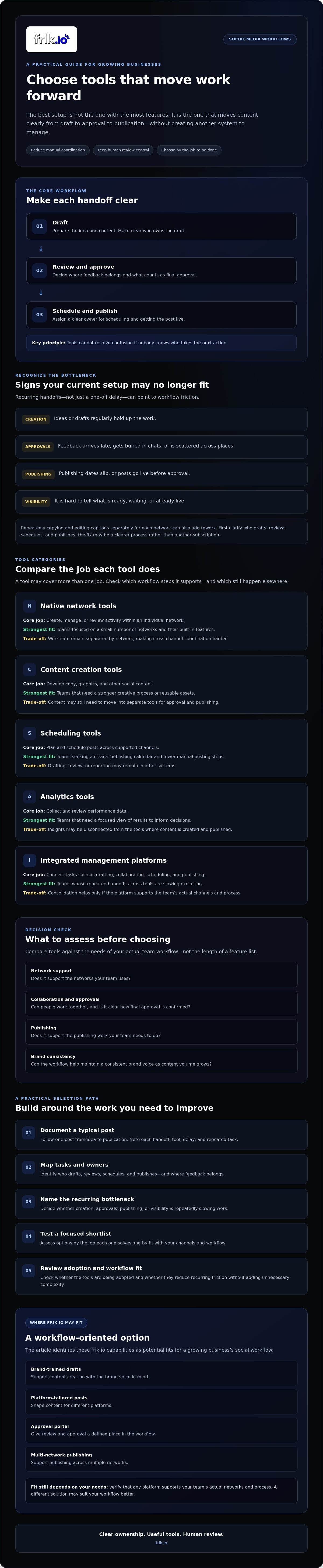
Build a scalable social media tool stack in five practical steps
A reliable stack starts with the work, not the software. Use these five steps to choose social media tools for growing businesses that support your actual workflow and can adapt as the team changes.
- Map the work. Follow a typical post from idea to publication. Record who drafts, reviews, schedules, and publishes it, along with the tools and handoffs involved.
- Identify the bottleneck. Pinpoint the recurring delay. Is the team waiting for content, feedback, approval, scheduling, or a clear view of what’s ready?
- Shortlist tools. Compare options against the bottleneck and existing workflow. Check what each tool replaces, what it adds, and whether it supports your channels and review needs.
- Pilot the workflow. Test a candidate with real content before moving every account or brand into it. Observe the work, not just the feature demo.
- Review adoption. Ask whether people use the tool consistently, whether handoffs are clearer, and whether the process needs adjustment before expanding.
Make ownership explicit at each stage. Assign who prepares drafts, gathers feedback, confirms approval, schedules and publishes content, and maintains the process. One person can hold several roles, but every action needs a clear owner. For more detail on evaluating platform workflows, see this guide to AI social media management platforms.
How should a team pilot a new social media tool?
Keep the test focused: choose one account, brand, or repeatable content workflow. Set practical measures before starting, such as fewer handoffs, clearer approval status, or less uncertainty about who publishes. Then collect feedback from creators, reviewers, and publishers. Their experience will show whether the tool fits the full process, not just one person’s task.
How do you keep a tool stack useful as the business grows?
Review the stack as roles, channels, and content needs change. Check that every tool still serves a distinct job and has active users. Document channel permissions, review expectations, and publishing responsibilities so new team members can follow the workflow. When reviewing performance, teams can also use this social media analytics guide for agencies to consider what to measure.
If you’re ready to connect drafting, review, scheduling, and publishing in one workspace, explore frik.io’s social media workflow.
When frik.io fits a growing business’s social media workflow
frik.io may suit a team that has identified a coordination gap between creating content, reviewing it, and publishing across multiple networks. It isn’t the right answer for every business. If one person manages a simple, single-network workflow without recurring delays, existing tools may be enough. If content moves through several people or channels, a shared workspace can help connect those steps.
frik.io is a subscription software platform, not a managed social media service. It doesn’t provide paid advertising management. Its role is to help teams create, review, schedule, and publish their own social content.
Which frik.io capabilities map to common growth bottlenecks?
Match each capability to a specific need. AI-generated captions trained on your style guide can give writers a consistent starting point, while leaving people responsible for editing and final approval. Platform-tailored posts help teams adapt content for different networks rather than treating every channel as identical. Client approval portals support collaborative review when clients or other external reviewers need to provide feedback.
For teams coordinating content in separate places, frik.io also supports scheduling and publishing across multiple networks from one workspace. The platform includes multi-platform analytics as well. These capabilities are most relevant when those steps are part of the same recurring workflow. Check that the supported networks and data meet your needs rather than assuming more features will improve the process.
What should you check before choosing frik.io?
Confirm that the current supported networks and publishing options meet your requirements. Check any channel-specific publishing limitations, integrations, plan details, and usage limits directly with the provider before deciding. These details can affect whether a platform fits your day-to-day operations.
Map your approval process, too. Identify who needs to review content, how feedback is collected, and what counts as final approval. Then confirm the portal supports that process. If your team relies on particular analytics or other tools, check whether the platform meets those needs or whether you’ll need a separate solution. A clear fit depends on the whole workflow, not a feature name.
If those capabilities align with your team’s priorities, see whether frik.io fits your workflow. Review your requirements first, then assess whether the platform can connect the work you want to bring together.
Build a social workflow that’s ready to grow
The best social media tools for growing businesses aren’t necessarily the ones with the longest feature lists. Start with the work your team needs to coordinate, identify the recurring bottleneck, and choose tools that make the next step clear. A focused pilot can show whether a new setup reduces handoffs and fits the way your team actually creates and publishes content.
For teams looking to connect more of that workflow, Frik.io brings together AI drafting trained on your style guide, collaborative client approval portals, scheduling and publishing across multiple networks, and multi-platform analytics. These capabilities can support a more consistent process, while human review keeps brand judgment in the hands of your team. Check supported networks, publishing requirements, and plan details against your needs before making a decision.
Ready to assess the fit? Explore Frik.io and see how it fits your social workflow. Choose the tools that remove friction without adding complexity, and give your team room to grow with confidence.
Frequently Asked Questions
Is a social media management tool worth it for a small business?
It can be worthwhile if publishing, approvals, or coordination repeatedly take time away from other work. First identify the task causing the most friction, then compare tools against that need. A small business with a straightforward process may manage well using native network tools. A growing team may benefit from shared planning and publishing. Focus on what you’ll use now, rather than paying for features you only expect to need later.
What social media tools does a growing business need?
There’s no required tool stack for every business. Social media tools for growing businesses may cover content creation, scheduling and publishing, collaboration, or performance measurement. The right mix depends on your channels, team size, review process, and existing software. Start with the workflow causing the most delay. Then see whether one platform can cover several needs without adding steps or making everyday tasks harder to manage.
Are all-in-one social media platforms better than separate tools?
Not automatically. An integrated platform can connect drafting, review, scheduling, and publishing, which may reduce handoffs for teams juggling several tools. Separate products can be a better fit when your process depends on specialized capabilities or already works smoothly. Compare supported channels, essential features, adoption effort, and overlap with your current software. The best option is the one that supports your workflow and that your team will use consistently.
How do I choose social media tools for a growing team?
List the team’s active channels, workflow steps, reviewers, and recurring bottlenecks before comparing tools. Check whether each option supports the collaboration, approvals, scheduling, and publishing your process requires. Test a shortlist with real content, then ask creators and reviewers where work feels clearer or more difficult. Verify current network support, publishing requirements, integrations, and plan limits directly with each provider before committing.
Can AI social media tools keep a business’s brand voice consistent?
AI can help draft content using brand guidance, but human review remains important for accuracy, tone, and authenticity. Check whether a tool can use your style guide, produce drafts your team can edit, and adapt content for different platforms. Test a few outputs against examples of your brand’s voice. Set clear approval responsibility so a person reviews each post before it’s published.
How can a business manage social media approvals more efficiently?
Make each review step visible. For every post, identify the content owner, reviewer, deadline, approval status, and person responsible for publishing. If feedback in messages or spreadsheets leads to repeated follow-ups, consider a shared workflow or approval portal. Agree on how reviewers should give feedback, then pilot the process with real posts. Check whether the new setup clarifies decisions or adds unnecessary steps.
What should I compare when evaluating social media tools?
Compare supported networks, publishing workflows, collaboration, approvals, content adaptation, usability, and fit with your existing tools. Ask whether the team can adopt the platform and whether it addresses a recurring need. Verify current integrations, plan limits, and network publishing requirements before choosing. Don’t treat a long feature list as proof of value. Prioritize the capabilities that improve your actual process, and set aside features you’re unlikely to use.


