

What if your approval process stopped being the handoff that slows publishing down? A client portal for social media agencies should give clients one clear place to review content, leave feedback, and approve work, not another inbox to check. Yet requests still get scattered across email, chat, and shared files, while vague notes trigger extra revision rounds.
That coordination drag is familiar: clients need visibility into their content, but they don’t need access to your entire internal workspace. Your team needs feedback attached to the right post, without manually chasing every decision. A portal helps only when it feels straightforward for clients and fits the workflow your agency already uses.
This guide explains how to evaluate portals based on their connections between content review, approval, scheduling, and publishing. You’ll learn what to check in client access, feedback clarity, workflow fit, and pricing, so you can compare options without choosing a tool that adds friction. We’ll also look at how a connected workspace, such as Frik.io, can bring client collaboration closer to content creation and scheduling. The right choice keeps approvals connected to the content moving toward publication and supports a repeatable process as your client roster grows.
Key Takeaways
- Choose a client portal for social media agencies that connects review and approval to the content moving toward scheduling and publishing.
- Check whether feedback stays tied to the right post, platform, and version so requested changes are clear.
- Compare client usability, feedback clarity, permissions, and workflow continuity before weighing optional features.
- Introduce a new portal with a focused pilot: map your process, configure the workflow, onboard reviewers, and assess adoption.
- Check whether Frik.io’s content creation, client review, approval workflows, scheduling, and publishing capabilities fit your agency’s needs.
Why a client portal for social media agencies matters as accounts grow
A few email threads and a spreadsheet can feel manageable when the review process is simple. As accounts grow, feedback arrives in more places: a client comments on a draft in chat, another edits a spreadsheet, and someone else replies to an older email. Your team then has to reconcile versions, confirm what’s approved, and follow up on what’s still waiting.
A client portal for social media agencies can make review more repeatable by giving clients a shared place to access selected work. Its value isn’t simply putting information in one destination. It’s making feedback and decisions easier to connect to the content they concern. The broader idea resembles an enterprise information portal, a unified access point for relevant information and processes. For an agency, the focus is client collaboration, not exposing every internal task or workspace.
What is a client portal for a social media agency?
A social media agency client portal is a shared, client-facing workspace where clients can access selected content, review drafts, and provide feedback or approval. It supports external review while the agency manages internal planning and production in its own workflow. The goal is a clear route from draft to decision, with less reliance on scattered messages and files.
That separation matters. Clients need enough visibility to respond confidently, while the agency needs room to manage production. A portal should clarify the client’s part of the workflow without assuming every internal note, task, or draft belongs in view. Before choosing a tool, confirm how it handles client access and review rather than assuming every portal offers the same controls.
Without a clear process, small ambiguities create operational drag. A client may comment on the wrong version, feedback may conflict, or the team may not know whose approval is needed before scheduling. Each uncertainty can trigger another message or revision. When review is connected to the relevant work, the team has a clearer way to act on feedback and see what still needs a decision.
When do email and spreadsheets stop being enough?
Look for recurring signals: clients asking for status updates, edits that contradict one another, or uncertainty about who has final approval. These don’t automatically mean you need dedicated portal software. They do suggest your current process may need clearer ownership, version handling, and a reliable place to record decisions.
Coordination gets harder as you manage more brands, content calendars, or reviewers. Each additional review path creates more details to track manually: which post is under review, whose feedback is outstanding, and whether a change has been addressed. Map those steps first. If your existing tools keep the process clear, a portal may be unnecessary. If they don’t, choose one that improves the workflow rather than adding another destination clients and staff must remember to check.
What a social media client portal should connect across the content workflow
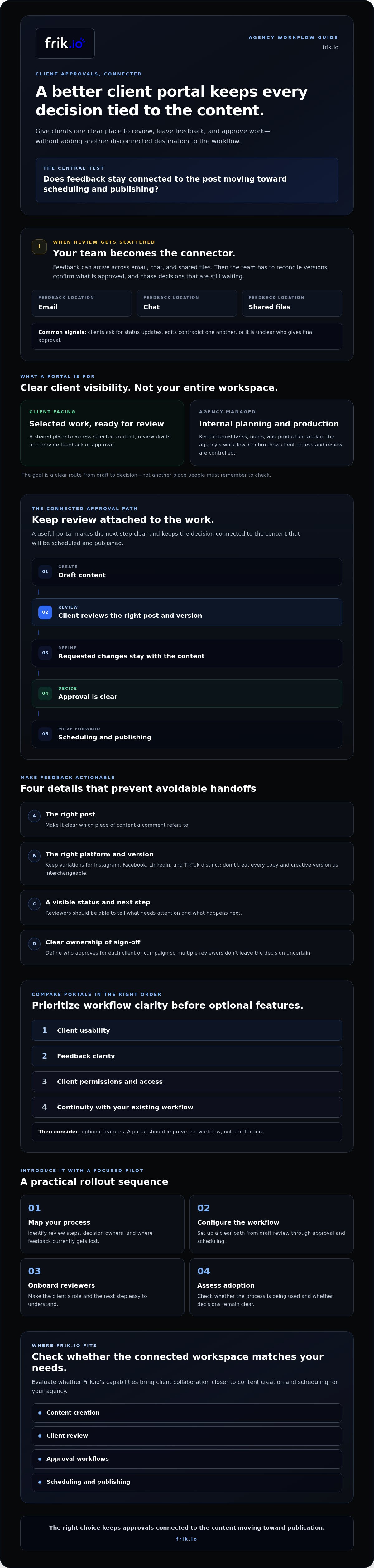
A useful portal keeps client review connected to the work that will eventually be scheduled and published. The workflow should move clearly from draft creation to client review, requested changes, approval, and scheduling. If feedback lives in an email thread or outdated document, your team has to reconcile it before acting. That creates another handoff rather than a smoother process.
Keep each review tied to the correct post, platform, and content version. A note to change a caption is hard to act on if the team can’t tell which draft it refers to. The same applies when a campaign has related posts for Instagram, Facebook, LinkedIn, and TikTok. Clients need to understand which copy and creative belong to each platform, rather than treating every variation as interchangeable.
For a wider view of how planning, creation, and publishing fit together, read this guide to the AI social media management platform. A connected workflow can reduce handoffs, but only if the portal makes each decision easy to locate and act on.
Which approval features reduce avoidable handoffs?
Assess whether reviewers can tell what needs attention and what happens next. Look for a clear review status, consolidated feedback, and an obvious next action. Define who owns sign-off for each client or campaign. Otherwise, comments from several reviewers can leave the team unsure whether the work is actually approved. Before selecting a portal, verify its review steps, status options, and client-facing experience. Don’t assume every product handles these controls the same way.
Test the process with a real draft. Can a client identify the post, leave actionable feedback, and understand whether more review is needed? Can your team distinguish requested changes from approval? The fewer decisions that depend on a separate message or manual tracker, the easier it is to keep content moving.
How should a portal support brand and platform consistency?
Clients should be able to review copy and creative in the context of the intended platform. A LinkedIn post may need a different treatment from an Instagram caption, even when both support the same campaign. Platform-tailored drafts help reviewers assess the actual content they’re being asked to approve. Confirm which networks and publishing capabilities a tool currently supports before building your process around them.
Style-guide-informed drafting can give a team a more consistent starting point, but it doesn’t replace human review or guarantee a perfect first draft. frik.io supports AI content generation in a brand’s voice, style-guide training, and platform-tailored posts. For more on shaping that input, see the AI brand voice content generator guide. Agencies evaluating a connected creation-to-publishing workflow can also review frik.io’s client review and content workflow, then verify that the current portal experience fits their approval process.
How to compare client portals for social media agencies
A feature list won’t tell you whether a portal will make approvals easier. Compare tools against the work clients and your team actually need to do. For a client portal for social media agencies, start with a simple test: can a client find the work waiting for review, understand how to respond, and complete that step without extra instructions?
Which client portal criteria matter most to an agency?
Use a consistent scorecard to separate core workflow needs from features that matter only in certain agency setups. Treat permissions and reporting as items to verify in the product, not capabilities to assume.
| Criterion | What to assess | Priority |
|---|---|---|
| Client usability | Can a reviewer quickly locate pending work and understand what action is expected? | Essential |
| Feedback clarity | Can clients provide specific feedback that stays associated with the relevant content? | Essential |
| Permissions | Can you confirm what clients can access, and whether access boundaries fit your workflow? | Essential to verify |
| Workflow continuity | Can approved content move into the team’s scheduling and publishing process without unnecessary manual handoffs? | Essential |
| Reporting | Does the tool provide the visibility your agency needs into review progress, or is a separate process sufficient? | Depends on need |
Start with the essentials: a usable review experience, clear feedback, appropriate access, and a dependable path from approval to scheduling. White-labeling, advanced reporting, or deeper customization may matter to some agencies, but shouldn’t outweigh basic workflow fit. Confirm the portal controls and client-facing steps before deciding.
How can agencies judge adoption and scalability?
Test the portal with a realistic task before committing. Share a draft with a reviewer, ask them to find it and respond, then check whether your team can interpret the feedback and identify what happens next. If the process requires extra explanation or duplicate tracking, the tool may add friction instead of removing it.
Consider how the same workflow would hold up across multiple clients, brands, and reviewers. Can your team repeat it without creating a separate manual system for every account? Compare options against those day-to-day requirements, not the longest feature list. A simpler portal that clients can use consistently may fit better than a more complex tool they avoid.
Assess how frik.io’s collaborative client review portal and approval workflows align with your agency’s needs. Review the platform as one option, and verify its current client access experience and workflow details before adopting it.
How to introduce a client portal without slowing client approvals
Roll out the portal as a change to an established habit, not as another task clients must figure out alone. Start with one willing client and a defined content approval workflow. Keep the pilot focused so you can spot confusing steps before using the process across other accounts.
What should an agency prepare before inviting clients?
Before the pilot, write down how work currently moves through review. Note the stages, decision owners, recurring bottlenecks, and client preferences that affect how feedback is given. Agree on where comments belong and who is responsible for final approval. Check the product’s current documentation to confirm access settings and what clients can see.
Use a four-step rollout:
- Map the process. Capture the current review stages, ownership, and pain points.
- Configure a pilot. Set up the chosen client’s workflow and test it with a small piece of active work.
- Onboard reviewers. Give clients concise instructions for accessing work and responding through the agreed process.
- Review adoption. Gather feedback from the client and account team, then refine the workflow before extending it.
Set expectations before the first review begins. Clarify which reviewer makes the final call, how the team will recognize approval, and what to do if feedback arrives through another channel. A short, shared agreement helps everyone follow the same process and keeps approval ownership clear.
How can teams measure whether the portal is working?
Compare approval completion and follow-up patterns before and after the pilot where records are available. Track practical signals such as response delays, repeated revision loops, incomplete approvals, and continued use of disconnected channels. The aim isn’t to produce a complicated report. It’s to identify where the workflow still stalls.
Ask clients and account managers whether the review process feels clear and convenient. If clients keep sending feedback elsewhere, find out which step is creating friction. You may need to simplify onboarding, clarify the agreed channel, or adjust the workflow. Use those observations to improve the pilot before rolling it out to more clients.
Once your requirements are clear, review frik.io’s client approval portal and verify its current access options and workflow steps against your rollout plan.
When Frik.io fits an agency's client approval workflow
Frik.io may suit agencies that want content creation, client review, approval, scheduling, and publishing connected in a broader workflow. Rather than treating a client portal as a standalone place to share files, teams can consider how review fits alongside the work being created and prepared for publishing. That makes it a relevant option for agencies looking for a client portal for social media agencies that supports collaboration across content operations.
What does Frik.io bring together for agency teams?
Frik.io is a social media management platform for creating, scheduling, and publishing content across multiple networks. Its capabilities include collaborative client review portals and approval workflows, alongside AI content drafting and platform-tailored posts. Teams can also train AI using a style guide to inform brand-voice drafting. These capabilities can support a connected process, from preparing content to collecting client input and moving approved work toward publishing.
Fit depends on your workflow. An agency that wants to keep client reviews closer to content creation and scheduling may find that approach useful. An agency seeking managed social media services or paid advertising management should note that Frik.io is software, not a provider of those services. Evaluate it for the platform capabilities that match your needs, not for work it doesn’t offer.
What should agencies verify before choosing Frik.io?
Confirm current product details before moving client work into any portal. In particular, check:
- Supported networks and publishing: Verify that the networks and publishing capabilities you rely on are currently supported.
- Client access: Review how clients access content and what visibility options are available. Confirm the details in current product documentation rather than assuming particular permissions or controls.
- Workflow settings: Check whether the review and approval steps align with your agency’s process and client expectations.
- Subscription details: Review current plans and confirm which features are included at each level before choosing.
Then compare those verified capabilities with your real requirements: who reviews each post, how feedback is handled, and what needs to happen after approval. A feature that sounds useful matters only if it fits a process your team and clients can follow. Test the review experience with a representative workflow where possible, and note any steps that still require manual tracking.
If the platform’s current capabilities match your agency’s needs, review Frik.io and assess how its client review and content workflow fit your publishing process.
Build a review workflow that can grow with your agency
The right client portal for social media agencies is one clients can use easily and your team can sustain as collaboration scales. Prioritize clear feedback, defined approval ownership, and a direct path from review to publishing. A thoughtful pilot can show whether the workflow reduces coordination or simply shifts it somewhere else.
Frik.io brings collaborative client review portals and approval workflows together with content creation, scheduling, and publishing. Its AI content drafting can also be informed by a user’s style guide, giving teams another way to support brand-aware content creation. Check current portal access, supported networks, and plan features against your agency’s specific requirements before deciding.
Explore Frik.io and see how client approvals fit into your content workflow. Choose a process that gives clients clarity and gives your team room to grow. A connected workflow can make each next step easier to manage.
Frequently Asked Questions
What features should a social media agency client portal include?
A useful portal should make it easy to locate work awaiting review and provide clear, actionable feedback. Look for comments associated with the relevant content, a way to distinguish review from approval, and a workflow that fits your agency’s handoff to scheduling. Also check what clients can access and whether the interface feels straightforward to your reviewers. Confirm specific permissions and review controls in the product documentation.
Can clients approve social media posts through a client portal?
Yes, clients can approve posts through a portal when the software includes a client review and approval workflow. Agree in advance on who gives final sign-off and what action counts as approval, especially if several people can comment. Frik.io provides collaborative client review portals and approval workflows. Before adopting any platform, confirm how its current client-facing steps work and whether they match your approval process.
How does a client portal improve social media approvals?
A portal can make approvals easier to track by giving reviewers a shared destination for selected content and feedback. This can reduce the need to reconcile comments scattered across email, chat, and files. The improvement depends on workflow fit: clients need to know where to respond, and the team needs to understand which feedback applies to which post. A portal won’t resolve unclear approval ownership unless the agency defines it.
Is a client portal better than email for social media approvals?
A client portal can work better than email when scattered replies, attachments, or unclear versions make reviews difficult to manage. Email may still be useful for notifications or clients with simple approval needs. Choose based on whether your current process keeps feedback tied to the correct content and makes decisions easy to find. If email already works reliably for your team and clients, dedicated portal software may not be necessary.
How do agencies get clients to use an approval portal?
Start with one willing client and a clearly defined review task, such as approving a batch of draft posts. Show reviewers where to find the content, how to leave feedback, and who has final approval. Keep the instructions brief and make the portal the agreed destination for content decisions. If clients continue sending edits through disconnected channels, ask what feels unclear and adjust the process or onboarding.
Can a client portal connect approvals with social media scheduling?
Yes, some platforms bring client review and approval into a wider content workflow that includes scheduling and publishing. Check whether approved content can move into your team’s scheduling process or whether that transition still requires manual steps. Frik.io supports client review and approval workflows alongside content creation, scheduling, and publishing from its platform. Verify current network support and publishing capabilities before relying on a specific workflow.


