

Adding another approval tool won’t fix a process nobody owns. A social media content approval workflow breaks down when feedback is scattered across email, chat, documents, and platform comments, and no one knows who has the final say. The result is familiar: duplicate edits, slow sign-offs, and posts that miss their publishing window.
If approvals feel like a bottleneck, the answer isn’t more admin or less oversight. It’s a clear process that gives each post an owner, keeps feedback specific, and makes the next decision obvious. Set that structure first, then choose tools that support it.
This guide explains how to assign responsibilities, set approval checkpoints, consolidate feedback, and move approved content into scheduling with a final review. You’ll also learn how a shared client review portal can give stakeholders visibility without opening every internal tool, and how AI-assisted drafts can support your brand voice while people remain responsible for the final check.
Key Takeaways
- Build your social media content approval workflow around clear owners, required inputs, decisions, and next steps for every post.
- Use a defined sequence from brief and drafting through review, sign-off, and scheduling to reduce unclear handoffs.
- Compare email, spreadsheets, client portals, and social management platforms based on feedback visibility and publishing continuity.
- Pilot the process before expanding it. Track turnaround time, revision rounds, missed deadlines, and posts returned after approval.
- Choose tools based on documented workflow needs, including client access, brand consistency, review visibility, and scheduling.
What a social media content approval workflow should control
A social media content approval workflow is the repeatable path each post follows from brief to approved, scheduled content. It defines who prepares the post, who reviews it, what they check, and who gives final sign-off. Keep the responsibilities distinct: editing improves the content, approval confirms it meets agreed requirements, and publishing makes it live.
Use the workflow to protect four things: factual accuracy, brand fit, platform suitability, and stakeholder alignment. These checks support a broader social media marketing strategy by helping each post serve its intended audience and purpose. Without a defined process, feedback can conflict or arrive on an outdated draft. Reviewers may not know which version is current, whether a post is approved, or who still needs to respond. Those gaps create avoidable rework and delays.
Which teams need a structured social media approval process?
Agencies coordinating multiple client accounts need clear reviewer lists and decision rights for each account. Otherwise, a client preference can be mistaken for an internal quality check, or two reviewers can make competing edits. In-house teams also benefit when legal, communications, product, or leadership stakeholders review different risks. Specify which roles must approve and which can offer optional input.
Solo social media managers can use the same structure. A client review portal, for example, can give clients a clear place to see and comment on content without requiring access to every internal tool. Team size isn’t the deciding factor. What matters is making review access and final responsibility explicit.
What should approval cover before a post goes live?
Set review criteria before work begins so feedback stays focused. A practical check should confirm:
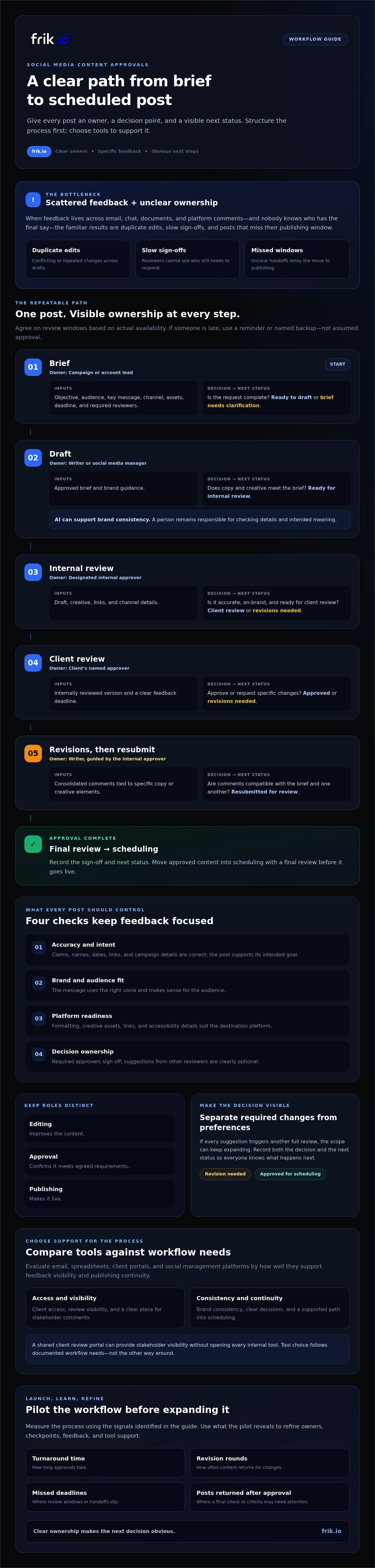
- Accuracy and intent: Claims, names, dates, links, and campaign details are correct, and the post supports its intended goal.
- Brand and audience fit: The message uses the right voice and makes sense for the audience.
- Platform readiness: Formatting, creative assets, links, and accessibility details suit the destination platform.
- Decision ownership: Required approvers have signed off, and suggestions from other reviewers are clearly optional.
Separate required changes from preferences. If every suggestion triggers another full review, the scope can keep expanding. Record both the decision and the next status, such as “revision needed” or “approved for scheduling,” so everyone knows what happens next.
How to build a social media content approval workflow step by step
Map the handoffs before choosing a tool. A useful social media content approval workflow gives every post an owner, a decision point, and a visible next status. Agree on review windows with your team and clients based on their actual availability, then decide what happens if a response is late. A missed window might trigger a reminder or an escalation to a named backup, not assumed approval.
- Brief. Owner: campaign or account lead. Input: objective, audience, key message, channel, assets, deadline, and required reviewers. Decision: is the request complete and ready for drafting? Next status: ready to draft, or brief needs clarification.
- Draft. Owner: writer or social media manager. Input: approved brief and brand guidance. Decision: does the copy and creative meet the brief? Next status: ready for internal review. AI drafting can support brand consistency, but a person should check the details and intended meaning.
- Internal review. Owner: designated internal approver. Input: draft, creative, links, and channel details. Decision: is it accurate, on-brand, and ready for client review? Next status: client review or revisions needed. For example, the U.S. Department of Health & Human Services publishes federal social media policies that include guidance on accessibility, copyright, and record-keeping.
- Client review. Owner: the client’s named approver. Input: the internally reviewed version and a clear feedback deadline. Decision: approve or request specific changes? Next status: approved or revisions needed.
- Revisions. Owner: writer, guided by the internal approver. Input: consolidated comments tied to specific copy or creative elements. Decision: are the comments compatible with the brief and with one another? Next status: resubmitted for review. If feedback conflicts, the accountable approver resolves it rather than asking the writer to guess.
- Sign-off. Owner: the assigned final approver. Input: revised, complete post. Decision: does it meet every required check? Next status: approved for scheduling. Renew approval if a later edit materially changes a claim, creative asset, or intended meaning.
- Scheduling. Owner: publishing lead. Input: approved content, final assets, and publishing details. Decision: does the scheduled version match the signed-off version? Next status: scheduled.
Assign decision rights and contain revisions
Name one accountable approver for each account or content category. Mark other reviewers as advisers unless they have explicit sign-off authority. Agree on response windows and escalation routes before a campaign begins. Explicit ownership prevents approval bottlenecks by making the next decision and its decision-maker clear. Ask reviewers to consolidate comments in one place, distinguish required changes from preferences, and tie each revision to the brief. A shared workspace such as frik.io’s social media management platform can bring drafting, client review, scheduling, and publishing into a common workflow.
Compare approval workflow methods: email, spreadsheets, portals, and platforms
The best social media content approval workflow isn’t the one with the most features. It’s the one that keeps the right people informed, makes the current version easy to identify, and supports a clear handoff after approval. Compare methods against your actual review path, client access needs, publishing process, and security requirements.
| Method | Visibility and version control | Client access and status | Handoffs and publishing continuity |
|---|---|---|---|
| Feedback sits in threads. Attachments and replies can make the latest version unclear. | It’s easy to include external reviewers, but status often has to be inferred from replies. | Someone must transfer approved details to the scheduling process. | |
| Shared spreadsheet | Rows and links provide a shared overview, but drafts may live elsewhere and updates depend on contributors. | Access is straightforward when sharing is configured, while status is usually updated manually. | Useful for tracking handoffs, but scheduling typically remains a separate step. |
| Client portal | Can bring review materials and comments into a client-facing space. Version handling varies by portal. | Designed to give clients a dedicated review route, with status features depending on the tool. | May clarify approval, but check whether content must be recreated elsewhere for scheduling. |
| Social management platform | Can keep content and review activity together in a shared workspace. Confirm how versions are handled. | May offer client review access and visible approval status. Check permissions and reviewer controls. | Can connect review with scheduling and publishing, depending on the platform’s capabilities. |
When are email and spreadsheets still sufficient?
These lightweight methods can work when publishing volume is low, the reviewer group is small, and each post follows a simple approval path. They require little process change. But duplicate drafts, buried decisions, and manually updated statuses become harder to manage as accounts, reviewers, and channels multiply. Set a review point: if staff regularly chase feedback or reconcile versions, test a shared system before those workarounds become routine.
What should a client approval portal or platform provide?
Prioritize clear post previews, consolidated feedback, appropriate reviewer access, and an unmistakable approval status. Then test the handoff: can approved content move into scheduling without someone rebuilding the draft? Verify supported channels, role controls, and data practices against your organization’s requirements. Don’t choose on feature count alone. A focused portal may suit client review, while a broader platform may fit teams that need review and publishing in one workflow.
How to launch the workflow and measure approval performance
Test the process with one team, client account, or campaign before rolling it out everywhere. Choose work that reflects your usual review steps, then record a baseline: how long approvals take, how many revision rounds posts need, how often deadlines are missed, and how many posts return for changes after sign-off. Review the results with the people involved and clarify any handoffs that caused confusion before expanding the workflow.
Create a lightweight checklist and status system
Keep each content record complete enough that nobody has to search elsewhere for the next step. Use consistent statuses such as draft, internal review, client review, changes requested, and approved. Include an owner, due date, channel, campaign, and final asset. Document an exception route for urgent or sensitive posts, including who can authorize a change to the normal review path and whether specialist review is needed.
Track performance to find friction, not to rush people. If approval turnaround improves but posts are increasingly returned after sign-off, the process may be moving too quickly or final checks may be unclear. Interpret measures together: multiple revision rounds can point to vague briefs, while missed deadlines may signal unrealistic review windows or missing ownership. Connect workflow trends to broader results in your social media analytics guide, but keep approval efficiency distinct from content performance.
Use AI without removing human accountability
Treat AI-generated copy as a draft, not an approval. A style guide can help shape tone and consistency; the AI brand voice guide offers a starting point for setting that guidance. A human reviewer still needs to verify facts, brand fit, and campaign intent. After adapting copy for a specific platform, check the wording, links, and creative against that platform’s requirements and the approved brief.
Once the pilot shows where work stalls, refine the checklist, ownership, and review windows, then expand in manageable stages. A shared workspace can help teams keep drafts, client feedback, and scheduling connected without replacing human judgment. Explore frik.io’s social media workflow platform as one option for bringing those steps together.
Scale approvals with a shared workflow platform like frik.io
Choose a platform after documenting what your process needs to support. That keeps the decision grounded in real workflow gaps, not an impressive feature list. For a social media content approval workflow, priorities may include giving clients a clear review route, applying brand guidance consistently, seeing each post’s status, and moving approved content into scheduling without recreating it.
frik.io is an AI-powered social media management platform for creating, reviewing, scheduling, and publishing social content. Its features include AI-assisted drafting, style-guide training, platform-specific content adaptation, and client approval portals. These capabilities can support a connected process: prepare a draft with brand guidance, share it for review, then schedule and publish approved content from a shared workspace. For a broader framework for assessing platform capabilities, see this AI social media management platform guide.
Match frik.io capabilities to approval workflow needs
A client review portal can give external reviewers a dedicated place to see content and share feedback, while the team keeps internal work in its own workspace. Style-guide training can help AI drafting stay closer to a brand’s preferred voice, but it doesn’t make the draft self-approving. People remain responsible for checking facts, brand fit, and final sign-off. Before choosing any platform, confirm that its reviewer roles, supported networks, permissions, and current plan details match your requirements.
Check the handoff in practice, too. Does the approved version remain clear as it moves toward scheduling? Can reviewers access what they need without exposing internal tools or information? Evaluate these details against your documented needs and data practices rather than assuming every platform handles them the same way.
Move from process design to a practical next step
Start by naming one approval bottleneck, such as feedback arriving in separate places or uncertainty about who has final authority. Then test the process with one account and a real piece of content, using agreed reviewer roles. Note where the platform helps and where your team still needs clearer ownership or guidance. A tool should support the process you’ve designed, not obscure it.
If you’re comparing software, assess how frik.io’s drafting, client review, scheduling, and publishing capabilities fit your team’s approval process. Use a focused pilot to evaluate the workflow without assuming the tool replaces human judgment.
Put a clearer approval process into motion
A scalable social media content approval workflow depends on more than moving drafts from one person to the next. Give every post a clear owner, define what approval means, and make the next step visible. Then pilot the process and use review metrics to spot friction without letting speed replace careful judgment.
The right platform should support the process your team has designed. frik.io brings content drafting, platform adaptation, client review, scheduling, and publishing into a shared workflow. AI can use your style guide to support brand consistency, while people stay responsible for accuracy and final approval. Client approval portals give reviewers a dedicated way to collaborate.
Ready to put those ideas into practice? Explore frik.io’s social media workflow platform and assess how it fits your team’s review needs. Start with one account, learn from the pilot, and build a process your team and clients can trust as you grow.
Frequently Asked Questions
What is a social media content approval workflow?
A social media content approval workflow is the agreed sequence a post follows from brief and draft through review, sign-off, and scheduling or publishing. It identifies who owns each step, what reviewers check, and what status comes next. Editing improves the post; approval confirms it meets requirements; publishing makes it live. A defined workflow helps teams keep feedback, decisions, and responsibility clear.
How do you create a social media content approval workflow?
Start by mapping the steps each post needs, then assign an owner and decision-maker at every stage. Specify the required brief details, review criteria, feedback location, response windows, and next status. For example, use statuses such as “internal review,” “client review,” and “approved.” Pilot the process with one account or campaign, then refine it based on revision rounds, delays, and missed deadlines before expanding it.
Who should approve social media content before it is published?
The people with final approval authority should match the post’s purpose and risk. A social media lead may approve routine brand content, while legal, communications, product, or leadership reviewers may need to sign off on specific claims or sensitive topics. Clients should approve content when that is part of the agreed process. Name one accountable final approver, and distinguish required sign-off from optional advice.
How long should social media content approval take?
There’s no universal approval time that suits every post or team. Set response windows with reviewers before work begins, considering content complexity, stakeholder availability, and the publishing deadline. A routine post may need a simpler path than a sensitive campaign with specialist review. Track actual turnaround during a pilot, then adjust deadlines and escalation steps. Don’t shorten review so much that people skip accuracy or brand checks.
Can social media content approvals be automated?
Some workflow tools can reduce manual coordination through features such as status tracking, review routing, or reminders, but capabilities differ by platform. Check what a tool actually supports before relying on automation. AI can help draft or adapt content, yet it can’t take responsibility for factual accuracy, brand fit, or final approval. Keep a named person accountable for sign-off, especially when content changes materially during review.
What is the best tool for social media content approvals?
The best tool is the one that fits your review process, client access needs, security requirements, and publishing setup. Look for clear post previews, consolidated feedback, appropriate reviewer controls, visible status, and a practical handoff to scheduling. frik.io is an AI-powered social media management platform with client review portals, brand-style-guided drafting, platform adaptation, scheduling, and publishing. Verify current plan details and supported networks against your needs.
How can agencies get client approval without endless revisions?
Agree on the brief, approval criteria, decision-maker, and feedback deadline before sending content for review. Ask clients to consolidate comments in one place and tie each request to specific copy or creative. Separate required corrections from optional preferences, and have a named lead resolve conflicting feedback. Set a rule for renewed approval if an edit changes a claim or meaning. A client review portal can help keep feedback organized.


