

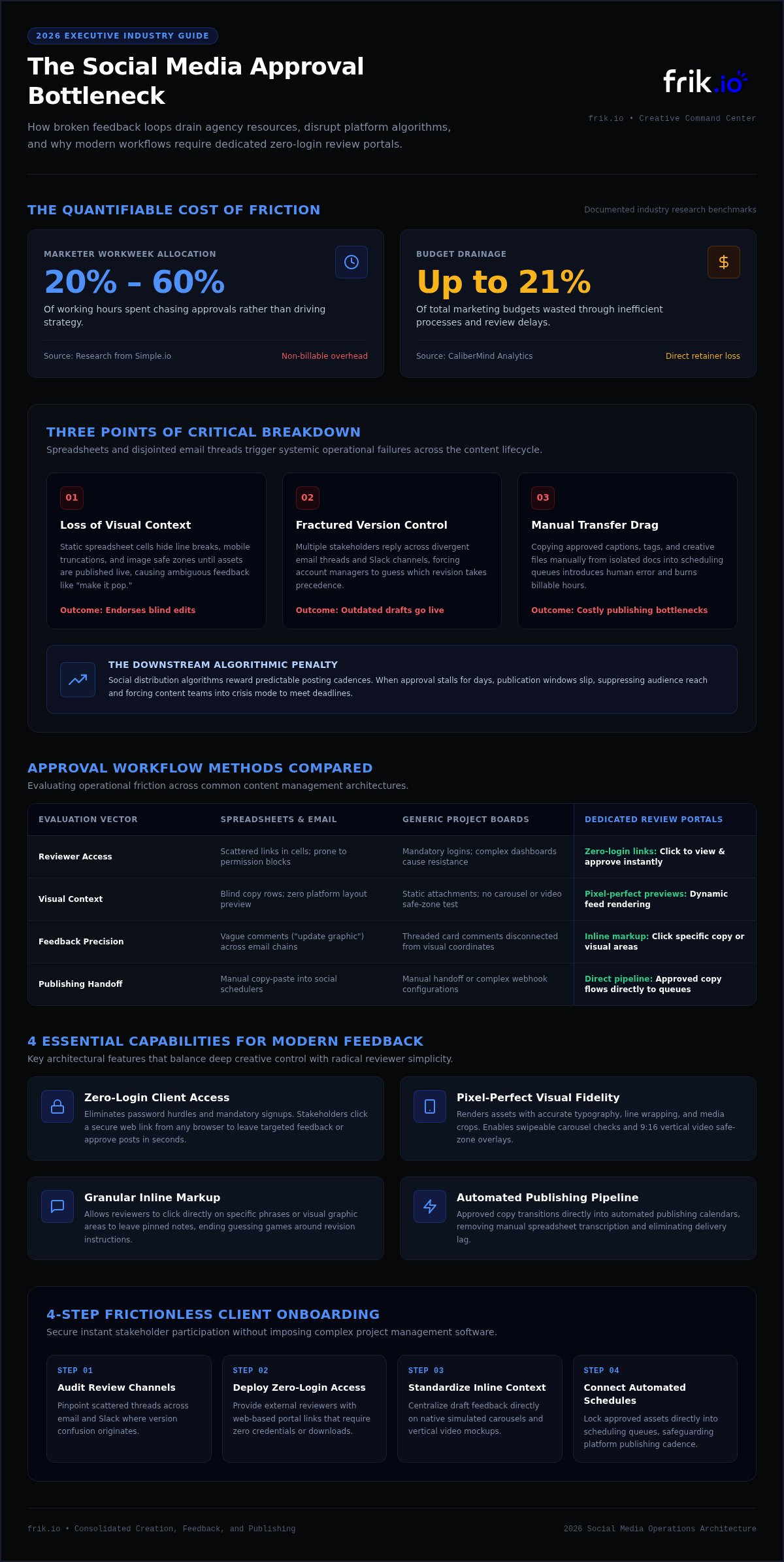
Marketers spend anywhere from 20% to 60% of their working hours chasing approvals rather than driving strategy, according to research from Simple.io. The answer isn't forcing stakeholders into bloated project management systems they will actively avoid. Selecting the right client feedback tool for social media content means prioritizing effortless simplicity for reviewers while keeping internal operations fast and reliable.
You know the drag of chasing comments across messy Slack threads, buried emails, and mismatched spreadsheets. When clients review outdated drafts or leave notes on live posts, scheduled campaigns stall out and momentum disappears. This 2026 buyer's guide shows you how to eliminate approval bottlenecks, remove review friction, and choose a platform that turns scattered feedback into clean, on-time execution.
We'll break down the key capabilities that actually move the needle, from frictionless zero-login approval portals to workspaces that link approved copy directly with automated publishing schedules.
Key Takeaways
- Escape the spreadsheet trap by identifying how fragmented review channels trigger version confusion and derail publishing schedules.
- Discover why choosing a dedicated client feedback tool for social media content with zero-login access dramatically boosts client adoption.
- Compare spreadsheets, generic project management boards, and dedicated portals to see which model actually cuts administrative drag.
- Execute a four-step onboarding rollout that secures instant client participation without forcing teams into complex software setups.
- Unify review workflows by connecting approved posts directly to automated scheduling and brand-aligned content generation.
The Hidden Cost of Broken Social Media Feedback Loops
A true client feedback tool for social media content is not a generic survey form or a website widget designed to measure customer satisfaction. In 2026, it serves as a dedicated creative command center. It bridges the gap between creative teams and external stakeholders, providing a single visual workspace where draft posts are reviewed, marked up, and approved in the exact layout they will inhabit online. Without this infrastructure, creative agencies leak billable hours and operational velocity.
Most agencies begin by relying on spreadsheets to coordinate content calendars. This choice quickly becomes an operational trap. When draft copy sits inside isolated cells alongside disconnected cloud storage links, visual context collapses. Ambiguous feedback like "make it pop" or "use the other graphic" triggers endless back-and-forth because neither side is looking at the same reference point. Research from organizations like CaliberMind shows that inefficient processes and wasted spending drain up to 21% of marketing budgets. Structured review portals stop this drain, acting as direct revenue protection by cutting administrative waste and safeguarding agency retainers.
Why Spreadsheets and Email Threads Fail Creative Teams
Static spreadsheet cells cannot replicate dynamic social network mechanics. Within modern social media marketing, visual presentation dictates performance, and traditional tracking methods break down across several operational friction points:
- Loss of visual context: Text blocks in shared sheets hide line breaks, character truncations, and image crops until the asset is already live.
- Fractured version control: When three stakeholders reply across divergent email threads, account managers end up guessing which edit takes precedence.
- Manual transfer drag: Copying approved captions, tags, and creative files from documents into scheduling queues introduces human error and consumes non-billable agency time.
The True Agency Cost of Delayed Content Approvals
Approval delays don't just create inconvenience; they disrupt platform reach. Social media distribution algorithms reward predictable posting cadences. When client feedback stalls for days, planned publication windows slip, suppressing audience reach and weakening overall campaign momentum.
The downstream effects hit internal operations hard. Content teams must constantly pivot into crisis mode, rushing emergency posts through ad-hoc approvals to meet deadlines. This friction leads straight to account manager burnout and erodes client confidence. Adopting an intuitive client feedback tool for social media content restores predictability, transforming chaotic sign-offs into a dependable, repeatable workflow that protects team morale and client retention.
Essential Features to Look For in a Social Media Feedback Tool
Agency software often fails because it prioritizes internal tracking over external usability. When shopping for a client feedback tool for social media content, your selection criteria must balance deep creative controls with radical client simplicity. If the platform creates friction for reviewers, adoption collapses immediately. To safeguard delivery schedules, prioritize solutions built around visual fidelity, zero-friction access, and direct automation.
Pixel-Perfect Previews and Visual Context
Clients shouldn't have to imagine how a finished post appears on a mobile feed. An effective review interface renders assets with platform-accurate typography, line wrapping, and media crops. When clients can swipe through multi-image carousels just like live Instagram users or check safe-zone overlays on 9:16 vertical videos, visual surprises disappear before publication.
Frictionless Client Portals vs. Mandatory Logins
Nothing stalls momentum faster than an account creation prompt. Forcing busy executives to configure passwords and download software leads directly to ignored review requests. Leading platforms solve this by offering secure, web-based workspaces where stakeholders click a shared link to review and comment in seconds. For agencies looking to simplify this dynamic, evaluating dedicated platforms like frik.io ensures clients get frictionless review portals without cumbersome onboarding hurdles.
Essential access capabilities should include:
- No-login review links: Grant clients immediate access to approve or comment directly from any browser.
- Granular inline feedback: Enable stakeholders to click specific copy elements or visual areas to leave targeted notes.
- Internal vs. external visibility: Keep internal team discussions private while presenting a clean interface to clients.
Automated Audit Trails and Version History
Disputes over who approved which draft drain agency goodwill. Modern feedback systems maintain an indisputable, timestamped record of every edit and sign-off. Side-by-side comparison tools highlight exact caption revisions and asset swaps across draft cycles, keeping historical context clear. Once final sign-off is logged, single-click approval status updates change across the system instantly, moving approved assets directly into your publishing queue without manual intervention.
Comparing Approval Methods: Spreadsheets vs. General Tools vs. Dedicated Portals
Agencies often cobble together disparate systems before realizing their review process has become an operational bottleneck. Selecting the right client feedback tool for social media content requires weighing setup velocity against client usability and revision accuracy.
| Approval Method | Setup Speed | Client Adoption | Risk of Version Errors |
|---|---|---|---|
| Shared Spreadsheets | Immediate | Moderate | High |
| Generic PM Boards | Slow | Low | Moderate |
| PDF Annotation Tools | Moderate | Moderate | High |
| Dedicated Portals | Immediate | High | Very Low |
Evaluating the Four Primary Content Approval Methods
Spreadsheets offer an easy starting point, but they provide zero visual context. Static PDF annotation software falls apart just as quickly when clients need to preview animated reels, multi-slide carousels, or platform-specific character counters.
Generic project management boards introduce a different problem: administrative bloat. Platforms built for software sprints overwhelm external reviewers with confusing columns, nested sub-tasks, and unnecessary account settings. Clients get lost, stop logging in, and retreat straight back to sending messy email feedback. Dedicated client portals eliminate this friction by stripping away the project management clutter, isolating each post into a distraction-free review canvas.
Security and Account Access: Protecting Client Brand Channels
Reviewing drafts natively inside social apps creates significant operational liabilities. Sharing administrative passwords with junior staff or multiple external reviewers invites accidental live postings, unauthorized account tweaks, and broken permissions.
Centralized portals eliminate these security risks by completely walling off draft previews from live social accounts. Clients interact with dynamic post simulations, leave targeted notes, and grant approvals without ever needing direct channel access. When evaluating an ai social media management platform, prioritize systems that secure your brand channels while keeping the feedback loop fast and transparent.
How to Implement a Client Feedback Tool Without Client Resistance
Client pushback rarely stems from stubbornness; it comes from cognitive friction. When introducing a client feedback tool for social media content, never frame the rollout as internal process management. Frame it as an executive time-saving upgrade. Position the dedicated portal as a streamlined service enhancement designed to protect their schedule and cut review time down to mere minutes per week.
Adoption rates hinge entirely on the initial onboarding experience. Rolling out a new workspace requires clear operational boundaries before sharing external review links.
The 4-Step Agency Rollout Framework
Securing 100% client adoption requires a systematic transition from legacy channels to your centralized workspace:
- Step 1: Standardize internal staging: Lock down internal copy, design assets, and scheduling tags before generating any client-facing previews.
- Step 2: Provision zero-friction access: Generate direct, secure review links that let stakeholders open draft queues immediately on desktop or mobile.
- Step 3: Conduct a sixty-second walkthrough: Show clients how to leave pinpoint inline notes and register one-click approvals without navigating complex dashboard settings.
- Step 4: Formalize turnaround SLA windows: Establish precise 48-hour review expectations to preserve publishing buffers and avoid rushed distribution schedules.
Aligning Review Cadences with Content Strategy
Weekly ad-hoc review requests cause stakeholder burnout and delayed feedback. Transition clients toward predictable monthly or bi-weekly batching rhythms instead. When presenting batched creative, tie every draft directly back to core strategy by referencing your documented framework for what is a content pillar. This keeps executive attention focused on high-level thematic resonance rather than micro-managing trivial copy choices.
Close the operational loop using quarterly performance reviews. Demonstrate how prompt sign-offs correlate with higher algorithmic reach and zero missed publication dates. If you are ready to modernize your agency review workflows and eliminate client pushback, start your transition with frik.io today.
Consolidating Creation, Feedback, and Publishing with frik.io
Running an agency across disconnected point solutions quietly bleeds profit margins. Paying for separate copy generators, design markup apps, client review boards, and scheduling platforms fragments your workflow. Juggling multiple subscriptions doesn't just inflate software costs; it forces team members into tedious manual copy-pasting that invites expensive version mistakes. A truly effective client feedback tool for social media content shouldn't exist in an isolated silo. frik.io replaces software fragmentation by uniting creative generation, client approvals, and direct distribution into a single, high-velocity workspace.
From Brand-True AI Drafting to Flawless Client Approval
Scaling creative output often stalls when generic AI generators produce robotic copy that clients immediately reject. frik.io eliminates this bottleneck with Brand-True AI Content Generation. By establishing specific client style parameters through an AI brand voice tool, your team drafts tailored captions and visual concepts that honor brand identity across every network.
Once drafts are staged internally, pushing them into review takes a single click. Instead of exporting PDFs or pasting copy into spreadsheets, your team shares a dedicated Client Approval Portal. Clients see platform-accurate previews, leave targeted inline notes, and sign off on posts without navigating complex login screens.
Autopilot Scheduling: Zero-Touch Publishing Upon Final Sign-Off
Manual scheduling after client sign-off is where publishing errors happen. Assets get lost, wrong versions go live, or scheduled slots are missed entirely. frik.io closes this operational gap through Autopilot Scheduling. The second a stakeholder registers final approval within the portal, the post flows straight into your pre-set publishing calendar.
This automated pipeline eliminates weekend posting panics and out-of-sequence releases. Your creative team drafts, your clients review with absolute clarity, and your campaigns deploy on time every single week. Discover how high-performing teams replace chaotic approval loops with a unified workspace at frik.io.
Transform Your Social Review Process into an Operational Engine
Chasing sign-offs through disconnected sheets and disorganized chat threads drains agency capacity and stalls publishing momentum. Creative teams don't need heavier project management platforms that clients actively avoid. They need focused clarity. Investing in a dedicated client feedback tool for social media content replaces spreadsheet confusion with pixel-perfect previews, zero-login review access, and rock-solid version tracking.
Unifying your creative pipeline pays immediate operational dividends. Pairing Brand-True AI Content Generation with an intuitive Client Approval Portal lets your team draft authentic copy, capture precise inline feedback, and transition signed-off assets directly into Autopilot Scheduling without re-uploading a single file. You eliminate administrative drag, protect client trust, and keep scheduled campaigns running like clockwork. Stop letting approval bottlenecks dictate your growth. Streamline your client approvals with frik.io and turn daily review chaos into a dependable, repeatable engine.
Frequently Asked Questions
What is a client feedback tool for social media content?
A client feedback tool for social media content is a specialized visual workspace where creative teams and external stakeholders review, edit, and approve scheduled posts. Unlike generic communication apps or website survey forms, these platforms render platform-accurate previews for networks like Instagram, LinkedIn, and TikTok. Reviewers leave pinpoint inline notes on visual assets and captions, creating an organized audit trail that accelerates creative approvals.
Why shouldn't marketing agencies use Google Sheets to manage client post approvals?
Google Sheets strips away visual context, forcing reviewers to evaluate social creative inside static text cells and clunky external drive links. Stakeholders cannot see how line breaks, aspect ratios, or video crops render across live mobile feeds. In addition, spreadsheets encourage messy version drift when multiple reviewers edit disparate rows, causing account managers to lose billable hours manually copying approved copy into social schedulers.
Do external clients need to create an account or pay to leave feedback?
No, modern platforms do not force external stakeholders to pay fees or configure software logins. Advanced platforms use secure, tokenized review links that allow clients to view mockups and submit feedback directly from any browser. Removing account creation hurdles eliminates client onboarding resistance, ensuring high participation rates while allowing agencies to manage access permissions safely from their internal workspace.
Can client feedback tools handle video reels, carousels, and multi-image posts?
Yes, dedicated platforms render dynamic multi-network assets exactly as they appear in native mobile apps. Clients can swipe through multi-image carousels, watch full-length video reels, and inspect safe-zone overlays to verify that captions or logos aren't covered by platform interface buttons. This realistic visual presentation eliminates guesswork and prevents unexpected formatting errors before assets go live.
What happens immediately after a client clicks approve on a scheduled post?
Once a stakeholder logs final approval in a unified client feedback tool for social media content, the status updates across the workspace automatically. In connected platforms featuring Autopilot Scheduling, the approved post moves directly into the publishing queue without manual handling. The system locks the copy and media to prevent accidental revisions, scheduling it for deployment during its designated optimal time slot.
How do social media feedback tools prevent accidental posting of unapproved drafts?
Dedicated approval platforms create strict operational firewalls between drafting environments and live social networks. Draft posts remain locked in a protected staging environment until designated client stakeholders submit explicit sign-offs. Automated publishing pipelines only execute for assets marked as fully approved, preventing unfinished creative, placeholder graphics, or rough copy from accidentally deploying to public brand feeds.
Can internal agency team members leave private comments hidden from external clients?
Yes, professional tools feature role-based visibility settings that separate internal agency collaboration from external client feedback. Creative teams can tag colleagues, debate design revisions, and refine rough copy privately behind an internal staging layer. External stakeholders only see finalized post previews and client-facing discussion threads, preserving agency professionalism while keeping messy internal problem-solving invisible to clients.


