

Can AI turn a blog post URL into captions you can publish with confidence? Some tools use a URL as their starting point, but a link alone doesn’t ensure the captions capture the article’s main point or fit your brand.
An AI that writes captions from blog post URL should save you time finding useful takeaways and adapting them for each social network, not leave you fixing generic copy. A reliable workflow starts with the article’s meaning, then reshapes the message for each platform and audience.
This guide walks through turning one article into accurate caption drafts, comparing tools, and choosing between URL input, pasted text, or a written prompt. You’ll also see where brand-voice guidance, human review, client approvals, and scheduling fit. The aim is a practical process that keeps content on message from first draft to publishing.
Key Takeaways
- Separate understanding the article’s key message from writing captions, then tailor each draft to its platform and audience.
- An AI that writes captions from blog post URL may accept links, pasted text, or both, so compare supported inputs before building your workflow around it.
- Use a concise caption brief to guide the AI, and review each draft for unsupported claims, accuracy, and brand voice.
- Compare tools across source grounding, brand-voice guidance, platform tailoring, collaboration, and publishing workflow.
- Combine approved brand guidance, human review, and scheduling to create a more consistent social content process.
What Does an AI Tool That Writes Captions from a Blog Post URL Do?
An AI tool that writes captions from a blog post URL turns an existing article into draft social posts. Rather than starting with a blank prompt, it uses the article as source material, identifies ideas that may interest readers, and produces caption options. The goal isn’t to squeeze every paragraph into a post. It’s to carry the article’s meaning into a format that suits social media.
The work has three parts: understanding the source, writing a caption, and adapting it for its destination. Natural language processing, or Natural Language Processing (NLP), helps computers work with human language. The result still depends on what information the tool can access and how clearly it follows instructions. Platform editing is a separate step: a message may need a different opening, length, or call to action for each audience.
What information should a blog post contribute to a caption?
Start with the article’s central takeaway. Then identify the intended reader and the supporting points that make the takeaway useful. A guide to preparing for a product launch, for example, could become a caption about one planning lesson rather than an attempt to summarize the whole guide.
Keep the draft grounded in the source. Names, figures, benefits, and claims should come from the article, not assumptions. Choose a link destination that supports the caption, usually the article itself when the post promotes its advice. Then select an action that fits the reader’s next step, such as reading the guide or considering one of its recommendations.
What makes URL-based caption writing different from a blank prompt?
A blank prompt asks AI to create from the details you provide. URL-based drafting starts with an existing article, which can provide more source material and reduce the need to summarize everything manually. The tool must be able to process the link and access the page content for the URL to work as source input.
If the tool doesn’t read the URL, provide the relevant article text or a concise summary with supporting details. Those methods can still produce source-based drafts, but the AI relies on what you supply rather than the link. Specify the audience, desired action, and points to avoid. A focused brief gives the tool more direction than a broad request to “write a caption.”
Whichever input you use, treat captions as drafts, not verified summaries. Compare each one with the article: does it preserve the main point, represent supporting details accurately, and avoid claims the source doesn’t make? Check the tone and the fit for the intended platform. A quick human review protects context and gives the team a clear approval step before publishing.
How to Turn a Blog Post into Social Captions with AI
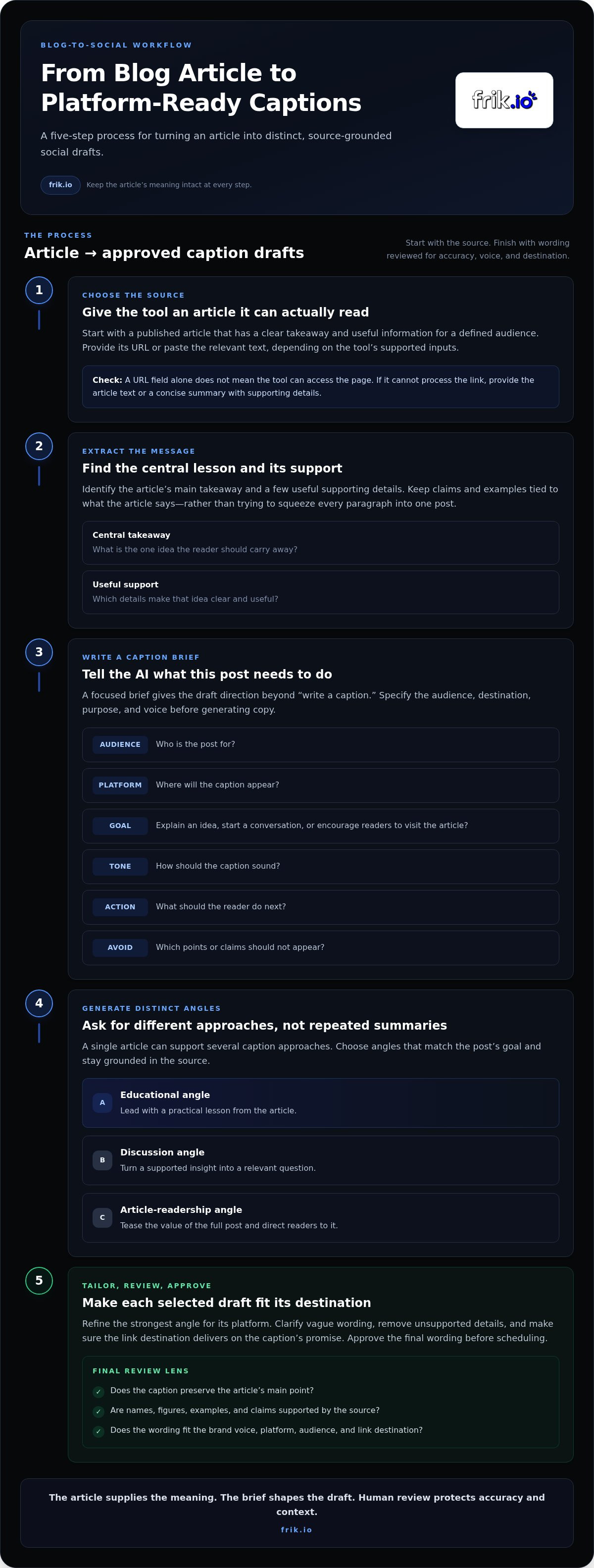
A reliable blog-to-social workflow involves more than entering a link in a generator. Give the AI the right source, clarify the message and audience, and leave time for editorial review. These steps take you from article to platform-ready drafts while keeping the core idea intact.
- Choose the source. Start with a published article that has a clear takeaway and useful information for a defined audience. Provide its URL or paste the text, depending on the tool’s supported inputs.
- Extract the key messages. Identify the central lesson and a few useful supporting details. Keep claims and examples tied to what the article says.
- Write a caption brief. Specify the intended audience, platform, goal, tone, desired action, and any points the draft should avoid.
- Generate distinct angles. Ask for different approaches to the topic, not several versions of the same summary. A how-to article, for example, could inspire a practical tip, a common-mistake angle, or a question that invites discussion.
- Tailor and review. Refine each selected angle for its destination, check it against the article, and approve the final wording before scheduling.
Prepare the article and define the social post goal
Choose an article with a focused subject and a clear reason for readers to care. Before generating copy, decide what the post should do: explain one useful idea, start a conversation, or encourage readers to visit the full article. A single caption is unlikely to serve every goal equally well.
Provide the source in a format the selected tool supports. If it can process article URLs, submit the link. If it works from pasted text or a summary, provide the relevant content directly. A URL field by itself doesn’t mean the tool can access the page.
Generate, tailor, and refine caption drafts
Give the AI a focused brief. Ask for a concise opening hook, one accurate supporting detail, and a call to action that matches the post’s goal. Request separate versions for each intended platform, with the audience and tone specified. This creates a useful starting point for platform-specific editing instead of relying on one caption everywhere.
- Educational angle: Lead with a practical lesson from the article.
- Discussion angle: Turn a supported insight into a relevant question.
- Article-readership angle: Tease the value of the full post and direct readers to it.
Compare the options and refine the strongest draft. Remove details the source doesn’t support, clarify vague wording, and make sure the link destination delivers on the caption’s promise. Check the voice and platform fit before scheduling. frik.io brings brand-voice caption generation, platform tailoring, review, and scheduling into a connected social content workflow. Explore frik.io’s social content workflow to see how those steps can work together.
How to Compare AI Blog-URL Caption Tools Before Choosing One
A caption generator and a blog-to-social workflow aren’t necessarily the same thing. A tool may produce engaging copy from a prompt without reading the article or grounding claims in that source. When evaluating an AI that writes captions from a blog post URL, assess how it handles the article first, then compare its writing, brand controls, and team workflow as separate capabilities.
Test tools with the same article and caption brief. Check whether each draft reflects the source, how much correction it needs, and whether it suits the intended platform. This reveals practical fit more clearly than a feature label alone.
Does the tool use the article as a reliable source?
Check whether the workflow accepts a URL, pasted article text, or both, and how it handles a page it can’t access. A dependable process makes source limitations clear rather than filling gaps with assumptions. Compare each generated claim with the article, too. If you can’t trace an important detail to the source, expect to verify or remove it.
| Criterion | Questions to consider | Practical implication |
|---|---|---|
| Source input | Does it accept a URL, pasted text, or both? | Choose a workflow that matches how you can provide the article. |
| Source grounding | Can you check a draft’s details against the article? | Clear source alignment can make fact-checking more direct. |
| Correction process | Can you revise a draft with focused instructions? | Easy edits reduce friction when a caption misses the point. |
| Brand and platform fit | Can you guide voice and tailor posts by destination? | Separate drafts can better suit distinct audiences and channels. |
| Team workflow | Are review and scheduling part of the process? | Connected steps can help teams move approved posts toward publishing. |
Can the tool support a repeatable team workflow?
Assess brand guidance, platform tailoring, collaboration, and publishing separately. A tool might produce a strong first draft but offer little support for keeping the tone consistent across team members. Another might help guide brand voice and tailor posts by platform, while review and scheduling happen elsewhere. Mapping each step helps you identify workflow gaps before they become routine work.
Also distinguish an article-repurposing tool from a general blog writer. A blog writer typically helps create an article from a prompt or brief. That doesn’t mean it can read an existing post and adapt its ideas into social captions. Look for a clear source-to-draft process, not just a text-generation feature.
For a practical comparison, note how much editing each tool needs before a draft is ready to publish. Check the central message, remove unsupported details, adjust the tone, and tailor the post to its destination. frik.io supports brand-voice AI caption generation, style-guide training, platform-tailored posts, collaborative client review, scheduling, and publishing. These features help teams manage caption creation and publishing in one workflow. Explore frik.io’s platform to see how these capabilities can support your social content process.
How to Review AI Captions for Accuracy, Brand Voice, and Platform Fit
AI can produce a polished caption that still misrepresents the article. Review each draft against the source before polishing the wording. This editorial pass protects the message, removes unsupported details, and checks that the post fits its destination. Use the same criteria for every caption to keep reviews consistent as your workflow grows.
Check every caption against the original article
Read the caption beside the article, not from memory. Confirm that the hook reflects the article’s actual takeaway and that the summary doesn’t turn a limited observation into a broad claim. An AI that writes captions from a blog post URL can help produce a draft, but the article remains the reference for what you can accurately say.
- Verify the message: Does the caption preserve the article’s central point, including any important qualification or context?
- Check every claim: Remove statistics, quotations, promises, examples, or implications the source doesn’t support. If a detail isn’t in the article, don’t let confident wording make it sound established.
- Test the link: Confirm that the destination is the right article and that it delivers the information the caption promises.
For instance, if an article describes one team’s process, don’t let a caption imply that the same result is guaranteed for every reader. Tighten the wording or remove the claim. Accuracy depends on both what the caption says and what readers are likely to infer.
Make each draft sound on-brand and platform-ready
Once the meaning is right, check the voice. Compare vocabulary, formality, sentence length, and tone with your style guide. Replace generic phrases with language your brand would use, and remove expressions that feel out of character. A consistent AI brand voice guide can help teams define those choices and apply them when reviewing drafts.
Then consider the caption in its intended platform context. Does the opening suit the audience? Is the level of detail right for the post? Does the call to action make sense there? A discussion-focused post may invite a response, while a post promoting an article should make the next step clear. Don’t simply copy one version across every channel.
- Does the opening fit the platform and audience?
- Is the supporting detail clear without changing the article’s meaning?
- Does the call to action match the post’s purpose?
- Does the caption meet the platform’s current requirements?
Platform specifications can change, so check current guidance rather than relying on character limits remembered from an older workflow. frik.io supports brand-voice caption generation and platform-tailored posts, with collaborative review, scheduling, and publishing across social networks. Use frik.io to organize caption review and scheduling as part of your social content workflow.
Build a Blog-to-Social Workflow with Frik
Turning an article into social content takes more than drafting a caption. Teams need a clear handoff from the article’s approved message to platform-tailored copy, review, and publishing. frik.io supports these social content steps with AI caption generation in a brand voice, style-guide training, platform-tailored posts, collaborative client review portals, and scheduling and publishing across social networks.
Keep the source and social workflow distinct. Start with the article and a short, verified brief: its central takeaway, supporting points, intended audience, and the action each post should encourage. Use the URL or article text according to the input options of the tool you’re using. Then bring the approved messaging into your caption workflow. frik.io helps teams draft and manage social content, including review and publishing.
Keep brand voice and platform adaptation in one workflow
Train AI with your style guide so caption drafts can follow established brand guidance. Include practical direction such as preferred vocabulary, formality, and tone. Treat that guidance as a foundation, not a substitute for review: check each draft against the article and adjust language that feels generic or changes its meaning.
Next, tailor each post to its intended social platform before review. The same article insight may call for a concise, direct opening in one context and a more discussion-oriented approach in another. Separate platform-tailored drafts make those choices visible, helping reviewers assess the right version for the right audience. For more on shaping repeatable brand guidance, explore the AI brand voice content strategy.
Move approved captions toward publication
Once a draft passes its source and voice checks, send it through a shared review process. frik.io’s client approval portal gives teams a collaborative place to review social content, gather feedback, and move toward approval. This creates a clearer handoff than scattered comments across documents or messages.
After approval, use frik.io’s scheduling and publishing capabilities to move the content toward its planned release. Keep the caption, destination, and review status together in your team’s workflow so an unapproved draft isn’t mistaken for ready-to-publish copy. The result is a connected process from a verified article brief to reviewed, platform-tailored social content.
If your current process involves switching between caption drafts, client feedback, and publishing tasks, frik.io brings several of those social content steps into one platform. Explore the AI social media management platform guide for broader workflow context, or explore frik.io’s social media workflow to see how caption generation, review, and scheduling fit together.
Make Your Next Article Work Harder
Your next blog post can start a more intentional social content cycle. Choose an article, identify the message worth carrying forward, and decide how to adapt it for each audience. An AI that writes captions from a blog post URL can help generate starting drafts, but a reliable process still depends on the source material, editorial judgment, and a clear handoff from draft to approval.
For teams ready to reduce disconnected steps, Frik brings brand-style guidance, platform-tailored caption drafts, client review, scheduling, and publishing into a social media workflow. Build a repeatable process around content your team has checked and approved, with clear steps from drafting to publication.
Explore Frik’s AI-powered social media workflow and see how your team can turn its next article into approved, on-brand social content. Start with one post, refine the workflow, and build from there.
Frequently Asked Questions
Can AI write captions directly from a blog post URL?
Some AI tools can turn a blog post URL into caption drafts, but URL support varies. An AI that writes captions from a blog post URL must be able to access the page content; a link field alone isn’t proof. If the page is gated, dynamically loaded, or blocked, provide article text or a concise brief instead. Then verify names and claims against the original before publishing.
How do I turn a blog post into social media captions with AI?
Start with the article’s takeaway and decide what you want readers to do. For a post about a new research report, for example, you might request one caption highlighting a key insight and another inviting readers to explore the report. Specify the audience and destination for each version. Once you have drafts, check that the link points to the right page and that its preview or title supports the caption.
Is an AI-generated caption accurate enough to publish without editing?
Don’t treat a generated caption as a final fact-check. Even polished wording can omit an important qualification or make a source’s suggestion sound like a proven result. Check numbers, quotations, and claims against the article, and remove anything you can’t verify there. Read the linked page as a reader would, too: the promised information should be easy to find after clicking.
What should I look for in an AI blog-to-caption tool?
Look beyond the first draft. Test whether the tool can handle your source material, follow your style guidance, and generate copy suited to distinct audiences. Then consider what happens after drafting: can the right people review the content, share feedback, and move approved posts toward scheduling? Run one article through the full process and note where manual work or corrections are still needed.
Can one blog post generate captions for multiple social platforms?
Yes. Use one verified article takeaway as the foundation, then create versions with different openings, details, or reader actions. A concise tip may suit an audience looking for a quick insight, while a question about the same topic may invite discussion elsewhere. Preview each caption in its destination and check current platform guidance, since format requirements can change.
How do I keep AI captions in my brand voice?
Give the AI usable style guidance, not just a label such as “professional.” Describe preferred vocabulary, formality, sentence rhythm, and phrases the brand avoids. Then compare generated copy with examples your team has approved. If several people create posts, use the same guidance and review standards across the team so captions don’t shift in tone depending on who prompted the AI.
What happens if a tool cannot access the blog post URL?
Provide the tool with source material in another supported form. You could paste the full article, share the relevant passage, or write a short brief with the verified takeaway and supporting details. For a long guide, identify the section the caption should draw from to avoid an overly broad summary. Review the finished draft against the original, especially if you supplied only an excerpt.


