

More posts won’t fix a broken content workflow. Creating a social media content factory means building a repeatable system, not simply asking your team to publish more. When ideas, platform formatting, approvals, and scheduling happen in separate places, production stays manual and brand consistency becomes harder to protect. The answer isn’t volume at any cost. It’s a clear workflow with ownership at every step.
This guide walks through that workflow, from capturing ideas and shaping platform-specific drafts to reviewing, approving, scheduling, and publishing content. You’ll learn where automation can reduce repetitive work, how AI trained on your style guide can support a consistent voice without replacing human judgment, and how a unified workspace can simplify handoffs. The goal is a content operation that can grow with your team while protecting editorial standards and platform fit.
Key Takeaways
- Creating a social media content factory starts with clear ownership and handoffs, not simply increasing post volume.
- Map each workflow stage by its owner, input, output, and next handoff to make production easier to repeat.
- Use a focused quality checklist to scale content while protecting brand voice, accuracy, and platform fit.
- Compare manual, connected-tool, template-driven, and unified-platform workflows to find the right balance of setup effort and visibility.
- Pilot one content stream, then track approval time, revisions, and scheduled-versus-published work before expanding.
What Does Creating a Social Media Content Factory Actually Mean?
Teams need a steady flow of social content, but ad hoc production turns every post into a fresh coordination exercise. An idea arrives in chat, a draft lives in a document, feedback gets buried in email, and someone has to remember which version is ready to publish. Creating a social media content factory replaces that improvised chain with a clear operating model.
A social media content factory is a repeatable workflow that moves ideas through creation, review, platform adaptation, and publishing, with quality controls at each handoff. It gives people a shared path from audience need to approved post. That doesn’t mean every post should look or sound the same. Social media includes different platforms, formats, and ways people share and interact, so a reliable process needs to leave room for adaptation. A foundational overview of social media platforms helps explain why one rigid format won’t fit every channel.
A content calendar shows what’s planned and when, but it doesn’t assign every task or define how feedback gets resolved. A single automation can move or schedule content, but it can’t establish a complete editorial process on its own. And a collection of tools isn’t a system if people still have to manually bridge every gap. A factory connects the work: who owns each stage, what information moves forward, and what must be true before content advances.
What belongs in a social content factory?
Start with useful inputs: audience needs, campaign priorities, brand guidance, and source material such as product details or approved messages. People contribute judgment and expertise; processes define responsibilities and review points; content assets provide the raw material; and software helps teams draft, collaborate, schedule, and publish. Each has a distinct role.
The output is approved, platform-ready content with a clear owner and publication timing. For example, a campaign message can become distinct drafts for two channels, each checked against brand guidance before scheduling. AI trained on a style guide can support consistent drafting, while a person checks accuracy, tone, and relevance. The workflow makes those decisions visible instead of treating publishing as the only finish line.
Who benefits from a factory-style workflow?
Agencies coordinating multiple client accounts can use explicit stages to separate each client’s source material, brand guidance, and review cycle. A client approval portal gives reviewers a defined place to respond, while the team remains responsible for revisions and final checks. Clear ownership helps keep feedback from becoming an informal, hard-to-track handoff.
In-house teams adapting campaigns across several channels face a related challenge: preserving the core message while shaping each post for its platform. Growing teams benefit when responsibilities are documented. New contributors can see who drafts, who approves, and who schedules, reducing reliance on memory and making it easier to expand production without removing editorial oversight.
How to Build a Social Media Content Factory Step by Step
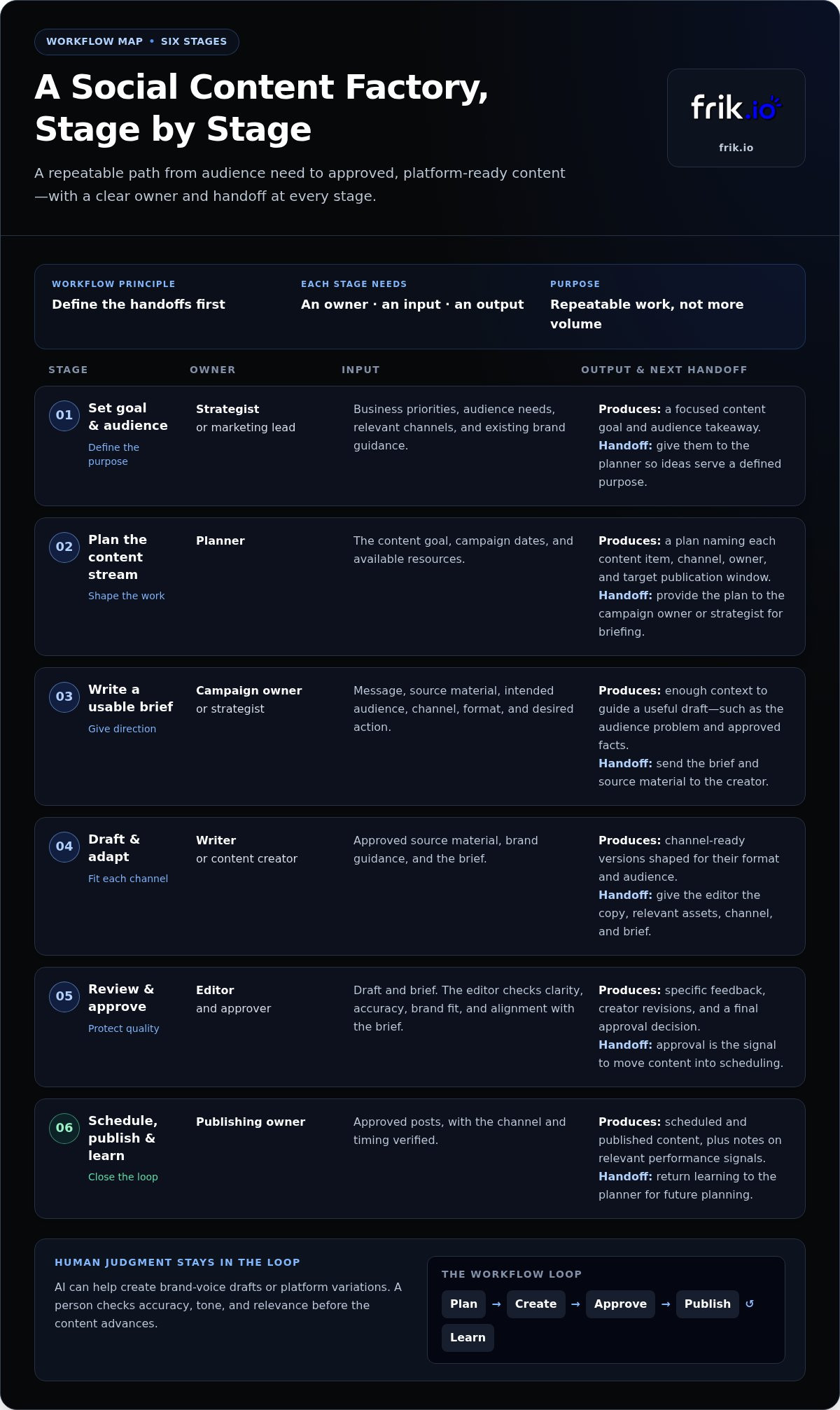
Build the workflow around decisions your team makes repeatedly, then give each decision a clear owner. This keeps routine production moving while leaving room for campaign-specific ideas. When creating a social media content factory, document the handoffs first. Tools can support the process once the team knows what each stage needs to deliver.
- Set the goal and audience. The strategist or marketing lead owns this stage. Start with business priorities, audience needs, relevant channels, and existing brand guidance. The output is a focused content goal and audience takeaway. Hand those to the planner so ideas serve a defined purpose, not just a publishing slot.
- Plan the content stream. The planner turns the goal into themes, formats, and a sustainable cadence. Use campaign dates and available resources as inputs; produce a plan that names each content item, channel, owner, and target publication window. Keep the cadence realistic for the team instead of copying an arbitrary posting benchmark.
- Write a usable brief. The campaign owner or strategist gives the creator the message, source material, intended audience, channel, format, and desired action. The brief should provide enough direction to guide a draft. For example, “announce the product update” is less useful than a brief that identifies the audience problem, approved facts, and next step.
- Draft and adapt. A writer or content creator turns the brief into channel-ready versions. Start with approved source material and brand guidance, then shape each draft for its format and audience. The handoff to editing includes the copy, relevant assets, channel, and brief, so the editor can assess accuracy and fit. AI can help create brand-voice drafts or platform variations, with human review guiding the final wording.
- Review and approve. The editor checks clarity, accuracy, brand fit, and alignment with the brief. The approver, such as a brand lead or client, gives specific feedback tied to the draft. The creator revises and resubmits; approval is the signal to move content into scheduling. Set a clear route for resolving conflicting feedback instead of leaving drafts in limbo.
- Schedule, publish, and learn. The publishing owner places approved posts into the schedule and verifies the channel and timing. After publication, the team reviews relevant performance signals and notes what to carry into future planning. That learning returns to the planner, closing the loop without requiring every campaign to use identical creative choices.
Consider a campaign about a product update. The strategist supplies the key benefit and approved details; the creator develops a concise post for one channel and a more explanatory version for another. An editor checks the claims, the approver requests one precise change, and the publishing owner schedules the approved versions. The reusable steps stay constant. The message, format, and creative angle change with the campaign.
A shared workspace can keep drafting, review, scheduling, and publishing connected, reducing manual handoffs. Explore frik.io's social media workspace as one way to bring those workflow stages together.
How to Scale Content Without Losing Brand Voice or Quality
More production doesn’t have to mean generic posts or lighter review. Quality scales when teams make standards repeatable: define what good looks like, adapt each draft for its audience and channel, and keep a person accountable for the final decision. The goal isn’t to make every post identical. It’s to make each post recognizably on-brand and fit for purpose.
Automation can accelerate drafting and handoffs, but editorial accountability stays with the people who verify, refine, and approve the content. That distinction matters when creating a social media content factory: speed is useful only when safeguards scale with it.
Use brand guidance to keep drafts recognizably yours
Turn brand voice into practical direction, not vague labels such as “friendly” or “bold.” Document the audience, tone, preferred vocabulary, phrases to avoid, core messages, and rules for claims. Training AI on a style guide can help produce more consistent starting points, but it can’t judge every context or verify every detail. A human editor still checks the content before it advances.
For a closer look at turning style rules into usable guidance, explore AI brand voice content generation. Keep the guide current as campaigns, products, and audience needs evolve. Examples of approved language help writers and reviewers apply the rules consistently without flattening the brand’s personality.
Adapt content for each platform before approval
Start with one core idea, then reshape it for the selected channels instead of copying the same post everywhere. A short, curiosity-led opening may suit one format; another may need more context before the audience sees the point. Adjust length, structure, visual treatment, and call to action to match the platform and the post’s purpose. Keep the message consistent, not the execution.
For example, a campaign explaining a product update could use a brief hook and direct action on one channel, while a second version leads with the audience problem and gives more detail. The facts stay aligned, but the opening, copy, and creative choices change. Review visuals and destination links alongside the text. A well-written caption can still fail if the image doesn’t support it or the link leads somewhere unexpected.
Before approval, use a compact quality check:
- Accuracy: Are details supported by approved source material, with no invented claims?
- Brand fit: Does the wording follow the voice, vocabulary, and messaging guidance?
- Audience relevance: Does the post address a real audience need and suit its channel?
- Clarity: Is the intended point or action easy to understand?
- Final integrity: Is the copy distinct where needed, with context, visuals, and links checked?
Use the checklist during final review, not as a substitute for judgment. It gives reviewers a shared standard while leaving room for fresh ideas to sound fresh.
Which Content Factory Workflow Should You Choose?
The right workflow depends on how much coordination your content needs, not on which setup sounds most advanced. Consider team size, number of channels, client review requirements, and how clearly your process is already defined. Creating a social media content factory can start with a simple manual routine and evolve as handoffs become harder to manage.
Use this comparison to identify the trade-offs. Setup effort and visibility vary by tools and implementation, so treat each model as a general operating pattern rather than a fixed product capability.
| Workflow | Setup effort | Handoffs and visibility | Approval needs | Adaptability |
|---|---|---|---|---|
| Manual | Low to start | People coordinate directly; status may depend on personal follow-up | Works with simple, clear review paths | Easy to change, but coordination grows with workload |
| Connected point tools | Moderate; tools need to be selected and connected | Work is split across tools; visibility depends on how well information stays aligned | Can support defined review steps, though feedback may be spread out | Flexible for teams with distinct needs and clear integrations |
| Automation template | Moderate; setup and customization are needed | Automated steps can reduce manual transfers, but visibility depends on the workflow design | Human review must be deliberately included | Useful for repeatable tasks, less suited to changing editorial decisions without adjustment |
| Unified platform | Requires adopting a shared workspace and workflow | Drafting, collaboration, review, scheduling, and publishing can sit together | Collaborative review and approval can be part of the process | Supports changes across connected stages, while still requiring a well-defined process |
When manual or point-tool workflows are enough
A manual process can work well when a small group produces a manageable volume of content and approvals are straightforward. A shared plan and consistent naming conventions may be enough to keep work moving. Separate tools can also suit teams with specific requirements, provided integrations and ownership are clear. Review the setup if people repeatedly copy updates between systems, search for the current draft, or can’t tell who owns the next step.
When a unified platform can reduce workflow friction
A unified workspace becomes useful when disconnected stages create more coordination than the work itself. Bringing drafting, collaboration, client review, scheduling, and publishing together can make post status and next steps easier to see. frik.io supports brand-voice content drafting, platform-tailored posts, and client approval portals, alongside scheduling and publishing. These capabilities can connect the workflow without removing human review.
Automation templates suit teams with a stable, repeatable task and the ability to configure its steps. They’re less of a complete answer when a workflow also depends on nuanced edits, client feedback, or changing campaign requirements. For a deeper evaluation of platform capabilities and selection criteria, read the AI social media management platform guide.
Choose based on your current friction, then reassess as channels, contributors, or approval cycles expand. If disconnected drafting and review are slowing your team, explore frik.io’s unified social media workspace.
Put Your Social Media Content Factory Into Operation
Don’t roll out a new workflow across every campaign at once. Pilot one content stream first, such as a recurring educational series or a single campaign on one channel. A focused test makes it easier to see where work stalls, whether responsibilities are clear, and which steps need adjustment before more contributors or client accounts depend on the process.
Run a focused pilot and refine the workflow
Before the pilot begins, map how that stream currently moves from idea to publication. Choose an owner for each handoff, set approval checkpoints, and agree on a review date. Track a simple baseline, such as how long posts wait for approval or how often drafts return for revisions. These measures help you compare the process with itself rather than chase a universal benchmark.
At the review, ask contributors where they had to search for information, repeat an update, or wait for a decision. Compare scheduled posts with what was actually published, and note why any items changed or slipped. Separate a one-time campaign issue from a recurring workflow problem. Then adjust the brief, ownership, or review step that caused friction before expanding the pilot to another channel or campaign.
Centralize creation, client review, and publishing
As the pilot grows, a shared workspace can connect draft versions, feedback, approvals, and scheduled posts. That gives the team one place to see what needs attention and who owns the next step. frik.io brings content creation, scheduling, and publishing into one workspace, with a client approval portal for collaborative review and AI drafts that can be tailored for different platforms. Human review remains essential for context, accuracy, and final decisions.
Use performance signals to improve future briefs, not to promise a particular result. If a post earned thoughtful responses, examine the topic, format, and audience need that shaped it. If a planned post wasn’t published, determine whether timing, approval, or production capacity was the cause. Feed those observations back into planning so the workflow improves alongside the content.
Before adding another content stream, run through this rollout checklist:
- Choose one pilot: Keep its audience, campaign, or channel clearly defined.
- Assign ownership: Name the people responsible for drafting, review, approval, and publishing.
- Track friction: Record approval time, revision volume, and scheduled-versus-published work.
- Review and refine: Gather team feedback, fix recurring bottlenecks, then expand deliberately.
Start creating a social media content factory with a manageable pilot, then scale the parts that work. Build a more streamlined social workflow with frik.io, connecting platform-tailored drafts, client review, and publishing in one workspace.
Make Your Next Content Cycle More Intentional
Your next step isn’t to produce more. Choose one recurring content stream and make its workflow visible from idea to publication. Use what the team learns to refine ownership, review points, and the standards that keep each post useful and on-brand. That steady improvement turns creating a social media content factory into a durable operating practice, not a one-time process redesign.
As your workflow matures, the right workspace can help keep creation and coordination connected. frik.io brings AI drafting informed by your style guide, client approval portals, and content creation, scheduling, and publishing into one platform. Your team keeps editorial judgment; the workflow makes the work easier to move forward.
Build a more streamlined social media content workflow with frik.io, and give your next content cycle a clearer path from draft to publication. Start with one improvement, learn from it, and build from there.
Frequently Asked Questions
What is a social media content factory?
A social media content factory is an operating system for producing social posts reliably while keeping quality checks and human editorial decisions in place. Think of it as the shared playbook behind your content: it connects the people, guidance, reusable assets, and tools involved in preparing posts. For example, a contributor should be able to identify the current approved message and the next responsible reviewer without searching through old chats.
How do you create a social media content factory?
Start creating a social media content factory by choosing one audience and business goal to guide the work. Then decide which channels support that goal, record the brand rules contributors need, and map the route from idea to published post. For a product launch, you might document who supplies approved details, who adapts the message for each channel, and who gives final sign-off. Keep the playbook easy to update as the team learns.
Can AI create social media content at scale without losing brand voice?
AI can help draft and adapt social posts, but clear brand guidance and human review keep the output aligned. Give the system examples of approved writing, preferred terms, audience context, and messaging boundaries. Then have an editor check facts, tone, and whether the draft fits its channel. For instance, a technically accurate caption may still need revision if it uses language the brand avoids or assumes knowledge the audience doesn’t have.
What should a social media content workflow include?
A practical workflow needs a brief, a responsible owner, drafting, quality checks, approval, channel adaptation, scheduling, and a way to learn from published work. Make each handoff explicit: specify what the next person receives and what they must decide. A brief might include a source link, intended audience, key message, and required action. That context helps a reviewer make a useful edit instead of returning a vague request to “make it stronger.”
How do you adapt one piece of content for multiple social platforms?
Keep the core message intact, then rebuild each version for the audience and format it will meet. A launch announcement could become a concise update on one channel and a context-rich explanation on another. Check line breaks, opening copy, visual crop, call to action, and destination link in the final version. Reviewing the finished post in its intended format can catch awkward formatting or missing context before it reaches the publishing queue.
When should a team automate its social media content workflow?
Automate a task after the team understands its rules and can describe what a correct result looks like. Repetitive scheduling or moving a draft to a review stage may be suitable; deciding whether a sensitive claim is appropriate needs human judgment. Before automating, write down the current steps and exceptions. If the team can’t agree on who owns a decision or what happens when information is missing, automation may simply move confusion faster.
How can agencies manage client approvals for social media content?
Agencies can make approvals easier to manage by defining the reviewer, feedback deadline, and decision required for each draft. Ask clients to tie comments to specific copy or creative elements, such as correcting a product detail or clarifying a call to action. Keep approval status visible so the account team can distinguish posts awaiting review from approved work. A shared client review portal can help keep feedback attached to the relevant content.


