

More AI tools don’t automatically make social media easier. The right ai tools for social media marketing should remove a specific bottleneck, not add another login, approval queue, or generic draft to fix. If your team is juggling creation, reviews, scheduling, and reporting across disconnected platforms, the problem isn’t a lack of automation. It’s a workflow that doesn’t connect.
AI can help teams move faster, but speed only matters when content still sounds like your brand and people retain control over what gets published. This guide shows you how to evaluate tools by the work they do, identify where your process is slowing down, and connect creation, approvals, and publishing into a practical system. You’ll also see why brand-voice training works best alongside human review, and how an integrated workspace such as frik.io can bring those steps together. The goal isn’t to automate every decision. It’s to scale content production with fewer handoffs, clearer approvals, and brand standards intact.
Key Takeaways
- Choose ai tools for social media marketing by matching each capability to a recurring task, not by counting features.
- Map your workflow from brief to measurement to spot where AI can speed up work and where human decisions matter.
- Compare tools on brand controls, collaboration, publishing, and analytics using real tasks from your team.
- Roll out AI gradually: define standards, review outputs, and assess results before expanding to more tasks.
- Explore how frik.io brings content creation, platform adaptation, approvals, scheduling, and publishing into one workspace.
Why AI Tools for Social Media Marketing Need to Solve Workflow Problems
AI tools for social media marketing are software features that assist with specific planning, creation, management, or analysis tasks. They can generate ideas, adapt a caption for different channels, organize publishing, or help review performance. They support a marketing strategy; they don’t independently decide what a brand should say, why it matters, or whether it’s right to publish.
Social media work rarely ends with drafting one post. A team may plan content for several channels, adapt assets and copy to fit each one, collect feedback, schedule approved posts, and review results. Every handoff can introduce delays. A tool may generate drafts quickly yet leave the real bottleneck untouched if approvals happen elsewhere or publishing requires manual re-entry.
Look beyond feature lists and identify the work your team repeats. The broad field of artificial intelligence in marketing includes applications across digital channels, but the practical question is narrower: which task should AI assist with, and where does a person’s judgment remain essential?
Which social media tasks can AI tools support?
Tools can assist at different points in the content cycle. Some focus on generating copy; others combine several stages in a shared workspace. Map your current process before comparing capabilities:
- Ideation: Turn a campaign brief or topic into possible post angles.
- Drafting: Create a first-pass caption for a person to edit.
- Adaptation: Reshape the message for each platform’s format and audience.
- Scheduling and publishing: Organize approved posts and prepare them for release.
- Performance review: Bring results together to help a team decide what to adjust.
For example, a marketer could use AI to outline a week of posts from an approved campaign brief, adapt a selected idea for different channels, route drafts for review, and schedule the approved versions. This can cut repetitive setup. A person still checks accuracy, fit, and timing, then uses performance results to inform the next plan. No tool can guarantee that an audience will respond.
Who benefits most from AI social media tools?
Solo marketers can spend less time starting from a blank page or manually reshaping every post. AI can help structure recurring content, leaving more attention for audience conversations and editorial decisions.
Agencies coordinating multiple client accounts can use shared workflows to organize drafts and collect feedback without losing track of which content is ready. Growing brand teams benefit when more contributors need a consistent process, with clear inputs, defined review points, and a reliable route from draft to scheduled post.
The strongest fit is a recurring bottleneck, not a desire to automate for its own sake. If drafting takes too long, prioritize creation and adaptation. If approved content gets stuck in handoffs, focus on collaboration and publishing. Start with friction you can name, then assess whether a tool removes it without weakening brand control.
How AI Social Media Tools Fit Into a Content-to-Publishing Workflow
Useful automation connects the handoffs, not just the tasks. A drafting tool can generate copy, but the team still needs a reliable way to adapt it, collect approval, schedule the final version, and learn from its performance. Map the content journey before choosing between a focused point solution and a platform that combines several stages. For a wider view of how these systems fit into team operations, explore this AI social media management platform guide.
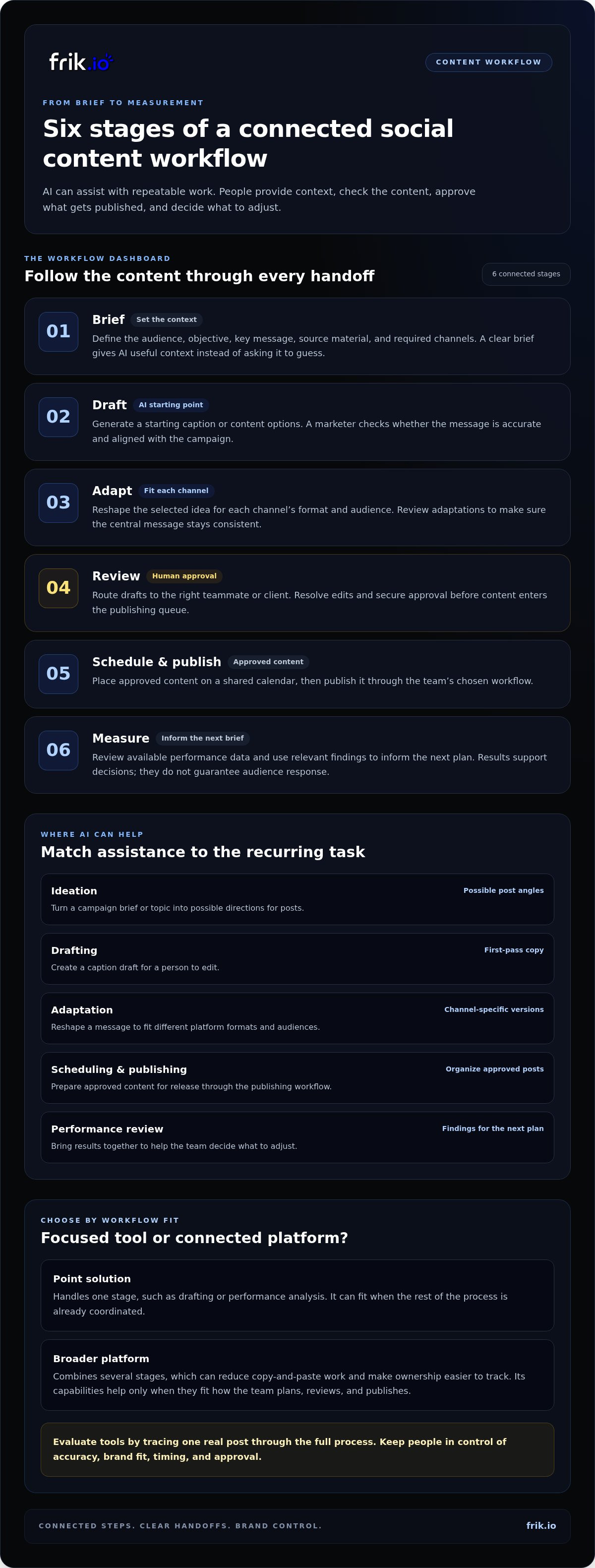
Use this sequence to see where AI can accelerate production and where a person should make the call:
- Brief: Set the audience, objective, key message, source material, and required channels. A clear brief gives AI useful context instead of asking it to guess.
- Draft: Generate a starting caption or set of content options. A marketer checks whether the message is accurate and aligned with the campaign.
- Adapt: Reshape the approved idea for each channel’s format and audience. Review the adaptations to ensure the central message stays consistent.
- Review: Route drafts to the right teammate or client. Resolve edits and approval before anything enters the publishing queue.
- Schedule and publish: Place approved content on a shared calendar, then publish it through the chosen workflow.
- Measure: Review available performance data and use relevant findings to inform the next brief.
A point solution may handle one step, such as drafting or performance analysis. That can work well when the rest of the process is already coordinated. A broader platform combines stages, which can reduce copy-and-paste work and make ownership easier to track. The trade-off is fit: combined capabilities help only if they match how your team plans, reviews, and publishes. Evaluate ai tools for social media marketing by tracing one real post through the full process, rather than assuming every feature belongs in your stack.
From prompt to platform-ready draft
Give the AI the audience, objective, source material, and channel requirements before requesting a draft. Then ask it to adapt the selected idea for each channel instead of reusing one caption everywhere. Before approval, a person should check facts, tone, accessibility, and platform-specific constraints. Brand-voice guidance, such as a team style guide, can improve relevance, but it doesn’t replace editorial review.
From review queue to scheduled post
A shared calendar makes the owner, status, and planned publishing time visible, helping teams spot what’s waiting on feedback. For agencies, approval steps give clients a clear place to review work; for brand teams, they help contributors follow the same process. Keep decisions and edits attached to the draft where possible, so feedback doesn’t get lost across scattered messages.
Scheduling automates timing, not editorial accountability. A person still owns the final check before publication. If your team wants to coordinate creation, review, and publishing in one workspace, frik.io’s social media workspace brings those workflow stages together.
How to Compare AI Tools for Social Media Marketing
Compare each tool against work your team actually does. A long feature list can look impressive while leaving the slowest handoff untouched. Start with a recurring task, such as preparing weekly posts for review, then assess whether the tool makes it easier without removing the controls your team needs. The matrix below turns broad capabilities into practical questions.
Score each capability against a specific recurring task, using a simple scale such as 1 for “doesn’t support it” and 5 for “fits the process well.” Add a note about what happened during the test. For example, record whether a draft needed extensive rewriting or whether reviewers could identify the version awaiting approval. This creates a useful comparison based on workflow fit, not feature-counting.
Which capabilities matter for your team size and workflow?
Priorities depend on where work stalls. If contributors produce uneven copy, weigh brand-voice guidance and editing controls more heavily. If content waits on feedback, look for shared calendars, visible status, and practical client review. If your team struggles to learn from published posts, prioritize reporting visibility. A solo marketer may value faster drafting, while an agency may need clearer coordination across accounts.
A point solution can be the right choice if one well-defined task is the main bottleneck and the surrounding workflow already works. A unified platform can suit teams that want connected creation, review, scheduling, and reporting. Don’t assume that more capabilities are automatically better. Consider the setup and handoffs your team would actually use.
How can you judge brand voice and output quality?
Test representative briefs against approved examples and your style guide. Use a familiar topic, audience, and channel so you can judge whether the result sounds appropriate, not just polished. Check whether team members can revise, reject, and regenerate drafts before publication. For deeper guidance on evaluating authentic content controls, see this AI brand voice guide.
The right tool removes a measured bottleneck while preserving review. Let the task, output quality, and your team’s ability to stay in control determine the score.
How to Introduce AI Tools Without Losing Brand Control
Adopt AI in a controlled slice of your workflow first. A small rollout shows whether a tool helps with real work before you rely on it across campaigns or contributors. Keep ownership clear, preserve human review, and track whether the change improves the process without weakening content quality.
- Select one task. Choose a recurring, contained job, such as drafting routine captions or adapting approved copy for another channel. Define what the tool should help with and what remains a human decision.
- Define standards. Give contributors usable guidance on brand voice, audience, approved source material, prohibited claims, and channel requirements. Assign an owner to maintain this guidance and the prompts used to generate drafts.
- Run a review period. Keep AI output in draft status while the team checks it. Name who reviews content, who handles client or stakeholder approvals, and who can authorize publication. Ask contributors to flag recurring errors and useful prompt adjustments.
- Assess results. Compare the trial with a baseline before expanding. Look at production time, review rounds, and scheduling consistency, alongside whether content meets brand standards. Keep, adjust, or stop the workflow based on what the evidence shows.
Clear roles prevent gaps as the process scales. One person can own the style guidance, another can manage the review queue, and a workflow owner can update prompts and document changes. In a smaller team, one person may hold several roles, but each responsibility should still be explicit.
How should teams set guardrails for AI-generated posts?
Make standards specific enough to use during editing. Document the brand’s voice and audience, claims the content must avoid, and requirements that vary by channel. Require human review for factual claims, sensitive subjects, visual assets, and content representing a client. AI output isn’t automatically accurate, original, or compliant, so reviewers must use their judgment before approval and publication.
For visual assets, check that the image fits the intended message and brand standards, and confirm that any text or details included are correct. For client-facing posts, route drafts through the agreed approval step. These checkpoints make review part of the workflow, not a last-minute safety net.
How can you tell whether the workflow is improving?
Record a baseline for the same type of work before the rollout. Track how long production takes, how many review rounds drafts need, and whether approved content is scheduled consistently. Compare like with like after adoption, and note quality issues as well as time saved. Measurement context can help teams interpret their results; see this agency social media analytics guide.
Expand only when the process is more efficient and still meets your review standards. To coordinate AI-assisted creation with shared review and scheduling, explore a shared AI social media workspace.
Bring AI Creation, Approvals, and Scheduling Together With frik.io
Disconnected tools can turn one post into a chain of copied drafts, scattered comments, and status checks. frik.io brings AI-assisted creation, platform adaptation, collaborative review, scheduling, publishing, and multi-platform analytics into one social media workspace. Teams can follow content from an initial idea through approval and publication, with fewer manual handoffs between stages.
This connected approach is useful for agencies coordinating client content and growing brand teams working across multiple contributors. Rather than treating AI as an automatic publisher, the workflow keeps people involved where their judgment matters: shaping the message, reviewing drafts, and approving what goes live. That balance makes ai tools for social media marketing more practical: AI supports production while the team stays accountable for the final content.
How does frik.io support brand-aware content creation?
frik.io can use a team’s own style guide to help generate captions that reflect its brand voice. That gives the AI useful direction instead of relying on a broad prompt with little context. Teams can then adapt a post for different social platforms, keeping the core message while adjusting how it’s presented for each channel.
Brand guidance is a starting point, not a publishing approval. Review each draft for factual accuracy, tone, audience fit, and channel-specific requirements. The team can edit the wording or request a new draft before moving content forward. This keeps brand standards active throughout creation, rather than treating them as a final check after the copy is already scheduled.
How does one workspace support collaboration and publishing?
Shared workflows help keep drafts and decisions organized as content moves between contributors. Client approval portals give agencies a structured way to share work for review, while growing teams can coordinate feedback and ownership before scheduling. With the content, approval status, and publishing process connected, it’s easier to see what needs attention and what’s ready for the next step.
- Create and adapt: Generate brand-aware caption drafts and tailor posts for different platforms.
- Review together: Coordinate team feedback and client approvals in a shared workflow.
- Schedule and publish: Move approved content into the publishing process from the same workspace.
- Review performance: Use multi-platform analytics to inform future content decisions.
That structure can replace disconnected manual steps with a clearer route from draft to published post. It doesn’t remove editorial ownership; it gives the people responsible for the work a coordinated place to create, review, and manage it. For teams ready to bring those stages together, explore frik.io for your social media workflow.
Make Your Next Workflow Improvement Measurable
Your next step doesn’t need to be a full-stack overhaul. Choose one recurring piece of social content and map how it moves from idea to publication. Decide where AI should assist, who reviews the work, and what you’ll measure. That gives your team a clear way to see whether the change reduces friction while keeping quality and accountability intact.
The strongest ai tools for social media marketing support a process your team can trust, not just faster output. frik.io brings brand-guided AI creation, client approvals, scheduling, publishing, and multi-platform analytics into one workspace, so teams can coordinate the work without losing human oversight.
Explore frik.io for your social media workflow and see how a more connected process could fit your team. Start with one bottleneck, learn from the results, and build a smarter workflow from there.
Frequently Asked Questions
Can AI tools for social media marketing publish posts automatically?
Yes, tools with publishing or scheduling features can publish posts automatically after you connect the relevant accounts and authorize access. Automation settings vary, so decide whether posts need approval before they enter the queue. For example, a team might allow routine evergreen tips to be scheduled after review while requiring a manager to approve campaign announcements. Check the publishing status and preview each post before it goes live, especially when timing matters.
Is AI-generated social media content copyright-free?
No, AI-generated content isn’t automatically copyright-free. The rules and risks can depend on the content, the tool’s terms, and the jurisdiction. A draft may also include material that resembles existing work, while images, music, and other assets can have separate usage terms. Keep records of your sources and edits, use assets with appropriate permissions, and get legal advice for high-stakes commercial use rather than assuming generated means unrestricted.
Can AI tools create social media content that sounds like my brand?
Yes, AI can produce closer-to-brand drafts when you provide clear guidance and examples, but results still need evaluation. Test a few real formats, such as a product update, a customer response, and an educational post. Compare the drafts with approved content for vocabulary, sentence rhythm, and level of formality. Note specific edits the AI repeatedly misses, then refine the guidance so future drafts start closer to the voice your audience recognizes.
Do AI social media tools replace social media managers?
No, they assist with production and coordination, but they don’t replace the judgment a social media manager brings. A tool can generate caption options or organize routine work; a manager decides whether the message fits the moment, handles nuanced audience interactions, and responds when a conversation takes an unexpected turn. Human ownership matters most for strategy, community relationships, sensitive issues, and interpreting results in the context of the brand.
Are free AI tools enough for a social media team?
They can be enough for an individual or a team testing a limited workflow. Start by checking whether the tool supports the accounts, publishing volume, and review process you actually need. As work grows, limitations around shared access, approval steps, or reporting may create extra manual effort. Track where the free setup slows the team down, then decide whether a different workflow or a paid capability would solve a recurring problem.
How do AI tools protect social media account and client data?
Data protection depends on the tool’s practices and your team’s setup, so review its privacy and data-handling information before adding sensitive material. Check who can access workspaces, how access is removed when roles change, and whether account connections use authorized access rather than shared passwords. Limit the information included in prompts, especially confidential client details. Use strong, unique passwords and multi-factor authentication where available, and set clear internal access rules.
Can AI tools tailor one social media post for multiple platforms?
Yes, AI can adapt a core idea into versions suited to different platforms, but each version needs a channel-specific check. A short text post may need a stronger opening, while a video caption may need context that makes sense without sound. Review length, links, formatting, image crops, and calls to action before publishing. Treat each adaptation as an edited version of the original message, not a duplicate to post everywhere unchanged.
How can I prevent AI social media posts from spreading inaccurate information?
Require a person to verify every factual claim before publication. Give the reviewer the source material, then check names, dates, figures, product details, and quoted statements against that source. Don’t let AI fill gaps with assumptions; revise the prompt or remove unsupported details instead. For sensitive or high-impact topics, use a second reviewer and keep source references with the draft. Publish only when the claims can be substantiated.


