

What if your team could move a post from first draft to client approval and publishing without losing feedback or brand context? A collaborative content creation platform brings those steps into a shared workflow. When drafts live in one tool, comments in another, and approvals in email, it’s easy to lose track of changes or mistake an outdated version for the final one. With multiple contributors, keeping every post consistent takes even more coordination.
You shouldn’t have to choose between creating content together and maintaining control over how it represents your brand. A clear workflow gives teammates and clients a place to review work, while brand guidance helps keep each post on message and suited to its platform. Human review still matters, but it doesn’t have to mean chasing scattered feedback.
This article covers how to connect drafting, brand consistency, client feedback, and publishing in a more organized process. You’ll also see how frik.io brings these steps together with AI content generation guided by your style guide, client approval portals, and scheduling and publishing across multiple networks. The result is a clearer path from idea to approved post, with fewer loose ends.
Key Takeaways
- Use a collaborative content creation platform to bring planning, drafting, review, and publishing into a shared workflow.
- Map each stage from brief to published post, then assign an owner and status so work moves forward without version confusion.
- Compare platforms by workflow coverage, brand guidance, client review, and publishing to find the right fit for your team.
- Set clear roles and review rules before rolling out a new workflow, then test the process with a draft.
- Explore how frik.io connects brand-guided content creation, client approvals, platform-tailored posts, scheduling, and publishing.
What Is a Collaborative Content Creation Platform for Social Teams?
A social post may pass through a strategist, writer, designer, brand lead, and client before it’s ready to publish. If the draft sits in a document, feedback arrives by email, approval happens in chat, and scheduling lives elsewhere, no one has the full picture. Teams can lose track of edits, ownership, and which version is approved.
A collaborative content creation platform gives social teams a shared workspace to plan content, create drafts, review changes, and move approved posts toward publication. It connects the work around a post, not just the text itself. Contributors can shape the draft, reviewers can offer input, and approvers can make a clear decision at the right stage.
A collaborative content creation platform is a shared workflow for planning, creating, reviewing, and advancing content, not just a tool for editing a document or scheduling a post. A basic scheduler can organize dates and publishing slots. A broader platform also helps teams see the steps leading up to publication, including who owns the next action and what needs attention.
This workflow is designed for internal collaboration on social content. That differs from audience co-creation, where followers or community members contribute ideas or content through polls, submissions, or shared stories. Both involve participation, but the purpose differs: a team workflow helps people produce and approve planned brand content; audience co-creation invites the public into the creative process.
The underlying idea of collaborative editing is that multiple people can work on shared material. For social teams, collaboration extends beyond editing. A post may need a platform-specific version, brand review, client feedback, and a publishing date. Each step needs enough context to keep the work coherent.
How does a collaborative platform differ from a basic content tool?
A document editor helps people work on copy, while a calendar shows planned dates. A shared workflow connects those activities to review and approval. Contributors create or adapt content, reviewers suggest changes, and an approver confirms it’s ready to proceed. When stages and ownership are clear, teammates can see whether a post is being drafted, reviewed, or awaiting a decision instead of piecing together its status from messages.
Who benefits most from collaborative content creation?
Agency teams can coordinate posts across client brands while keeping feedback and brand context separate. In-house marketing teams can share drafts with subject-matter experts, legal or brand reviewers, and approvers. Clients can review planned social content without taking on production tasks such as drafting or scheduling. Each person contributes where needed, while the team responsible for production keeps the work moving.
Look for a workflow that makes handoffs understandable, not simply another place to store content. A useful shared workspace should help answer practical questions: What is this post for? Who needs to review it? What happens next? When those answers are clear, teams spend less time reconstructing conversations and more time improving the content.
How Collaborative Content Creation Moves from Brief to Published Post
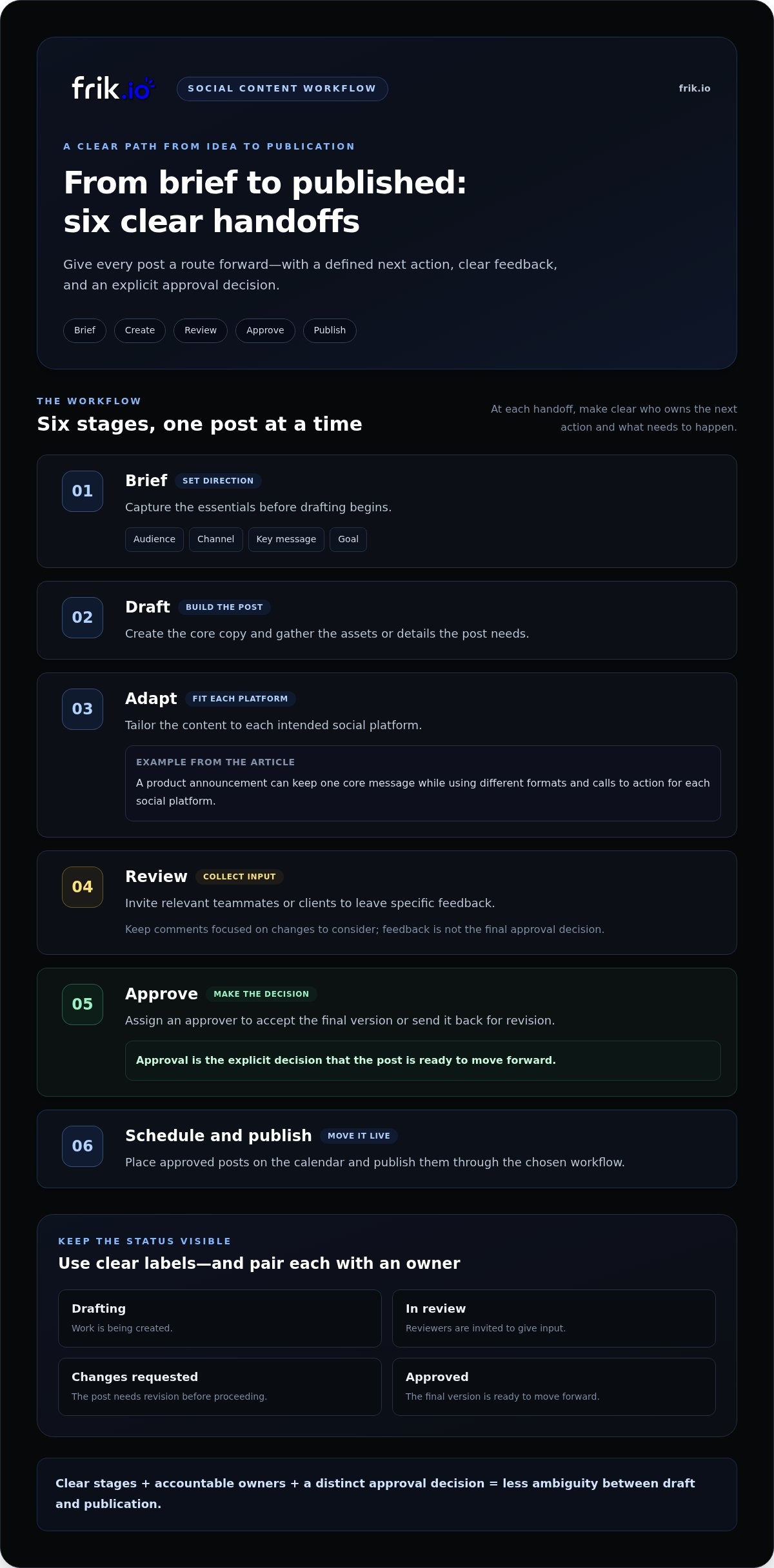
A reliable social workflow gives every post a clear route forward. It starts with a focused brief, moves through drafting and platform adaptation, then separates feedback from the final approval decision. Approved content can then be scheduled and published. At each handoff, clarify who owns the next action and what needs to happen before the post advances.
An effective approval workflow is a sequence of assigned decisions that moves content from brief to publication with a clear owner at every stage. This structure keeps revisions purposeful and prevents drafts from sitting in an ambiguous “almost ready” state.
What happens at each stage of a social content workflow?
Start with a brief that captures the intended audience, channel, message, and objective. For example, a product announcement may need one core message but different formats and calls to action for each social platform. Establish the purpose first so contributors can make informed choices rather than editing in different directions.
- Brief: Record the audience, channel, key message, and goal.
- Draft: Create the core copy and gather the assets or details the post needs.
- Adapt: Tailor the content to each intended social platform.
- Review: Invite relevant teammates or clients to leave specific feedback.
- Approve: Assign an approver to accept the final version or send it back for revision.
- Schedule and publish: Place approved posts on the calendar and publish them through the chosen workflow.
Use status labels such as “Drafting,” “In review,” “Changes requested,” and “Approved” to show where work stands. Pair each status with one accountable owner. Feedback should identify a change to consider; approval is the explicit decision that the post is ready to move forward. Keeping these actions distinct prevents every comment from reopening the entire brief.
Structured collaboration matters beyond marketing, too. The OECD Observatory of Public Sector Innovation describes a Digital Transformation Co-Creation Platform built around knowledge sharing and mutual learning. Social teams can apply a similar principle: make contributions visible, preserve useful context, and clarify how input leads to a decision.
How can AI support collaboration without taking over the work?
AI can provide a first draft or help reshape copy for a specific platform, giving the team material to review rather than a finished decision to accept. When generation uses a team’s style guide, it can provide a more consistent starting point across contributors and brands. People still need to refine the language, check the message, and decide whether the post is accurate and appropriate. An AI brand voice content generator can be one part of this process, not a substitute for review.
When drafting, review, client feedback, and scheduling are connected, the team can follow a post’s progress without reconstructing its history across conversations. Explore frik.io’s collaborative social workflow to see how these stages can work together.
How to Evaluate Collaborative Content Creation Platforms
Choose a platform by tracing a real post through your team’s process, from the initial idea to publication. A polished feature list won’t tell you whether client comments stay connected to the right draft or whether approved content has to be copied into a separate scheduler. Evaluate how a draft moves through the workflow, not feature count alone.
Start with the capabilities your team needs now, then separate them from features that matter only as your operation grows. A small in-house team may need shared drafts and straightforward review. An agency managing several brands may need clearer brand separation and a consistent way to collect feedback from different clients.
| Evaluation area | Essential | Useful as needs grow |
|---|---|---|
| Workflow coverage | Connect content creation, review, approval, and publishing. | Support more contributors or brand workflows without duplicating steps. |
| Brand guidance | Keep each brand’s voice and requirements visible during creation. | Use a team’s style guide to inform AI-generated drafts. |
| Client review | Give reviewers a clear way to see planned content and provide input. | Manage review across multiple clients or complex approval paths. |
| Publishing | Prepare content for its intended social platform. | Schedule and publish across multiple networks from the same workflow. |
Use the table to identify must-haves, not to chase every optional capability. For each essential, ask whether it removes a handoff or adds another step. If a teammate has to re-enter a post, copy comments into another tool, or confirm approval elsewhere, the platform may preserve the same friction in a new interface. A better fit keeps work connected and makes the next action clear.
Which workflow capabilities matter for agencies and growing teams?
Agencies should assess whether work can be organized across client brands while keeping each brand’s content and review context distinct. In-house teams should check that drafts can reach the people who need to review them without giving every contributor the same responsibility. In both cases, look for a practical path from shared creation to client feedback and publishing, rather than treating the calendar as the whole workflow.
How should teams assess brand consistency and platform fit?
Check whether brand guidance can shape AI-generated drafts, then assess how easily teammates can refine the result. Content should also be adapted to its intended social platform rather than copied unchanged across channels. Teams comparing AI social media management platforms can use these checks to see whether creation, brand guidance, and publishing work as one process.
Finally, match the setup to the complexity of your review process. A team with few reviewers may value a simple approval path; an agency with several client stakeholders may need more structure. The right collaborative content creation platform supports the decisions your team actually makes without adding duplicate work.
How to Set Up a Collaborative Content Workflow That Stays Clear
A workflow works only if the team can follow it consistently. Before moving tasks into a collaborative content creation platform, agree on who does what, what each stage means, and how a draft advances. Keep the setup lightweight. The goal is a dependable path for content, not extra administration.
- Map the roles. Identify who creates content, checks subject details, gathers client feedback, and gives final approval. One person can hold more than one role, but each decision needs a clear owner.
- Define the stages. Choose labels that reflect actual work, such as “Brief ready,” “Drafting,” “Review,” “Changes needed,” “Approved,” and “Scheduled.” Spell out what must be true before a post moves to the next stage.
- Set review rules. Agree on who reviews, where they leave feedback, and the expected feedback window. Explain how late changes may affect scheduled content so timing is clear.
- Test and adjust. Pilot the workflow with one brand or recurring content series. Note where work stalls, instructions are unclear, or people repeat steps, then refine the process before expanding it.
Give each draft one accountable owner who moves it to the next stage. That person doesn’t need to make every decision; they make sure required input arrives, the status is current, and the next action has an owner. Keeping the draft and its approval status in one source of truth also prevents an outdated attachment or chat message from being mistaken for the final version.
How should teams assign roles and approval steps?
Separate creation, subject review, client feedback, and final approval, even if some roles overlap. Give reviewers a defined window and explain how late edits can affect scheduled work. Keep the active draft, feedback, and status together. A client approval portal gives clients a dedicated way to provide input without taking over production.
Make briefs concise but specific. Include the post’s purpose, audience, key message, channel, and relevant brand guidance. Reviewers who understand the post’s goal can give focused feedback instead of reopening settled decisions. Ask them to group comments by priority and identify the change they need, such as correcting a factual detail or clarifying the message.
How can teams reduce review friction over time?
Look for patterns in repeated revision rounds. If reviewers keep asking for the same context, strengthen the brief. If drafts repeatedly miss the brand voice, make the relevant guidance easier to use during creation. These small adjustments address the source of the friction. For teams coordinating external feedback, a client approval portal helps keep review attached to the content being reviewed.
Once the pilot is clear, extend the same stages to another brand or content series. Adjust them only where approval needs differ. See how Frik.io supports client content reviews as part of a social workflow that connects creation, approvals, and publishing.
Bring Creation, Client Review, and Social Publishing into One Frik.io Workflow
Teams that have outgrown scattered drafts and manual approval tracking need more than another place to store content. They need a connected workflow that supports creation, review, and publishing. Frik.io is an AI-powered social media workspace for teams, agencies, and brands, bringing these parts of social content production together.
Rather than moving every post between disconnected tools, teams can use Frik.io to draft content in a brand’s voice, adapt posts for different social platforms, coordinate client review, and schedule and publish across multiple networks. Each capability supports a different stage, while the shared workflow helps keep content and feedback connected.
How does Frik.io connect content work across the team?
Start with your team’s style guide. Frik.io’s AI content generation can use that guidance to help create on-brand drafts, giving contributors a relevant starting point instead of a blank page. People remain responsible for reviewing and refining the copy. Brand guidance supports consistency, while human judgment keeps the message relevant to its audience and purpose.
A draft can then be tailored for its intended social platforms. The core message may stay consistent, but each version can be adjusted to fit its channel. This lets teams work from a shared content direction without assuming one format will suit every network. When the content is ready for feedback, collaborative client review portals give clients a place to review planned posts as part of the approval process.
After review, teams can connect approved content to scheduling and publishing across multiple networks. That continuity helps agencies coordinate work across brands and in-house teams align contributors and reviewers. Instead of manually tracking every handoff across separate conversations and calendars, teams can use a connected social workflow to keep creation, review, and publishing aligned.
What is the next step for teams ready to streamline collaboration?
Begin with the handoff that consumes the most attention. Is it turning a brief into a first draft, adapting content for channels, gathering client feedback, recording approval, or moving approved posts into the publishing schedule? Naming the bottleneck shows which part of the workflow needs attention first.
Then map that handoff to the stage it belongs to: drafting, review, approval, or publishing. Identify who owns the next action and what information they need to move the work forward. This keeps a tool change focused on solving a real coordination problem rather than adding features the team won’t use.
For teams looking to bring these stages into one collaborative content creation platform, Frik.io combines brand-guided drafting, platform-tailored content, client review, scheduling, and publishing in a social media workspace. Explore the Frik.io platform and see how its workflow fits your team’s content process.
Make Your Next Content Handoff Clearer
Improve a workflow before missed comments or unclear ownership become routine. Choose one recurring handoff that slows your team down, then define the information, decision, or owner that would help it move forward. That change can show whether your process needs clearer rules, a better shared workspace, or both.
A collaborative content creation platform should support the way your team works, not force people to maintain a second process around it. Start with the coordination challenge that matters most, bring the right contributors into the workflow, and refine the setup as you learn what works. Progress comes from making the next step easier to see and act on.
Ready to bring social content creation, client review, and publishing into one workflow? Explore Frik.io’s collaborative content workflow and start with the handoff your team most wants to simplify.
Frequently Asked Questions
What is a collaborative content creation platform?
A collaborative content creation platform helps a team coordinate content work in a shared digital workspace. For example, a campaign post can start with a strategist’s idea, move to a writer for drafting, then go to a brand reviewer for input. The platform connects those contributions and next steps, so the team can manage the work as a process rather than a collection of separate files.
How is collaborative content creation different from user-generated content?
Collaborative content creation usually involves people working on content for a brand, while user-generated content comes from an audience or community. A marketing team might collaborate on a product announcement; customers might contribute stories or images about using that product. The approaches can work together, but audience submissions need their own process for selecting, reviewing, and preparing contributions before a brand shares them.
Can clients review social media drafts in a collaborative platform?
Yes. A platform with client review workflows can give clients a structured way to comment on planned posts before publication. For a product launch, a client might flag an outdated product detail while the agency handles the edit. Agree in advance on who consolidates comments and who makes the final decision. This keeps clients involved without making every reviewer responsible for managing production.
How can AI-generated social content stay consistent with a brand voice?
Give AI clear brand guidance, then treat its output as a draft for people to assess. A style guide might specify whether the brand uses informal language, which product terms must stay exact, and which phrases feel off-brand. A team member can check the draft for accuracy and adapt it to the channel before approval. This combines a consistent starting point with human judgment.
What should a small team look for in collaborative content software?
A small team should prioritize its most frequent coordination problems, not a complicated set of features. If posts get lost between a writer and reviewer, start with a clear owner, a shared status, and one location for current drafts. If publishing is the main challenge, focus on how approved content gets onto the schedule. Keep the process simple enough to use consistently.
How do you prevent endless feedback loops during content approval?
Prevent repeated review rounds by giving feedback a clear purpose and decision-maker. Ask reviewers to separate required corrections, such as a factual fix, from optional preferences, such as an alternate phrase. Have one person combine overlapping comments and return a focused revision brief to the writer. If the same correction keeps appearing, update the original brief or brand guidance so future drafts start with clearer direction.


