

The platform with the biggest feature set isn’t always the one that makes visual planning easier. In the hootsuite vs planable for visual planning comparison, the real test is whether your team can organize posts, check how creative will appear on each channel, collect feedback, secure approval, and publish without jumping between tools.
A calendar can show when content is scheduled without making it easy to assess the finished post. Scattered comments and unclear approvals can slow the workflow further. Hootsuite takes a broader social management approach, while Planable puts more emphasis on content collaboration and review. The better fit depends on your channel mix, team size, and how much sign-off your workflow requires.
This guide compares practical differences across planning, previews, approvals, and publishing. You’ll see how to match each platform to your workflow, what to check before committing, and when a connected workspace for brand-true drafting, client review, and scheduling may be worth considering.
Key Takeaways
- Evaluate visual planning as a complete workflow, from organizing creative to reviewing, approving, and publishing, rather than judging a calendar view alone.
- In the hootsuite vs planable for visual planning comparison, verify which previews, approval steps, and publishing capabilities are available on the plans you’re considering.
- Separate must-have needs from nice-to-haves to decide whether your team needs broader social management or a more review-focused workflow.
- Test both platforms with real posts, channels, assets, and reviewers. Compare calendar clarity, revision effort, approval speed, and handoff.
- Consider whether a shared workspace connecting brand-true drafting, client review, and publishing could better fit your team’s next stage.
Hootsuite vs Planable for Visual Planning: What Are You Comparing?
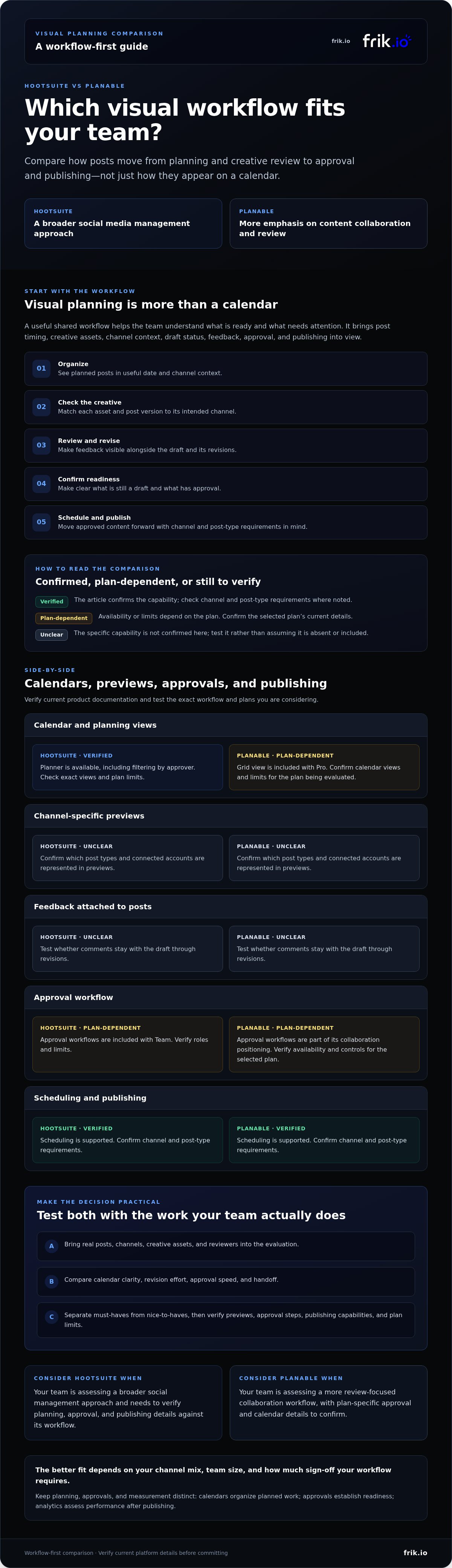
Visual planning is the process of organizing social posts, creative assets, channel context, review, and publishing in a shared workflow that helps a team understand what’s ready and what needs attention. It goes beyond a calendar. A calendar helps people see planned posts by date and channel, but the plan is more useful when the team can also assess creative, track draft status, and understand feedback and approval context.
What does visual planning mean for a social team?
Consider a post intended for several channels. The team needs to know when it’s scheduled, which creative belongs with each version, and whether the copy fits its channel. Reviewers need to see what’s still a draft and what feedback remains. Without that context, a publishing queue may show timing but leave the team to piece together the rest elsewhere.
A visual workspace brings those planning questions together. It isn’t the same as approvals, which establish whether content is ready to move forward, or analytics, which help assess performance after publishing. These functions can connect, but they address different needs. For broader context on the discipline, see this overview of social media marketing strategies.
Why compare Hootsuite and Planable specifically?
Hootsuite is positioned as a broad social media management option. Planable is a planning-and-collaboration contender, with comparison coverage emphasizing approval and client-review workflows. That makes them useful to assess through the same practical lens: can your team move from organizing a post to reviewing and publishing it with enough channel and creative context?
Don’t assume either platform’s calendar tells the whole story, or that a product description confirms a specific capability. Interfaces, supported channels, plan limits, previews, and approval options can change. Before committing, verify the details in each platform’s current documentation and test the workflow your team actually uses.
For a fair hootsuite vs planable for visual planning comparison, define the work before you compare tools. List the channels you publish to, the assets and post formats you use, who reviews the work, and what must happen before scheduling. Then separate three questions:
- Planning: Can the team see posts in a useful date and channel context?
- Review: Can the right people understand the creative, leave feedback, and confirm readiness?
- Measurement: Can the team assess published content separately from its planning and approval process?
This checklist keeps the decision grounded in workflow rather than feature labels. Next, compare the documented calendar, preview, feedback, approval, and publishing capabilities side by side. Note what’s confirmed, plan-dependent, or still unclear.
How Hootsuite and Planable Handle Calendars, Previews, and Approvals
Compare the workflow stage by stage, and distinguish confirmed capabilities from details that need checking. “Unclear” means the specific capability isn’t confirmed here, not necessarily that the platform lacks it. This helps keep product descriptions from becoming assumptions about what a particular plan includes.
| Workflow stage | Hootsuite | Planable |
|---|---|---|
| Calendar and planning views | Verified: Planner is available, including filtering by approver. Exact view and plan limits should be checked. | Plan-dependent: Grid view is included with Pro. Confirm the calendar views and limits for the plan being evaluated. |
| Channel-specific previews | Unclear: Confirm the post types and connected accounts represented in previews. | Unclear: Confirm the post types and connected accounts represented in previews. |
| Feedback attached to posts | Unclear: Test whether comments stay with the draft through revisions. | Unclear: Test whether comments stay with the draft through revisions. |
| Approval workflow | Plan-dependent: Approval workflows are included with Team; verify roles and limits. | Plan-dependent: Approval workflows are part of its collaboration positioning; verify availability and controls for the selected plan. |
| Scheduling and publishing | Verified: Scheduling is supported; confirm channel and post-type requirements. | Verified: Scheduling is supported; confirm channel and post-type requirements. |
Can you see planned content clearly across channels?
Run the same sample through both tools: a scheduled image post for Instagram and a channel-adapted version for LinkedIn. Check whether the calendar makes dates, channels, and draft status easy to scan. Then open each item and confirm that its preview reflects the selected account and format. A thumbnail alone may not show how a final post renders, so verify format-specific behavior in the platform’s current documentation.
Test filters using a realistic team view, such as showing only posts awaiting a particular reviewer. Hootsuite’s Planner approver filter is listed as available, while Planable’s Grid view is listed as a Pro feature. Don’t assume those views answer the same planning question.
How do comments and client approvals fit into planning?
Follow one draft from creator to internal reviewer, then client and final approval. At each handoff, check who can see the post, where feedback appears, and whether an editor can tell what changed and what remains to be done. Governance may matter too. The U.S. Department of Health & Human Services outlines official social media guidelines that address areas such as accessibility, record-keeping, and copyright.
The practical distinction is breadth versus review emphasis: Hootsuite combines planning with wider social management, while Planable foregrounds collaborative review. Teams assessing another workflow that connects drafting, client review, and publishing can explore frik.io’s approach to collaborative social publishing.
Hootsuite vs Planable: Which Visual Workflow Fits Your Team?
The choice comes down to what your workflow needs beyond displaying posts on a calendar. Hootsuite may suit teams that need visual planning alongside broader management capabilities. Planable may suit teams where draft review and client approval are central. Neither is a universal winner: the right fit handles your must-haves with the fewest workarounds.
When might Hootsuite be the better fit?
Consider Hootsuite if your team needs publishing alongside capabilities such as social listening, analytics, or a social inbox. Approval workflows are included with its Team plan, so check whether the available approval controls and calendar tools fit your review process. For a broader overview of its suitability and feature set, see the Forbes Advisor review of Hootsuite.
Before choosing it, confirm that your accounts and post formats are supported. Test whether reviewers can see enough creative and status context in the workflow. A broader platform only helps if the features your team relies on are included in the plan and easy to use.
When might Planable be the better fit?
Planable is worth testing if client feedback and sign-off shape how your team works. Its positioning emphasizes collaboration and content review; Grid view is listed as a Pro feature, and analytics as a paid add-on. Verify which plan supports the review steps you need. Then check whether the calendar and previews give reviewers enough context to assess each channel-specific post.
Don’t treat approval strengths as proof that every publishing requirement is covered. Confirm supported channels, post types, user roles, and any analytics or engagement needs against current plan documentation.
Use this short pros-and-cons check to narrow the options:
- Hootsuite, potential advantage: broader management features, including listening and analytics in its offering. Check: plan access, account support, and whether its calendar-to-approval handoff works for your team.
- Planable, potential advantage: a collaboration-led workflow and a Pro Grid view. Check: whether previews, client review, publishing, and any needed add-ons cover your actual process.
Start by sorting requirements into two groups. Must-haves might include a specific channel, client sign-off, or analytics access. Nice-to-haves could include an extra view or a broader set of management tools. Then test the same sample posts and reviewers in both platforms. This makes the hootsuite vs planable for visual planning decision about demonstrated workflow fit, not feature-list volume.
How to Evaluate Hootsuite and Planable With a Real Content Workflow
A controlled test reveals more than a feature list. Use the same campaign brief, posts, assets, channels, and reviewers in both platforms. That keeps the comparison fair and shows where the workflow feels clear, where it stalls, and what may depend on setup or plan access.
Run a fair side-by-side visual planning test
Choose a small batch of representative content: for example, an image post, a short-form video, and a channel-adapted version of one post. Use the same captions, creative files, publishing requirements, reviewer instructions, and connected accounts in each platform. Ask the same people to complete the same steps, from finding a draft to leaving feedback and identifying the approved version.
Keep a friction log as you go. Note when a reviewer can’t locate a post, misses a comment, or can’t tell whether it’s approved. Before treating a problem as a product limitation, check whether it came from account configuration, plan access, or the way the workspace was set up.
Choose criteria that reflect your actual workflow
Focus on the channels and formats your team publishes regularly. Add client access, internal roles, and review history if they shape daily work. Don’t award points for integrations or features you won’t use. For broader questions about platform scope, read the AI social media management platform guide.
Score each platform against the same criteria, using a simple scale such as 1 for difficult, 3 for workable, and 5 for clear and efficient. Record a short reason beside each score so the result reflects what happened, not just a gut feeling.
- Calendar clarity: Can each reviewer find the right post, date, channel, and status?
- Preview usefulness: Does the preview help the reviewer assess the specific post format and account?
- Revision effort: How many steps does it take to understand feedback and update the draft?
- Approval speed: Can the next approver see what needs their attention?
- Handoff: Is it clear what happens after approval, including scheduling or publishing?
In the hootsuite vs planable for visual planning decision, prioritize the workflow that reduces friction in your must-have criteria. If drafting consistency is also part of the evaluation, learn about AI brand voice tools.
If your test points toward connecting brand-true drafting, client review, and publishing in one workspace, explore frik.io’s social media workflow.
After Hootsuite vs Planable: Choose a Workflow That Can Scale
Keep Hootsuite in the lead if your team depends on broader social management capabilities and its calendar and approval workflow meet your needs. Favor Planable if its review process fits the way your team and clients prepare content for sign-off. The right choice is the one that supports your recurring work, not the one with the longest feature list.
When should you consider an alternative to both tools?
Reopen the shortlist if the bottleneck starts before review. Your team may need help drafting on-brand content, adapting it for different platforms, and moving it through client feedback and publishing without scattered handoffs. First identify where work slows down most: drafting, adaptation, approval, or scheduling. Switching tools just to gain more features won’t solve a process problem unless those features address the actual bottleneck.
Then map the workflow from start to finish. Ask whether brand-voice drafting, client review, approvals, and scheduling can fit into a connected workspace. Verify the specific capabilities and access available before making a decision.
Could frik.io fit a content team’s workflow?
frik.io is another option for teams assessing a connected workflow. Its AI content generation can be trained on a user’s style guide and can tailor posts for different social platforms. Collaborative client review portals support feedback and approval workflows, while scheduling and publishing are available from a shared workspace.
That combination may be relevant if your team wants to connect drafting, client review, and publishing. Assess it against the same real posts, channels, assets, and reviewers you used to compare Hootsuite and Planable. Check whether the available capabilities match your requirements. Don’t assume a feature description guarantees a particular preview, approval control, or channel fit.
Ultimately, hootsuite vs planable for visual planning is a workflow decision. Retain Hootsuite when broader management matters and its planning process works for your team. Choose Planable when its review workflow is the closer fit. If neither resolves a recurring drafting-to-publishing bottleneck, assess frik.io against your requirements.
Explore frik.io’s AI-powered social media workspace and see whether its capabilities align with your team’s workflow.
Choose the Workflow That Moves Your Team Forward
The right choice in hootsuite vs planable for visual planning depends on where your team needs the most support. Keep Hootsuite in consideration when broader social management is essential. Favor Planable when its review workflow fits the way your team and clients approve content. In either case, check current capabilities and test the tools with real posts before deciding.
If your workflow also needs brand-true drafting, platform-tailored posts, and collaborative client review, Frik.io offers another option to assess. Its AI can be trained on your style guide, and its client review portals support collaborative approval workflows.
Explore Frik.io’s AI-powered social media workspace to see whether its capabilities align with your team’s needs. Choose the workflow that clears friction from planning and gives everyone a clearer path from draft to publish.
Frequently Asked Questions
Is Hootsuite or Planable better for visual content planning?
Neither is automatically better for every team. In the hootsuite vs planable for visual planning comparison, assess the channels you use, calendar visibility, post previews, feedback, and approvals. Hootsuite may suit teams that also need broader social management capabilities, while Planable is positioned around collaboration and client review. Check current features and plan access, then test both platforms with the same campaign to see which fits your workflow.
Can Hootsuite and Planable show social media posts in a visual calendar?
Both are used for social media planning or publishing, but their calendar layouts and available views may change. Check each platform’s current documentation for channel filters, post statuses, supported formats, and plan restrictions. For a practical comparison, add the same sample posts to each calendar. Can your team quickly spot what’s scheduled, what’s still in review, and which channel each post is for? Record any setup or access limits you encounter.
How do Hootsuite and Planable compare for client approvals?
Planable is positioned in comparison coverage around approvals and client review. Hootsuite also offers team workflows, but specific approval functions may depend on the current product and plan. Test the full path: share a draft, collect comments, revise the content, record sign-off, and confirm who can publish. Check current vendor documentation before relying on a feature, especially if client permissions or approval history are essential to your process.
Does Planable provide visual previews for every social media platform?
Don’t assume Planable previews every channel or format, or that a preview will exactly match the live post. Availability may vary by platform, post type, and product updates. Check current documentation for the networks and formats your team uses, then create representative drafts and compare the previews with published results. Repeat the same test in Hootsuite, using the same accounts and creative, to keep your comparison consistent.
What should an agency compare before choosing Hootsuite or Planable?
Start with client access, approval steps, comments, revision visibility, supported channels, and publishing permissions. Then check how easily account teams can see upcoming posts and identify content awaiting sign-off. Include plan limits and setup effort in your evaluation. Test both platforms with the same client accounts or internal reviewers. Choose the workflow that reduces friction without removing capabilities your agency relies on, and verify current documentation before committing.
Can I switch from Hootsuite to Planable without disrupting scheduled posts?
Treat a switch as a migration project, not an automatic transfer. Confirm which content, account connections, schedules, analytics, and approval history can move and which may need to be recreated. Document upcoming posts, test connected accounts, and, where practical, run both workflows in parallel. Review each vendor’s current migration guidance. Don’t cancel your existing setup until critical publishing tasks are working in the replacement and you’ve checked upcoming scheduled content.
What if neither Hootsuite nor Planable supports my content workflow?
Identify the specific gap first, such as brand-voice drafting, adapting posts for different platforms, client approvals, scheduling, or analytics. Then assess alternatives against that requirement instead of restarting a broad search. Frik.io may suit teams evaluating AI content generation trained on a user’s style guide, platform-tailored posts, collaborative client review portals, and social publishing. Check current product information and test whether its capabilities fit your workflow before choosing.


