

A shared spreadsheet isn't a collaborative system; it's an operational breakdown waiting to happen. Audits show that up to 94% of operational spreadsheets harbor errors, yet distributed teams still try to run multi-channel campaigns out of color-coded cells. You know the friction all too well. Formatting breaks across remote workspaces, assets vanish in buried folders, and chasing stakeholders for sign-offs dissolves into a web of frantic Slack pings. Building a high-performing social media content calendar for teams shouldn't feel like managing administrative damage control.
You already know your team produces better creative work when they aren't bogged down by manual busywork. In this guide, you'll discover how modern marketing operations build, automate, and scale a high-velocity publishing pipeline without spreadsheet chaos. We'll explore how to establish a unified command center, implement frictionless approval workflows, and automate cross-network scheduling while keeping your brand voice sharp. Here is your roadmap to running a predictable, collaborative engine that ships on time, every time.
Key Takeaways
- Eliminate version confusion and broken formulas by swapping static sheets for an operational pipeline built for velocity.
- Establish defined team roles and strategic content pillars to balance brand storytelling with predictable daily output.
- Deploy a 5-step collaborative workflow that connects high-level creative ideation directly to native social publishing.
- Remove review friction by replacing messy email threads with dedicated, one-click portals for client and executive sign-offs.
- Scale your modern social media content calendar for teams using an integrated platform that handles multi-network formatting and scheduling on autopilot.
Why Spreadsheets Fail as a Social Media Content Calendar for Teams
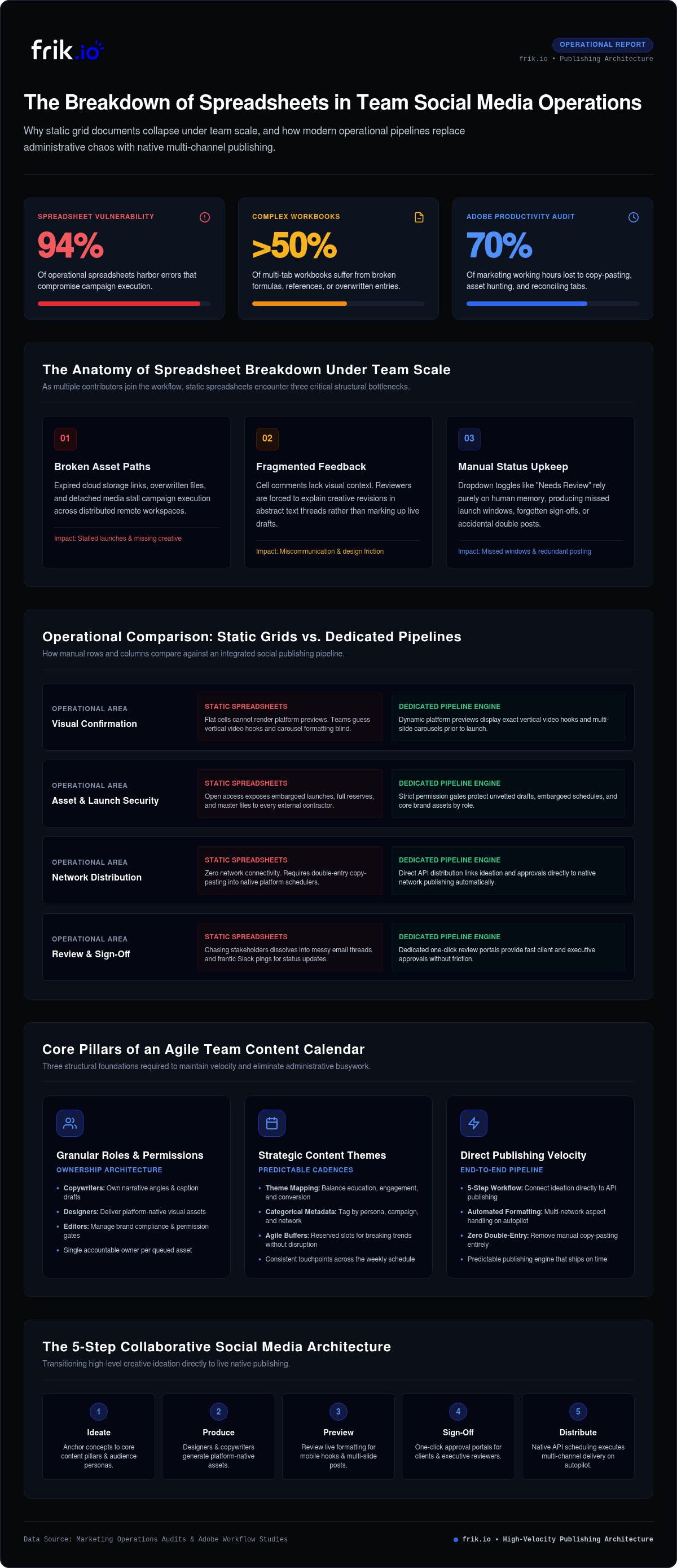
Legacy marketing advice still tells growing companies to manage publishing schedules with free spreadsheet templates. While a grid works for a solo creator tracking five posts a month, it collapses under collaborative demands. Research shows that up to 94% of operational spreadsheets contain errors, with over half of complex multi-tab workbooks harboring broken references or overwritten entries. Relying on rows and columns to orchestrate an agile social media content calendar for teams guarantees friction, lost context, and wasted creative labor.
Static documents naturally create information silos. A copywriter drafts caption variants in cell B12, a graphic designer links an asset in a separate cloud folder, and an editor leaves notes in a side comment. Because these inputs live apart from the actual distribution channels, team members spend hours chasing updates instead of shipping campaigns. Studies by Adobe show marketers lose up to 70% of their working hours on disconnected administrative tasks, including manual copy-pasting, asset hunting, and reconciling feedback across disparate tabs.
The Breakdown of Static Spreadsheets Under Team Scale
Scale magnifies every structural weakness of a manual document. As more contributors join the workflow, version control quickly fractures into duplicate files and conflicting edits. Common failure points include:
- Broken asset paths: Expired cloud storage permissions, overwritten files, and detached media links stall execution.
- Fragmented feedback: Cell comments lack real visual context, forcing reviewers to describe design adjustments in text threads rather than marking up live posts directly.
- Manual status upkeep: Toggling dropdown menus like "Needs Review" or "Approved" relies entirely on human memory, leading to missed launch windows and double postings.
Spreadsheets vs. Dedicated Team Calendars: Operational Comparison
Modern multi-channel distribution demands dynamic visual confirmation. Flat grid cells cannot render live platform previews, leaving your team guessing how a vertical video hook or an Instagram carousel will look on mobile screens until after it goes live. This blind spot inevitably triggers preventable publishing mistakes.
Security and execution pose even steeper hurdles. Sharing open master spreadsheets creates access risks, exposing entire content reserves, embargoed launch details, and raw assets to every contributor or contractor. Worse, spreadsheets have no native connection to social networks. Every approved line item still demands manual transcription into publishing schedulers, doubling human handling. Upgrading to a centralized, dynamic social media content calendar for teams eliminates double-entry entirely, linking initial concept to native API distribution in a single operational pipeline.
Core Pillars of an Agile Team Social Media Content Calendar
Moving beyond spreadsheet chaos requires a reliable operational framework. An agile social media content calendar for teams is not simply a schedule of dates. It functions as an integrated production pipeline that ties high-level brand strategy directly to multi-channel execution, ensuring every contributor knows their role and deadlines.
Defining Granular Roles and Permissions
Collaborative workflows stumble when ownership stays fuzzy. A high-velocity setup designates strict responsibilities: copywriters own narrative angles, designers supply native creative assets, and editors manage compliance. Implementing strict permission gates ensures unvetted drafts cannot trigger native publishing APIs accidentally. Every queued asset must link back to one accountable owner who moves it through the delivery chain.
Structuring Predictable Content Themes and Cadences
Consistent output relies on systematic categorization rather than daily guesswork. Anchoring your weekly calendar to proven content pillars keeps your messaging balanced across brand education, audience engagement, and product conversion. Key structural tactics include:
- Strategic distribution: Map specific themes to dedicated days, giving your audience predictable touchpoints throughout the week.
- Categorical metadata: Tag every draft by audience persona, objective, and campaign for instant multi-channel filtering.
- Agile buffers: Leave scheduled calendar gaps each week so creators can pivot to breaking trends without disrupting evergreen campaigns.
Standardizing Post Statuses Across the Production Pipeline
Status transparency keeps cross-functional teams moving without manual status inquiries. Every piece of collateral advances through four unambiguous states: Drafting, Internal Review, Client Review, and Scheduled. Clear staging signals handoffs instantly, notifying copywriters when design revisions finish or pinging stakeholders when assets enter final sign-off.
Connecting your production rules to an automated distribution engine like frik.io ensures these pillars translate directly into queued posts, giving your team a clean foundation for high-velocity output.
How to Build a Collaborative Social Media Content Calendar in 5 Steps
Transforming strategy into high-velocity execution requires a structured roadmap. Setting up an agile social media content calendar for teams comes down to building a repeatable pipeline that removes friction from drafting, reviewing, and publishing. Follow these five practical steps to establish your unified command center.
Step 1: Map Channel Cadence and Target Capacity
Audit historical channel metrics to calculate realistic posting cadences. Instead of aiming for arbitrary volume, align target frequency with production bandwidth and engagement density. Establish clear balance across feeds by locking in baseline numbers: three weekly in-depth carousels, two short-form videos, and daily community prompts. Anchor key launch dates early so creators know production cutoffs well in advance.
Step 2: Establish the Centralized Digital Workspace
Ditch disconnected document silos and configure a unified operational hub. Build customizable views organized by brand, platform, and campaign objectives. Integrate visual creative repositories directly into the staging interface so writers and designers can attach final assets without juggling cloud drive permissions. An organized command center keeps distributed team members aligned within the same visual context.
Step 3 to 5: Draft, Approve, and Deploy Automatically
Once your workspace foundation is solid, execute the final three stages to activate live publishing:
- Step 3: Accelerate multi-platform drafting. Preserving a unified tone across multiple copywriters can be difficult. Deploy a specialized AI brand voice content generator trained on your exact style guidelines to produce platform-tailored copy variants in seconds while safeguarding brand authenticity.
- Step 4: Route through frictionless review gates. Never send raw copy over email threads. Move finished drafts into dedicated review queues where editors and stakeholders can approve or request revisions directly on live post previews.
- Step 5: Lock in automated publishing queues. Eliminate manual distribution entirely. Connect approved assets directly to platform APIs, scheduling posts to publish automatically across target networks at pre-calibrated peak engagement times.
Executing these five steps establishes an operational social media content calendar for teams that operates smoothly week after week without administrative gridlock.
Solving the Approval Bottleneck: Streamlining Multi-Brand and Client Reviews
Bottlenecks rarely originate during the creative phase; they peak during sign-off. Research reveals that approval delays factor into 92% of all missed marketing deadlines, with 62% of teams citing reviews as their primary operational roadblock. When your social media content calendar for teams relies on messy Slack threads or forwarded email chains, momentum stalls immediately. Stakeholders drop conflicting notes, critical context gets lost, and planned launch dates pass by without resolution.
Eliminating Feedback Fragmentation Across Disconnected Channels
Scattered feedback creates endless confusion for creators. When an executive replies via email while an internal editor leaves notes in a shared doc, the copywriter gets stuck reconciling contradictory instructions. Resolving this issue requires anchoring all feedback directly to the asset itself. Production moves faster when comments sit alongside live post previews, letting contributors review captions, tags, and visuals in context. A unified conversation history ensures clear accountability, cutting down revision rounds and preventing accidental regressions.
Deploying Frictionless Client Approval Portals
Legacy tools often fail because they force external stakeholders to create accounts, remember passwords, and navigate complicated administrative suites. Clients quickly abandon the software and revert to unstructured inbox replies. High-performing teams eliminate this barrier by using dedicated review links that open instantly without forced onboarding.
- Frictionless access: Deliver interactive, mobile-optimized previews that display exact cross-platform rendering with zero login barriers.
- One-click sign-offs: Enable stakeholders to greenlight individual assets or batch-approve entire weekly campaigns with a single click.
- Governance isolation: Keep internal creator chats, drafts, and staging iterations hidden from external eyes, maintaining total operational security.
Combine these portals with established 24-hour review windows to protect your calendar from unexpected publishing delays. If you want to permanently eliminate sign-off drag, streamline your review workflow with frik.io and keep client approvals moving at full speed.
Scale Your Social Media Publishing with frik.io
Modern marketing teams don't need another rigid spreadsheet or bloated enterprise tool requiring lengthy onboarding. They need a fast, intuitive command center that brings strategy, creation, and distribution into one cohesive interface. Operating an agile social media content calendar for teams becomes effortless when you adopt an AI social media management platform designed specifically to strip away operational overhead.
Unifying Creative Ideation and Automated Distribution
Creative momentum dies when teams constantly switch contexts between writing tools, image editors, and external schedulers. Consolidating these fragmented steps into a unified workspace restores velocity across every channel. Key execution benefits include:
- Brand-True AI Content Generation: Produce channel-tailored copy in seconds. The native engine learns your unique brand voice, guidelines, and tone rules, ensuring multi-writer teams output cohesive messaging without manual rewriting.
- Integrated asset prep: Clean up logos and vector graphics directly in your production view using the built-in SVG Converter Tool, avoiding delays between design handoffs and scheduling.
- Autopilot Scheduling: Queue approved assets once and let the engine handle live distribution across supported networks at targeted peak windows without manual double-handling.
Frictionless Collaboration for Growing Teams and Agencies
Review bottlenecks vanish when external stakeholders have an intuitive way to provide feedback. Using a dedicated Client Approval Portal, you can share interactive, branded previews via clean links. Clients view how posts will render natively, leave clear comments, and approve individual assets or full campaigns with a single click. No forced account signups. No confusing dashboard navigations. Internal team discussions stay private, protecting operational governance while delivering a polished, transparent client experience.
Eliminating disconnected documents and manual scheduling gives your creators their time back. Instead of managing administrative damage control, your staff can focus on high-impact campaign strategy and deeper community engagement. It's time to retire brittle grids and run your publishing pipeline from a unified command center. Ready to eliminate calendar chaos? Start scaling with frik.io today.
Transform Your Social Media Publishing into an Agile Command Center
Operational friction doesn't have to define your team's publishing routine. Replacing brittle spreadsheets with a unified pipeline immediately restores creative focus and team alignment. Running a high-velocity social media content calendar for teams is ultimately about giving your creators the leverage to build, review, and ship campaigns without manual handoffs or administrative bottlenecks.
Sustainable marketing velocity requires automated clarity at every stage. Custom brand voice AI training ensures an authentic tone across every team member, while a dedicated Client Approval Portal eliminates chaotic email threads and review stalls. Paired with Autopilot Scheduling that handles cross-network publishing automatically, your production pipeline runs with predictable precision. Stop losing hours to broken workflows and give your team the foundation they need to execute at their best. Upgrade your team to frik.io's AI-powered social workspace and build a frictionless publishing engine today.
Frequently Asked Questions
What is the best way for a team to manage a social media content calendar?
The best way to manage a social media content calendar for teams is deploying a centralized digital workspace that connects creative ideation directly to automated publishing pipelines. Avoid static spreadsheets that fracture under scale. Modern teams use an integrated platform where copywriters, designers, and managers collaborate in real time. This ensures visual previews stay accurate, permissions remain locked, and approved assets queue automatically for distribution across all networks without manual copying between tools.
How do collaborative social media calendars handle client approvals?
Collaborative systems streamline reviews through dedicated external portals that eliminate long email chains and messy message threads. Instead of forcing clients to register accounts or navigate complex internal software, the calendar generates secure, shareable preview links. Clients view exact post mockups on mobile or desktop layouts, leave contextual comments, and issue one-click approvals. Internal team notes remain completely hidden, safeguarding brand governance throughout the entire process.
Can AI tools maintain a consistent brand voice across a team calendar?
Yes, specialized platforms use custom brand voice training to enforce consistent style rules across multiple contributors. Rather than generating generic copy, brand-true AI tools analyze your brand style guidelines, past top-performing captions, and tone parameters. When writers draft new content, the system automatically adapts phrasing, hooks, and formatting to fit your established voice. This allows distributed teams to produce high-velocity content while preventing off-brand variations.
How far in advance should a marketing team plan their social media calendar?
Most agile marketing teams maintain a two- to four-week rolling content calendar to balance consistency with cultural responsiveness. Planning foundational campaigns two to four weeks out gives designers and copywriters adequate runway to produce quality creative and secure stakeholder approvals. Leaving dedicated calendar buffers each week ensures your team has the agility to capitalize on sudden industry shifts, trending conversations, or breaking company news without derailing queued schedules.
What is the difference between a content calendar and a social media scheduler?
A content calendar is a collaborative planning workspace, whereas a scheduler is strictly the technical distribution tool. Traditional schedulers merely queue finished copy and push it live through platform APIs. A dedicated calendar oversees the entire production lifecycle, including thematic ideation, asset creation, internal revisions, and client sign-offs. Modern platforms unify both layers, allowing teams to build, review, and deploy content within a single operational command center.
How do you manage content calendars for multiple brands without cross-posting errors?
Preventing cross-posting errors requires isolated workspaces with segregated user permissions and channel connections for each separate brand. Never bundle distinct clients or brands into a single shared interface. High-velocity teams rely on modular environments where each brand retains its own asset libraries, custom style guides, and dedicated publishing queues. This architectural separation ensures team members never accidentally push one brand's messaging to another's live channel.
What essential features should agencies look for in a team social media calendar?
Agencies need a social media content calendar for teams that features isolated client workspaces, frictionless review portals, and native multi-channel scheduling. Essential capabilities include role-based access controls to protect sensitive drafts, built-in brand voice AI generation to speed up production, and live cross-platform post previews. Look for platforms that offer dedicated client approval links without forcing external approvers to purchase expensive user seats or complete complex software onboarding.


