

More client accounts don’t have to mean a more complicated operation. They call for a more consistent one. If you’re figuring out how to manage multiple social media accounts for clients, you know how quickly routine work can fragment across platforms, calendars, and approval threads. Add distinct brand voices and last-minute feedback, and even a solid publishing plan can slip.
The answer isn’t to make every client’s content sound the same. It’s to standardize the workflow around it. A clear process for drafting, reviewing, scheduling, and reporting helps prevent account mix-ups while leaving room for each client’s voice, priorities, and approval expectations.
This guide shows how to build that repeatable process, from organizing account access and brand guidelines to setting review deadlines and tracking results. It also covers where tools can bring work together: AI drafting informed by style guides can support brand-specific content, while client approval portals and scheduling can coordinate handoffs. The goal is a calmer, more scalable operation, with editorial judgment still in your team’s hands.
Key Takeaways
- Map the handoffs behind each client account so deadlines, reviewers, and responsibilities stay clear.
- Build a repeatable post workflow, and carry essential status details from draft through publication.
- Compare manual tools with a shared workspace by how well they support visibility, account separation, approvals, and reporting.
- Use a pre-publishing checklist to catch client, platform, creative, copy, timing, and approval errors.
- Learn how to manage multiple social media accounts for clients with a connected workflow for brand-specific content and coordinated publishing.
Why managing multiple social media accounts for clients gets complex
Each client account brings its own mix of brand priorities, platforms, publishing deadlines, and reviewers. The workload isn’t simply the number of profiles. One client may need regular educational posts, while another prioritizes product updates or timely campaign content. Each also has different expectations for tone, review, and timing. The challenge is coordinating those differences while keeping track of what’s ready, what’s waiting, and who owns the next step.
Managing client accounts means coordinating client-specific work across channels, not simply publishing more posts. That distinction matters because the same task can require a different approach for each brand. Social media marketing combines strategy, content creation, and measurement, as outlined in Social Media Marketing on Wikipedia. Managing a client portfolio adds another layer: aligning those activities with each client’s goals and decisions.
Where the workload compounds across client accounts
Routine work repeats, but not always in the same way. A weekly planning session, drafting, review, scheduling, and reporting may form the regular cycle. Alongside that cadence, a client might request a timely update, revise campaign details, or change the priority of an upcoming post. These requests may fall outside the original calendar, and they shouldn’t be treated as identical work across every client.
Switching platforms adds friction. A manager moving between native publishing tools, spreadsheets, email, and chat has to reconstruct the context each time: which brand is this for, which version is current, and has it been approved? Those mental resets make status harder to track and increase the risk of duplicate drafts or missed handoffs. Diagnose the workload by separating:
- Recurring tasks: Planned work such as scheduled content reviews and regular reporting.
- Variable requests: Client-specific changes or new priorities that need an owner and a clear next step.
This separation helps teams plan predictable work without assuming every account needs the same publishing cadence or coverage.
Why one generic process can create client-specific problems
Standardizing the workflow is useful. Standardizing the content too far is not. Reusing a caption without adapting its language, format, or context can flatten a client’s voice and make a post feel out of place on its platform. A shared structure should make each brand easier to manage, not make different brands sound alike.
Unclear approval ownership is another common source of delay. A post can be fully drafted and still sit idle if no one knows whether the account lead, client contact, or another reviewer has the final say. Unclear responsibility can also trigger parallel edits: two people revise separate versions, then the wrong one moves forward. Before sending content for review, define who gives feedback, who resolves conflicting notes, and who grants final approval.
To learn how to manage multiple social media accounts for clients, treat each account as a distinct strategy within a consistent operating structure. Keep the process predictable, but record client-specific details such as voice, platform priorities, review expectations, and current campaign focus. This gives the team a reliable way to coordinate work without losing the decisions that make each client’s presence distinct.
Build a repeatable workflow for every client social media account
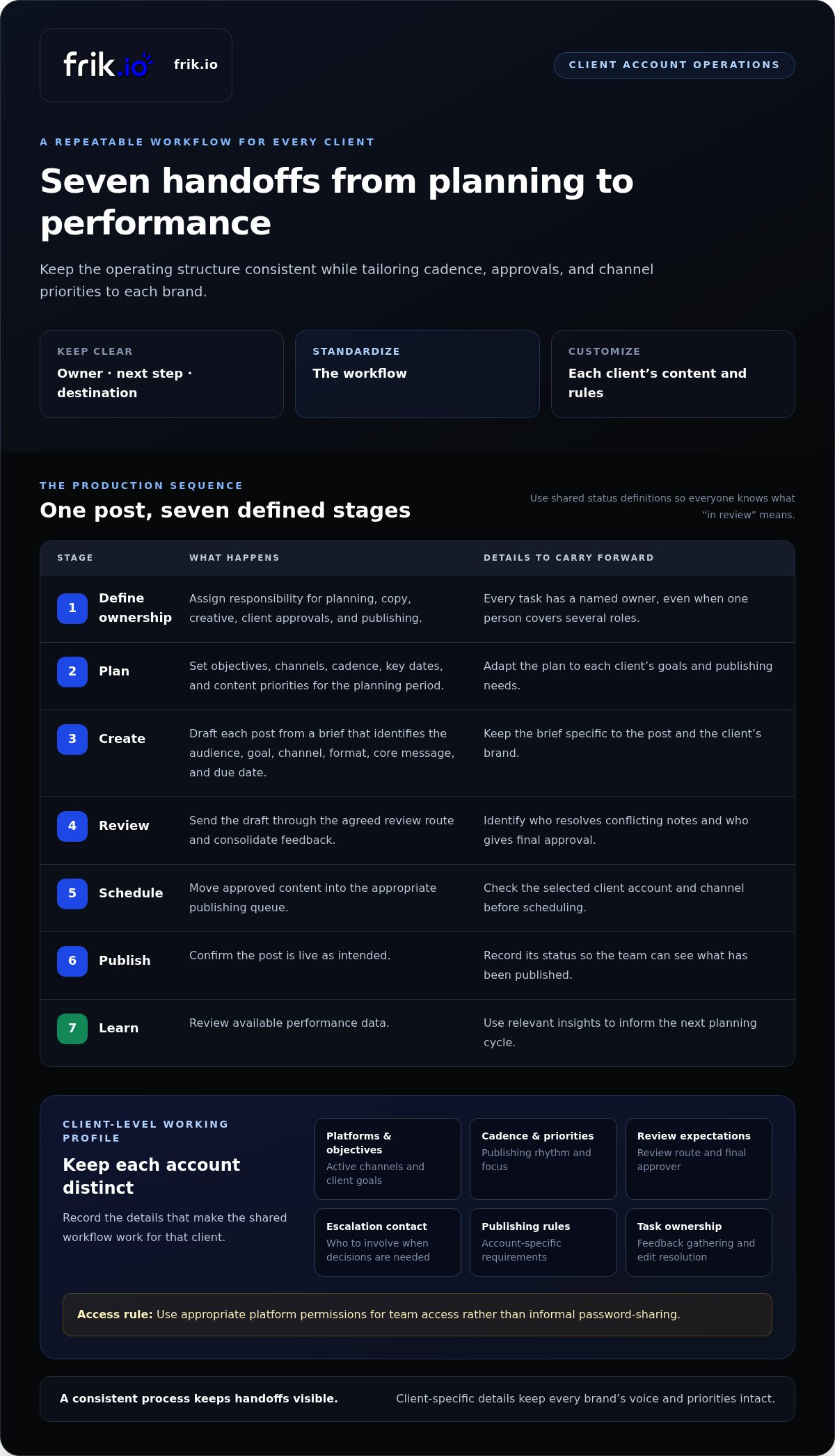
A reliable workflow gives every post a clear owner, next step, and destination. Keep the sequence consistent across your portfolio, but tailor details such as publishing cadence, approval deadlines, and channel priorities to each client. This is the practical foundation for how to manage multiple social media accounts for clients without forcing every brand into the same strategy.
- Define ownership: Assign responsibility for planning, copy, creative, client approvals, and publishing. One person may cover several roles, but each task needs a named owner.
- Plan: Set the client’s objectives, channels, cadence, key dates, and content priorities for the planning period.
- Create: Draft each post from a brief that identifies its audience, goal, channel, format, core message, and due date.
- Review: Send the draft through the agreed review route, consolidate feedback, and identify who has final approval.
- Schedule: Move approved content into the appropriate publishing queue, checking the selected client account and channel.
- Publish: Confirm the post is live as intended and record its status.
- Learn: Review available performance data and use relevant insights to inform the next planning cycle.
Set client-level ownership, access, and working rules
Create a concise working profile for each client. Record its active platforms, objectives, publishing cadence, review expectations, escalation contact, and account-specific publishing rules. Assign owners for key tasks, including who gathers feedback and who resolves conflicting edits. Use appropriate platform permissions for team access rather than informal password-sharing. Clear ownership reduces ambiguity when a post needs a decision or a deadline changes.
Move each post through a visible production and review sequence
Make status visible wherever the team coordinates work. Use shared definitions so “in review” means the same thing to everyone: draft is being prepared, review is awaiting feedback, approved has final sign-off, scheduled is queued for publishing, and published is live. Keep the client, channel, owner, due date, current version, and next action attached to the post. Consolidate comments before revising, and record who can approve the final version. A client approval portal can make review a defined handoff instead of scattering comments across messages.
Preserve each client’s voice while adapting content by platform
Keep voice guidance, approved examples, audience notes, and terminology specific to each client. Adapt the format, length, and framing for the intended channel instead of pasting identical copy everywhere. AI can provide an editable first draft informed by a client’s style guide, but a person should review accuracy, voice, context, and fit before approval. For a deeper approach to brand-specific drafting, use this AI brand voice tool guide.
A shared workspace can support this process by bringing drafting, client review, scheduling, publishing, and analytics together. Explore how frik.io’s social media workspace fits into a repeatable client workflow.
Compare manual and centralized ways to manage client accounts
Spreadsheets and native platform tools can work well when the portfolio is small, publishing is straightforward, and only a few people review content. Their limits tend to appear gradually: calendars live in separate files, drafts sit in different places, and someone has to reconcile performance data manually. A shared workspace can bring more of that activity into view, but it won’t fix unclear roles or inconsistent client processes on its own.
| Workflow area | Spreadsheets and native tools | Shared management workspace |
|---|---|---|
| Visibility | Teams check separate calendars and platform views to understand what’s coming up. | Shared planning and publishing views can make upcoming work easier to scan across accounts. |
| Handoffs | Updates may pass between files, messages, and platform tools, leaving the next step less obvious. | Coordinated creation, review, and scheduling can keep work moving through a more visible process. |
| Account separation | Account names and channel details need careful manual tracking across documents and logins. | Organized client work can help teams keep each brand’s content and publishing context distinct. |
| Review tracking | Approval status may need to be updated across a calendar, email thread, or other record. | Client approval portals can support collaborative review within the workflow. |
| Reporting | Teams may need to gather results from separate platform analytics views. | Multi-platform analytics can bring reporting into a more connected view. |
When spreadsheets and native platform tools can be enough
Keep your current setup if it gives the team a reliable view of each post, its owner, and its approval status. A compact portfolio with stable publishing needs may not call for a process change. First, note where manual upkeep is already required: reconciling calendars, finding the latest draft, or collecting results from different platforms. These recurring tasks show whether the setup still serves the work.
What a centralized workspace changes for an agency
A shared workspace can reduce the need to jump between tools just to see what’s planned or waiting for review. Check how it supports your actual handoffs: Can the team keep client work distinct, use brand guidance, coordinate approvals, and review analytics in a connected workflow? frik.io supports content creation, scheduling, publishing, client approval portals, and analytics across multiple platforms. Centralization can coordinate those activities, but it doesn’t replace strategy, editorial judgment, or client-specific decisions.
Choose the workflow based on operational friction
Before comparing features, identify where work gets stuck. Is the main issue a growing number of accounts, complex approvals, multiple team members, or manually assembling reports? Match the workflow to those needs, and change tools only when the current process creates repeated friction. The best-fit system reduces handoff friction while keeping every client’s work distinct. For more detail on measurement, explore this social media analytics agency ROI guide. If shared planning, review, publishing, and analytics fit your workflow, frik.io’s social media management workspace offers a connected option.
Use this checklist to keep client publishing accurate and on schedule
A dependable publishing check catches more than typos. It confirms that the right content is moving through the right client’s workflow, on the right channel, with approval in place. Use the checklist below as a weekly control point, then adapt it to each client’s review windows and publishing needs. This makes how to manage multiple social media accounts for clients easier to put into practice without assuming every account follows the same schedule.
Run a weekly planning and approval check
Before the week’s content moves forward, review upcoming priorities with the team and identify anything that could block production. Confirm campaign dates, assets, review windows, and the person responsible for each missing input. Build time for client feedback into the plan. If an asset or approval is outstanding, assign an owner and due date rather than letting the post sit without a clear next step.
- Confirm upcoming priorities, campaign dates, and required creative.
- Check that client review windows fit the planned publishing dates.
- Assign an owner and due date to every open item.
Apply a final account-and-content quality check
Complete a final review before scheduling or publishing, even if the content has already passed through client approval. Verify the destination and the exact version being used. Platform adaptations should be intentional, not accidental copies of another channel’s post. A short, consistent check helps catch mismatches while there’s still time to correct them.
- Confirm the client account and social network.
- Check that the creative and copy match the approved version and brand context.
- Test links and review accessibility details, such as alt text where relevant.
- Confirm timing, platform fit, and approval status before publishing.
- After publication, verify that the post is live as intended and note any issue for follow-up.
Handle changes without losing the publishing record
Late edits, sensitive content, or a paused campaign need a defined route, not an improvised workaround. Decide who can pause, edit, or reschedule content, and who must be notified when a decision changes. If a client requests a pause, review queued posts for that account before the next scheduled item goes live. Record what changed, when it changed, and who approved the new direction.
- Pause affected content while the team confirms the requested change.
- Update the post’s status and document the decision and next action.
- Notify the relevant client contact and internal owner.
- Recheck queued content before rescheduling or resuming publication.
Once this checklist is part of your routine, a shared workspace can help coordinate review, scheduling, and publishing across client accounts. Explore frik.io’s social media management workspace to support that publishing workflow.
Scale client social media management with a connected workspace
Once your workflow is clear, software can help carry it across client accounts. Think of a connected workspace as the operational layer for drafting, review, scheduling, publishing, and learning, not a substitute for the process itself. Keep each client’s voice, channel priorities, cadence, and approval expectations distinct while coordinating the work in one place. That balance is central to how to manage multiple social media accounts for clients as your portfolio grows.
Coordinate client content creation and publishing in one workspace
frik.io supports creating, scheduling, and publishing content across social networks. Its AI can draft captions in a brand’s voice and tailor posts to different platforms, while training on a style guide can help shape a more relevant first draft. Treat that draft as a starting point, not a finished post. Your team still needs to check the message, channel fit, and client-specific requirements before content moves forward. For broader context on using AI in the workflow, see this AI social media management platform guide.
Make client review and performance learning part of the workflow
Client approval portals support collaborative review, giving the team and client a shared step for feedback and sign-off. After publishing, multi-platform analytics can inform how you assess account performance and plan future content. Use those insights as inputs, not automatic instructions: the team remains responsible for interpreting results, making editorial decisions, and communicating with each client. Technology organizes the handoffs; people provide the context and judgment.
Choose a focused next step for your agency workflow
Don’t move every account into a new process at once. Map one client’s workflow from initial planning through review, publishing, and performance review. Note where work waits or information gets lost. Then choose the most time-consuming handoff as your first improvement opportunity. This grounds the change in a real need and gives the team a clear example to refine before applying the workflow to other clients.
As you map that account, identify which activities need to stay client-specific and which steps can follow a shared structure. For example, you might use a consistent review sequence while keeping each client’s voice guidance and publishing priorities separate. A workspace should support that distinction, not erase it. Start with the workflow, then assess whether connected drafting, approvals, scheduling, publishing, and analytics fit the way your team works.
Explore frik.io to see how a connected social media workspace can support your client workflow.
Make your next workflow easier to scale
The next step doesn’t need to be a full agency-wide overhaul. Choose one client account and identify the handoff that creates the most friction. Then map how that work should move while preserving the client’s voice, review expectations, and publishing priorities. A focused test gives your team a practical way to refine the process before expanding it to other accounts.
frik.io can support that workflow with AI drafting informed by a user’s style guide, client approval portals for collaborative review, and scheduling, publishing, and multi-platform analytics. Your team stays in control of editorial decisions and client communication. The goal is to make how to manage multiple social media accounts for clients a clear, repeatable operation that can grow without erasing what makes each brand distinct.
Explore frik.io’s social media management workspace and take the next step toward a more coordinated client workflow. With a strong process in place, your team can scale with greater clarity and confidence.
Frequently Asked Questions
Is it safe to manage all client social media accounts from one dashboard?
Yes, a centralized dashboard can be safe if access is managed carefully. Use role-based permissions where available, limit access to people who need it, and avoid shared passwords. Centralizing work changes where accounts are coordinated, not who should have access or who owns publishing decisions. Review permissions when responsibilities change, and make sure the client’s account ownership and your team’s publishing authority are clear.
How many client social media accounts can one manager handle?
There’s no universal account count that works for every manager. The workload depends on factors such as platform mix, publishing frequency, content complexity, approval steps, client response times, and whether community engagement is included. To assess how to manage multiple social media accounts for clients sustainably, track recurring work and note where reviews or revisions create bottlenecks. Expand capacity only when existing work remains timely and meets quality expectations.
Can multiple clients use the same social media content calendar?
Yes, a shared calendar can help teams see deadlines across their client portfolio, provided each client’s work stays clearly separated. Use consistent client labels, assign ownership, and make each post’s approval status visible. Set calendar access according to what each person needs to see, especially when clients use the same planning space. Keep strategy, audience details, and approved voice guidance client-specific so a convenient overview doesn’t blur brand boundaries.
What should an agency do when a client has no documented brand voice?
Create a working voice guide from approved content and client input before drafting at scale. Collect examples the client considers on-brand, audience information, preferred terms, and language to avoid. Turn those into concise guidance, then ask the client to review it against a sample post. If you use AI drafting, compare its output with the approved examples and revise the guide when feedback reveals a new preference or positioning change.
How can agencies avoid publishing a post to the wrong client account?
Check the account deliberately immediately before scheduling or publishing, rather than relying on the account selected earlier in the day. Confirm the client name and social profile together, then verify the approved copy, creative, timing, and authorization. A consistent naming convention can make similar profiles easier to distinguish. After the post goes live, check the intended profile. If an error occurs, document what caused it and adjust the safeguard.
What should happen if a client asks to change a scheduled post at the last minute?
Route the request through a clear change process and pause publication if the authorized owner hasn’t resolved it. Confirm exactly what needs changing, whether the revised content requires client approval, and who will update the scheduled post. Record the request and decision in the publishing record so the team doesn’t act on an isolated message. If the revision affects a campaign, review related queued content before it continues.
Should agencies post the same content on every social media platform?
Reuse the core idea when it suits the client’s goals, but adapt how it appears on each platform. For example, a product announcement might need a concise, visual-led version on one channel and a more explanatory caption on another. Review the audience, format, creative, and message for each version before scheduling. This keeps campaign messaging aligned without making every post feel copied or disconnected from its channel.


