

What if the post that damages trust isn’t a major campaign, but a small copy-and-paste error that nobody caught before publishing? A wrong link, outdated detail, or caption that misses the mark can turn a routine post into a public problem. To prevent embarrassing social media mistakes, teams need more than a final glance. They need a reliable review process.
If you’re concerned about inaccurate, insensitive, or off-brand content, focus on the steps before a post goes live. Unclear approvals and juggling several platforms can leave even careful teams exposed. The answer isn’t to slow every post with endless sign-offs. It’s to make ownership and checks clear.
This guide explains how to build a practical pre-publish checklist, assign review roles, and set escalation steps for higher-risk content. You’ll learn how to adapt posts for each platform without letting changes slip through, and what to do calmly if a mistake gets published. Brand-voice AI and shared approval workspaces can support the process, while human judgment remains the final safeguard.
Key Takeaways
- Sort potential errors by risk, from small typos to inaccurate claims, sensitive topics, rights issues, and publishing details.
- Use a lightweight checklist for routine posts, then add specialist review when the content carries higher stakes.
- Assign one accountable approver and define clear handoffs from brief and draft through scheduling and monitoring.
- Prevent embarrassing social media mistakes by adapting content for each platform and checking the final version before it goes live.
- Centralize drafts, feedback, and approval status in a shared workspace, while keeping final judgment with people.
Embarrassing Social Media Mistakes and Why They Happen
An embarrassing social media mistake is a preventable post that weakens trust, creates confusion, or makes a brand look careless. Not every typo has the same impact. A missing comma may be easy to fix, while a false product claim, insensitive caption, or post aimed at the wrong audience can raise bigger questions about a brand’s judgment.
The impact matters more than the size of the error. A broken link can often be corrected quickly. A joke that lands badly during a serious event may need a thoughtful public response because the problem is the message, not just its formatting.
Which social media mistakes can damage a brand’s credibility?
Credibility risks range from basic publishing details to content that misjudges the moment. A post might include an outdated event date, incorrect product detail, broken destination link, or tag pointing to the wrong person or organization. Each can confuse followers or make the brand seem inattentive.
Tone and timing need equal care. Humor that feels natural in a campaign can sound dismissive beside a sensitive news event. Before publishing, check whether the wording fits the audience, context, and purpose. Correct factual or technical errors promptly. If a post may have caused offense or damaged trust, consider its impact before deciding how to acknowledge and address it.
Why do preventable mistakes slip through?
Speed can create blind spots. A last-minute edit to a caption, image, or link may happen after approval, leaving the published version different from the one reviewers checked. Copying a post across platforms can create another mismatch: a call to action may refer to a feature that isn’t available there, or the format and context may not suit that audience.
Ownership matters, too. If everyone assumes someone else checked the final draft, key details can be missed. If several people review without a clear approver, the same checks may be repeated while another important one is skipped. Rushed publishing, unclear handoffs, and platform differences turn small oversights into avoidable public errors.
- Accuracy: Are names, claims, dates, and details current?
- Destination: Do links work, and do tags identify the intended account?
- Context: Does the tone fit the audience and the moment?
- Platform: Do the copy, format, and call to action make sense here?
These checks help teams prevent embarrassing social media mistakes without relying on someone to remember every detail under deadline pressure. A repeatable workflow makes the right review visible before a post goes live.
How do you identify high-risk posts before they go live?
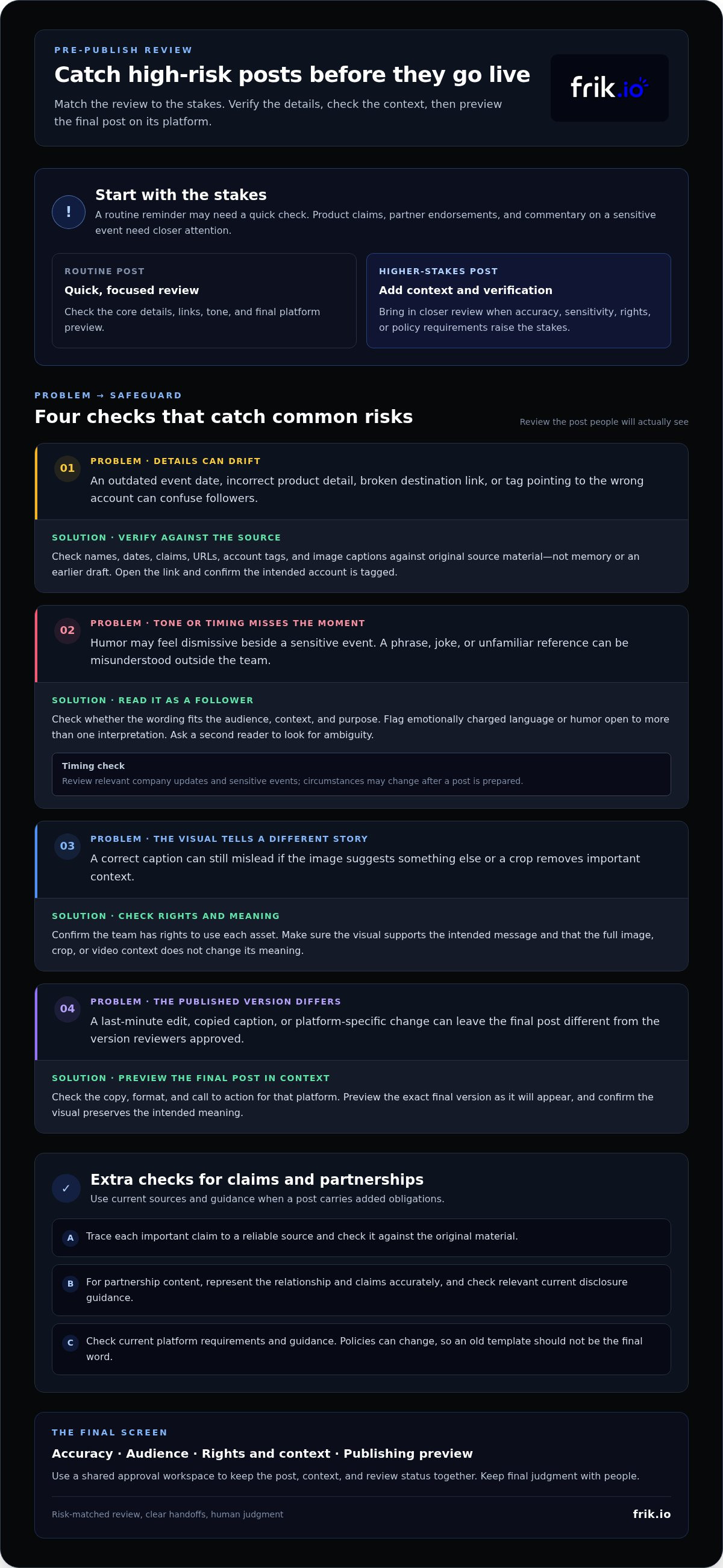
Sort each post by risk rather than treating every draft the same. Check accuracy, audience sensitivity, brand voice, usage rights, links, and publishing details. A routine reminder may need a quick check. A post with product claims, a partner endorsement, or commentary on a sensitive event needs closer attention because a mistake could have consequences beyond the post itself.
A high-risk post is content that needs extra context, verification, or approval before it’s safe to publish. That doesn’t mean every such post requires a long review. Match the review to the stakes. For claims, partnerships, and platform-specific requirements, check current guidance and source material before approving. Rules and platform policies can change, so don’t rely on an old template as the final word.
Check facts, links, tags, and visual context
Verify details against the original source, not memory or an earlier draft. Confirm names, dates, quoted claims, URLs, account tags, and image captions. Then open the destination link and preview the post as it will appear on the platform. A correct caption can still mislead if the image suggests something different or a crop removes context from a graphic or video.
For partnership content, confirm that the relationship and the post’s claims are represented accurately, and check relevant current disclosure guidance. For images and other assets, make sure the team has the rights to use them and that the content supports the intended message.
Review tone, timing, and audience impact
Read the post as a follower would, without assuming they know the brand’s intent. Could a phrase sound dismissive? Could a joke rely on context the audience won’t have? Flag emotionally charged wording, unfamiliar cultural references, or humor that could be interpreted in more than one way. A second reader can often spot ambiguity the writer has stopped noticing.
Check the schedule against relevant company updates and sensitive events before publishing. A prepared post may feel out of place after circumstances change. For a fast, practical screen, ask:
- Accuracy: Can each important claim be traced to a reliable source?
- Audience: Could the wording or visual be misunderstood outside the team?
- Rights and context: Is the asset appropriate to use, and does it reinforce the message?
- Publishing: Does the final platform preview preserve the intended meaning?
These checks help teams prevent embarrassing social media mistakes by matching scrutiny to risk. A shared approval workspace can help reviewers see the post, context, and status together. Collaborative social media approvals make those handoffs easier to track.
Can a social media checklist prevent mistakes without slowing publishing?
Yes, when the review matches the post’s risk. A checklist makes essential checks repeatable without adding approval layers to every routine update. Use a quick self-review for low-risk content, a lightweight checklist for standard posts, and a role-based approval workflow when a post needs specialist input or explicit sign-off.
The goal is clarity, not more process. One person should know what they’re checking and who has authority to approve the final version. This AI social media management platform guide offers broader context on organizing content and approvals across a team.
| Approach | Speed | Accountability | Best suited to |
|---|---|---|---|
| Informal self-review | Fastest | Depends on the author’s own checks | Low-risk, routine posts |
| Lightweight checklist | Fast once familiar | Records the checks and owner | Standard posts across platforms |
| Role-based approval | More review time | Clear approver and specialist handoffs | Sensitive claims, major announcements, or client-facing content |
What belongs on a pre-publish social media checklist?
Make each item specific enough for another teammate to apply consistently. “Check the post” is vague; “open the destination link and confirm it matches the caption” is actionable. Include:
- Verify facts, names, dates, and claims against the source.
- Check audience fit, tone, and whether the visual supports the message.
- Confirm asset usage rights, links, tags, and captions.
- Review platform format, final preview, and scheduled time.
- Record the post owner, approver, and approval status before it enters the queue.
For routine content, one person can complete the checklist and mark the post ready. That’s faster than routing every post through several reviewers, while still creating a visible checkpoint.
When should a post receive an additional review?
Add a reviewer when the content includes sensitive claims, a high-visibility announcement, uncertain context, or a topic that requires subject-matter expertise. For agency teams, route client-facing posts to the designated client approver and wait for explicit approval before scheduling. Make the handoff clear: identify who reviews the content and what status signals approval.
A checklist reduces reliance on memory, but it can’t eliminate every error. Recheck the final version after meaningful edits, and keep human judgment in the workflow. A short, risk-based process can help teams prevent embarrassing social media mistakes without making every post a bottleneck.
How can teams build a reliable social media review process?
A reliable process gives every post a clear path from idea to publication, with one accountable approver at the end. Keep the steps visible so a post can’t move forward based on assumptions or outdated feedback.
- Brief: Record the goal, audience, platform, key facts, assets, and any required input.
- Draft: Create the copy and platform-specific versions. Use an AI brand voice guide to support consistent drafting, then review the language for context and accuracy.
- Review: Ask the assigned reviewer to check the content against the brief. Route factual claims to a subject-matter expert when needed.
- Approve: Name one person accountable for the final decision. For client-facing content, make the client approval step explicit.
- Schedule and monitor: Schedule only the approved version, then check the live post and watch for issues that need a response.
Define roles by content type. One teammate might draft and check links, while a subject-matter reviewer verifies a technical claim and the designated approver gives final sign-off. Set an escalation path for posts that need legal, leadership, or client input. Clear routing prevents missed checks and approval by assumption.
Set clear roles, approvals, and version control
Keep feedback and approval tied to the current version of the post, not scattered across email, chat, and separate documents. If an approved caption changes, mark it as needing review again. Even a small late edit can alter a claim, tone, or link. A shared workspace can keep ownership, comments, and approval status together. frik.io supports collaborative approvals and client review portals, helping teams manage these handoffs in one workflow.
What should you do after an incorrect post is published?
Respond calmly and follow a simple sequence:
- Pause scheduled follow-up posts if they could repeat or compound the error.
- Assess the post’s reach, the nature of the mistake, and its likely impact. Then decide whether to edit, publish a correction, or remove it.
- Communicate clearly if an audience-facing correction is needed. Avoid defensive wording.
- Document what happened, identify where the process failed, and update the relevant check or handoff.
Reviewing the cause turns a slip into a workflow improvement. A shared publishing and approval workspace can make that process easier to manage. Build a clearer social media approval workflow with frik.io.
How can social media tools help prevent embarrassing mistakes?
Tools can reduce workflow gaps by bringing drafts, feedback, approval status, scheduling, and publishing into one shared space. That’s easier to track than a version moving between email threads and documents, where reviewers may comment on different copies or miss a late edit. A shared workspace shows what’s ready, what needs attention, and who owns the next step.
Software supports the checks, but doesn’t replace them. AI can help draft in a consistent brand voice or adapt copy for different platforms. It can’t prove that a fact is accurate, a joke is appropriate, or a claim is ready to publish. A person still needs to verify details, assess tone, and review each platform-specific version.
Which safeguards should a social media platform support?
Look for shared drafts, visible approval status, collaboration, and previews that show how content will appear on each platform. Brand-voice guidance can make drafts more consistent, especially when it reflects the team’s own style guide. It doesn’t validate claims or judge context, so keep fact-checking and human review in the process. For more on AI-assisted drafting, explore this AI brand voice content generator strategy.
These safeguards are most useful when they keep the approved version connected to the scheduled post. If content changes after approval, reviewers should be able to see that it needs another look before it goes live.
How does frik.io fit into a mistake-prevention workflow?
frik.io brings brand-voice content generation, platform-tailored posts, collaborative approvals, client review portals, scheduling, and publishing into a social media management workspace. Teams can use AI trained on their style guide to support drafting, adapt content for each platform, and route it through review. Keeping post ownership and approval status visible helps prevent confusion about which version is cleared to publish.
For agencies, client review portals provide a way to include clients in approval workflows. Reviewers can assess the content before it moves into scheduling, while the team remains responsible for checking facts, tone, and context. Used this way, tools help teams prevent embarrassing social media mistakes by making the process easier to follow, not by promising that errors can never happen.
Explore frik.io to see how drafting, review, scheduling, and publishing can fit into one workflow.
Make Every Post Easier to Review
Prevent embarrassing social media mistakes with a process your team can repeat: match review effort to risk, make ownership clear, and check the final version before it’s published. A focused checklist catches routine issues without turning every post into a lengthy approval chain.
Give reviewers a shared view of drafts, feedback, and approval status, then keep human judgment at the center. AI trained on your team’s style guide can support consistent drafting, while platform-tailored content helps teams adapt posts for different channels. People still need to verify facts, assess tone, and approve the version that will go live.
frik.io brings drafting, collaborative approvals, client review portals, scheduling, and publishing into one workflow. Explore frik.io’s social media workflow and make the path from draft to publication easier to manage. With clear checks and the right tools, your team can publish with more confidence and spend less time untangling avoidable mistakes.
Frequently Asked Questions
What are the most common embarrassing social media mistakes?
Common mistakes include inaccurate claims, outdated details, broken links, incorrect tags, and posts published with the wrong image or context. Tone can also misfire: a joke or promotional message may feel insensitive when the audience is dealing with a serious event. Copying content across platforms without adapting the format or call to action can create confusion. A small typo is usually easy to correct; misleading or poorly judged content may need a more considered response.
How can I prevent posting from the wrong social media account?
Make account identity part of the final publishing check. Confirm the profile name and icon in the composer, then preview the post in the account and platform where it will appear. Keep access limited to the people who need it, label connected accounts clearly, and avoid switching profiles mid-task when possible. For scheduled content, check the selected account again before approving the queue, especially when managing several brands or platforms.
Should every social media post require approval?
No. Match the approval process to the post’s risk. A routine update with established messaging may only need the author’s checklist, while a sensitive claim, major announcement, partnership post, or uncertain topic may need an accountable approver or subject-matter review. Define these thresholds in advance so the team knows when to escalate. This keeps reviews focused on content that needs extra scrutiny instead of making every post wait for multiple sign-offs.
Can AI prevent social media mistakes?
AI can support safer workflows, but it can’t guarantee error-free posts. It can help draft in a brand’s voice or adapt copy for different platforms, giving reviewers a useful starting point. People still need to verify facts, check links and tags, review tone, and confirm that each version fits its audience and platform. To prevent embarrassing social media mistakes, treat AI as a drafting aid, not the final approver.
What should a social media pre-publish checklist include?
A useful checklist covers the details most likely to change or be overlooked: facts, names, dates, claims, audience, tone, visual assets, links, tags, platform format, and scheduled time. Include the post owner and a clear approval status, too. Make each instruction specific, such as “open the link and confirm it matches the caption,” rather than “check everything.” That gives teammates a consistent standard and makes the final review easier to complete.
What should a brand do after publishing an embarrassing mistake?
First, assess what’s wrong and whether scheduled follow-up content could repeat or worsen it. Then consider the post’s reach and likely impact before choosing to edit it, publish a correction, or remove it. If the audience needs clarification, respond clearly and avoid defensive language. Record what happened, identify which review step failed, and update the workflow so the same issue is less likely to slip through again.
How do social media approval workflows reduce publishing errors?
Approval workflows make ownership, feedback, and status visible, so teams can see who must review a post and whether the current version is cleared to publish. They also reduce confusion caused by comments scattered across documents, email, and chat. For example, a shared workspace can keep client feedback attached to the relevant draft. Reviewers still need to use judgment, but clear handoffs make missed or duplicated checks less likely.


