

What if AI could break your poll-planning block without making every question sound like it belongs to every brand? Using AI to generate social media polls and questions can give you a fast first draft, but the strongest ideas still start with what your audience cares about. Generic options may fill a content calendar. Relevant ones give people a clear reason to respond.
If you’ve stared at a blank planner or struggled to make AI output sound like your brand, you’re not alone. Treat AI as a starting point, not a source of audience insight. Give it context, review each suggestion, and shape the wording for the people you want to reach.
This guide lays out a repeatable prompt-to-post process: how to build audience-relevant polls and open-ended questions, adapt them for different social platforms, and spot generic or off-brand results. You’ll also learn how drafting, review, and platform adaptation can fit into a shared team workflow.
Key Takeaways
- Use AI to generate social media polls and questions as drafts, then add audience context to make each prompt more relevant.
- Build stronger prompts by specifying the audience, objective, format, constraints, and variations you need.
- Compare workflows by how well they support brand guidance, platform adaptation, review, and publishing handoff.
- Review each draft for clarity, neutrality, answerability, and brand fit before sharing it with your audience.
- Turn useful edits into a repeatable team process, from audience insight through review and publication.
What AI-Generated Social Media Polls and Questions Can, and Cannot, Do
AI-generated social prompts include draft poll wording, answer options, and open-ended questions created from instructions. They give you material to assess and refine, not a finished measure of what your audience thinks. A poll asks people to choose from set options. An open-ended social question invites them to respond in their own words.
Use a poll when you want a quick choice between clear, distinct options. For example, a travel brand might ask, “Which kind of weekend trip would you choose?” with options such as “A quiet cabin” and “A city break.” Use an open-ended question when you want people to explain a preference, share a story, or suggest an idea: “What makes a weekend trip feel restorative to you?” The first is easy to answer with a tap; the second asks for more thought and typing.
Both formats are part of the broader mix of Social Media Platforms, but the right choice depends on your post’s goal and the effort your audience is likely to give. A lightweight preference check may suit a poll. A request for detailed feedback may suit an open question, especially when people have a clear reason to share. Don’t choose a format just because AI produced a polished draft. A question that doesn’t connect to your audience can still feel generic, while an unclear poll can leave people unsure how to compare the options.
When to use a poll versus an open-ended question
Match the response format to the insight you need. Polls work well for quick choices when the options are easy to understand and cover realistic responses. Open-ended questions are better for explanations, personal experiences, or suggestions that won’t fit in a short option list. Consider the effort involved: a one-tap choice is easier to answer than a prompt that asks someone to compose a detailed reply.
AI can suggest both formats, but it can’t decide on its own whether a question is timely, appropriate, or meaningful to your specific audience. That judgment comes from your knowledge of the people you serve, the conversation you want to start, and a human review of the draft. Treat AI to generate social media polls and questions as a way to expand your starting ideas, not as a substitute for audience insight.
What AI needs before it can generate useful ideas
Give the model enough direction to draft for a real audience and purpose. Describe the audience characteristics that matter, set topic boundaries, and explain the post’s objective. Include brand language or a style guide, then specify constraints such as tone, length, and number of answer options. Clear inputs narrow the creative space and make the drafts easier to assess.
- Audience: Who should recognize themselves in the prompt?
- Objective: Are you gathering preferences, inviting stories, or sparking discussion?
- Boundaries: What topics, assumptions, or wording should the draft avoid?
- Format and constraints: Should AI write a poll or open question, and what tone, length, or option count should it follow?
For instance, “Write engagement questions for a fitness brand” gives little direction. A stronger brief names the audience, describes a situation they recognize, and states the post’s goal. Review the drafts for relevance and clarity before adapting them to the social channel you plan to use.
How to Prompt AI for Better Social Media Polls and Questions
A useful prompt gives AI a clear job and enough audience context to do it well. Instead of asking for “engaging poll ideas,” define who the post is for, what they care about, what you want to learn, and what kind of response you want. Then set boundaries for tone, length, and format. This structure makes drafts easier to evaluate and refine.
Build a prompt around audience, objective, and topic
Start with the audience’s situation, not just a broad demographic label. “Busy parents” is a start; “parents planning quick weeknight dinners after work” gives the model a more concrete context. Name a topic your audience is likely to recognize, then state whether you want to gather preferences, opinions, experiences, or ideas. Define subjects to avoid so the draft stays relevant and appropriate.
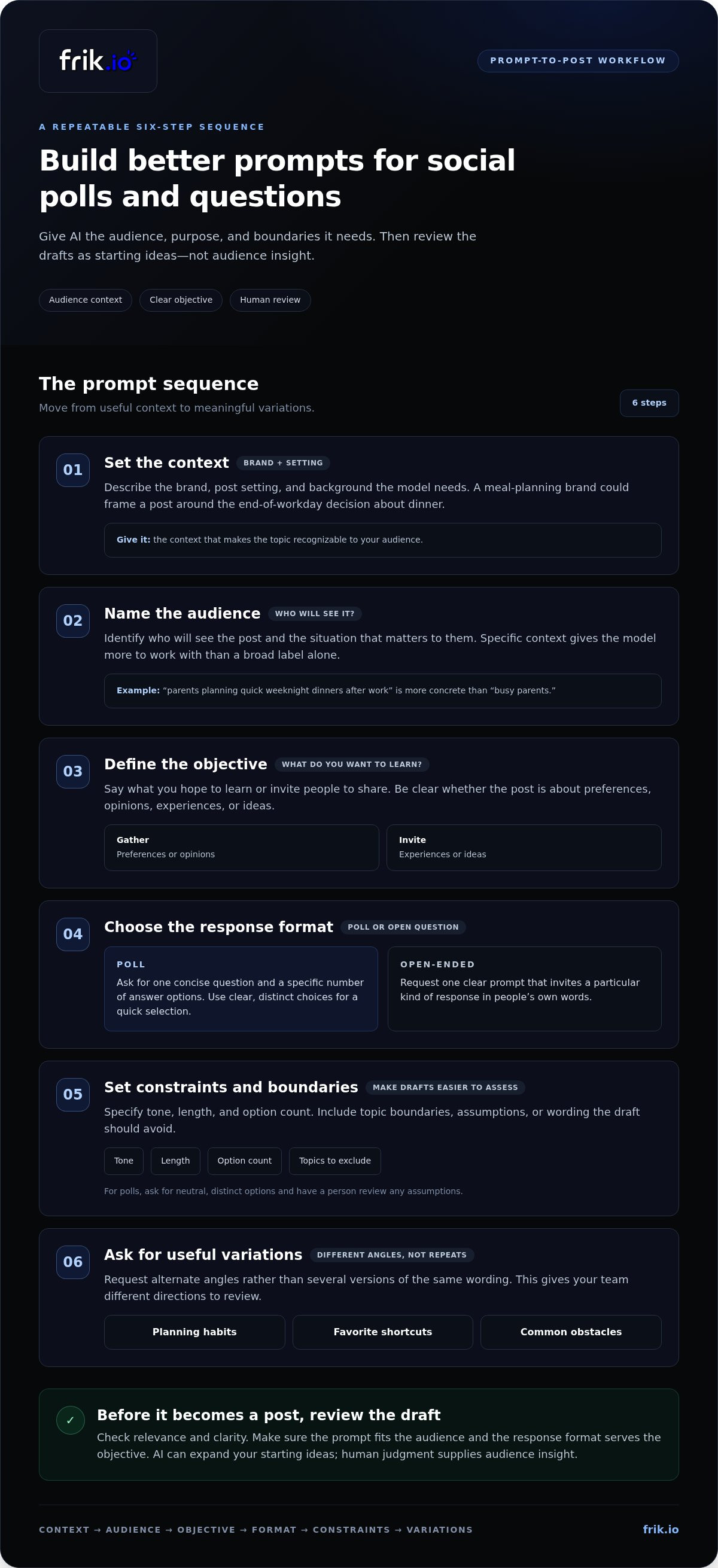
A repeatable prompt sequence helps keep the brief complete:
- Context: Describe the brand, post setting, and background the model needs.
- Audience: Identify who will see the post and the situation that matters to them.
- Objective: Say what you hope to learn or invite people to share.
- Format: Request a poll or an open-ended question.
- Constraints: Specify tone, length, option count, and topics to exclude.
- Variations: Ask for different angles, not just alternate phrasing.
For example, a meal-planning brand could prompt around the end-of-workday decision about dinner, rather than simply requesting engagement ideas. That specific situation gives the model a useful frame while leaving room for options the team can review.
Request distinct options and useful variations
For a poll, ask for one concise question and a specific number of answer options. Tell AI to make the choices distinct and neutral, and to flag assumptions for human review. For an open-ended question, request one clear prompt that invites a particular kind of response. Ask for alternate angles, such as planning habits, favorite shortcuts, or common obstacles, rather than several versions of the same question.
Illustrative prompt, not a guaranteed-performing formula:
“We’re a meal-planning brand speaking to people who decide what to cook after a busy workday. Draft one concise social poll about choosing a weeknight dinner. The goal is to learn what people prioritize: speed, ingredients they have on hand, or variety. Give exactly three distinct, neutral answer options. Keep the tone practical and warm. Avoid health claims and assumptions about household size. Provide two alternative angles and flag anything that needs human review.”
In short, AI generates more relevant drafts when you specify context, audience, objective, format, constraints, and meaningful variations. Review options for assumptions and brand fit before using them. If your team is building a consistent drafting and review process, brand-voice content generation can connect prompts with the style guidance behind your social copy.
How to Compare AI Workflows for Social Polls and Questions
The right workflow depends on how often you create interactive posts, how many people review them, and how far a draft travels before publication. Manual brainstorming keeps the process direct. A general-purpose AI assistant can expand ideas quickly, while an integrated social-content workflow can connect drafting with brand guidance, review, platform adaptation, and publishing. The best fit depends on how your team works.
Compare workflows across the handoffs that matter, not just the speed of the first draft:
| Workflow | Context retention | Brand guidance | Platform adaptation | Review | Publishing handoff |
|---|---|---|---|---|---|
| Manual brainstorming | Relies on team knowledge and saved briefs | Applied by the people writing | Handled manually | Managed through the team’s existing process | Transferred to the publishing process |
| General-purpose AI assistant | Depends on the tool and the context supplied | Can follow guidance included in the prompt | May require manual adaptation | Usually handled outside the drafting step | Often involves transferring the draft |
| Integrated social-content workflow | Can bring style guidance into the drafting workflow | May use brand voice and a team style guide | Supports adapting content across networks | Can include collaborative review and approval | Can connect approved content with scheduling and publishing |
When standalone AI generation is enough
A general-purpose assistant can suit occasional ideation or a small volume of poll drafts, especially when one person owns the prompt and final edit. Supply relevant context each time, then move the best outputs into your content process and adapt them as needed. This keeps setup simple, though repeated manual transfers can add friction as volume or collaboration needs grow.
When a social-content workspace adds value
A shared workspace becomes more useful when several people contribute, brand consistency matters, or drafts need review before publishing. Brand-voice generation informed by a team style guide can help shape copy, while collaborative review keeps feedback and approval within the content workflow. Platform adaptation, scheduling, and publishing can reduce handoffs between separate steps, but they don’t guarantee audience response.
Choose based on the work your team needs to coordinate. If you brainstorm occasionally, a standalone process may be enough. If you manage recurring content across networks with multiple reviewers, an integrated workflow can bring more of the process together. When assessing AI to generate social media polls and questions, consider the full path from draft to approved, adapted post, not only the initial output. For a broader view of how these capabilities fit into a social operation, explore the AI social media management platform guide.
How to Review, Refine, and Adapt AI-Generated Prompts
A draft can read smoothly and still confuse, exclude, or steer the people you want to hear from. Review it as audience-facing content, not just polished copy. Human judgment catches missing context and unintended assumptions that an AI-generated prompt may not reveal. AI can draft the question, but people must judge whether it is fair, relevant, and right for the audience.
Check each question for clarity and fairness
Read the prompt as a follower seeing it in a feed. Can you understand it immediately, and does it ask about one idea? Replace internal jargon with familiar language. Look for wording that hints at a preferred answer, and remove it. For example, “Which feature do you love most?” assumes the audience loves at least one feature. “Which feature matters most to you?” leaves room for a more neutral response.
Use this checklist before approving a draft:
- Clarity: Is the question direct, focused, and easy to understand without extra context?
- Relevance: Does it connect to something this audience actually encounters or cares about?
- Neutrality: Does the wording avoid praise, blame, pressure, or a preferred answer?
- Answerability: Can people respond without needing information or experience they may not have?
- Brand fit: Does the language sound consistent with the brand’s voice and standards?
Then inspect the options. Each should be understandable on its own and distinct from the others. Overlapping answers make it hard to know which option reflects someone’s real preference. Double questions create a similar problem: “Which topics and formats do you want to see?” asks for two decisions at once. Split it into separate prompts or choose the one insight that matters most. If realistic responses are missing, revise the choices or use an open-ended question instead.
Adapt the draft to the network and brand
A strong draft may still need a different length, tone, or setup for the channel where it will appear. Add enough context for the question to make sense in that feed, but remove details that don’t help people respond. Before publishing, verify the network’s current native poll formats and publishing requirements. Features and constraints can change, so don’t assume a draft will transfer unchanged across platforms.
Use the team’s style guide to keep adaptations consistent. Check whether the wording reflects preferred terms, sentence style, and brand personality, then revise each version without changing the question’s meaning. Documented voice guidance helps teams maintain consistency as they adapt content. For a deeper framework, explore this AI brand voice content guide.
Use a shared workflow for drafting and reviewing social content to bring brand guidance, feedback, and platform adaptation into a more coordinated process.
Turn AI-Generated Social Questions Into a Repeatable Team Workflow
Make interactive posts easier to manage by giving each draft a clear path from audience insight to publication. Start with a real question, customer conversation, or content objective. Then use AI to generate social media polls and questions as draft options for the team to select, refine, and route for review. A repeatable process helps without treating every AI suggestion as ready to post.
- Start with an audience insight. Record the need, interest, or decision you want the post to address, along with the intended audience and goal.
- Brief the AI. Include relevant brand guidance, desired format, platform context, and constraints.
- Generate and select. Request several distinct drafts, then choose the option that best fits the insight and objective.
- Assign a reviewer. Name one person to check clarity, fairness, relevance, and brand fit, and to resolve feedback before publication.
- Adapt and publish. Prepare the approved wording for the intended network, verify its current poll format and publishing requirements, then schedule or publish it.
- Capture what changed. Save useful edits and recurring feedback so future prompts and style guidance improve over time.
Move from idea to approved post
Keep ownership clear at every handoff. The person closest to the audience can bring forward the insight; the content creator turns it into a prompt and draft; the assigned reviewer approves it or requests revisions. For example, if customers often ask how to make a routine easier, the team can shape that need into a focused social question rather than posting a broad, disconnected prompt. Route the final copy through the team’s usual approval process before it goes live.
Recording revisions makes the workflow more useful with each cycle. If reviewers repeatedly replace jargon, adjust a phrase to match the brand, or reject options that presume a particular experience, add that learning to the next brief or style guidance. This makes review a practical source of direction, not just a final checkpoint.
Scale the process with a shared content workspace
As more people contribute, a shared workflow can keep drafts, brand direction, and feedback connected. frik.io supports AI content drafting in a brand’s voice, training on a team’s style guide, platform adaptation, and collaborative client review portals. Teams can use it to move poll copy from draft through feedback and adaptation, with scheduling and publishing as part of the wider content process.
For related guidance on keeping generated copy aligned with brand voice, explore the AI brand voice tool guide. To bring drafting, review, and platform adaptation into one workflow, explore frik.io’s social content workspace.
Turn Audience Responses Into Your Next Content Idea
Think beyond the post itself. A poll or question can open a conversation and help your team spot what to explore next. Note the themes people raise, the questions they ask, and where responses suggest a need for more context. Use those observations to shape future content, rather than assuming one post represents your entire audience.
That makes AI to generate social media polls and questions part of an ongoing learning loop: audience insight informs the next prompt, and real responses give your team fresh direction. frik.io brings together AI content generation informed by your team’s style guide, adaptation for different social networks, and collaborative client review portals for approval workflows.
Explore frik.io’s AI-powered social media workspace to bring those steps into a shared process. Start with one audience question, learn from the conversation it creates, and use that insight to shape your next post.
Frequently Asked Questions
Can AI generate social media polls for different platforms?
Yes. AI can draft poll questions and answer options for different social contexts, but the post still needs to fit its destination. A draft written for a short, fast-moving feed may need more context on another network. Before publishing, check the platform’s current native poll options and requirements, then adjust the wording and format. Don’t assume every network supports the same poll features or presentation.
Do AI-generated social media polls increase engagement?
AI can help you develop poll ideas, but it can’t guarantee more engagement. Results depend on factors such as audience interest, timing, and how clearly the post communicates its question. Compare a poll’s responses with your own previous posts that had a similar goal. For example, assess whether a preference poll drew useful feedback, not only whether it received more reactions. Use what you learn to shape later posts.
What makes a good social media poll question?
A good poll question is clear, relevant to its audience, and easy to answer without extra explanation. Ask one focused question, then check that each option means something distinct. For example, a software company asking about preferred training formats could offer “Short video,” “Live demonstration,” and “Written guide” rather than choices that overlap. Avoid options that leave out a likely response or assume every follower has used the product.
Can AI create unbiased poll answer options?
AI can suggest balanced options, but the draft may still contain leading language, gaps, or overlapping choices. Ask it to identify assumptions and provide options that allow different preferences, then inspect the result yourself. For instance, if every choice implies a customer is satisfied, add a neutral alternative or rethink the question. If no answer fairly fits, revise the options or invite written responses instead.
How many answer options should a social media poll have?
Choose the number that fits the platform’s current poll format and keeps the choices easy to scan. More options aren’t automatically more useful. A poll about preferred content could become hard to answer if it lists every possible topic, so group related choices only when those groups remain distinct. Check the destination’s available format first, then simplify any list that feels crowded or difficult to compare.
Can I use AI-generated social questions for a business account?
Yes, if each question suits your audience, brand, and communication goals. Before posting, check that the wording is accurate, appropriate, and consistent with how your business speaks. For client accounts, route the draft through the normal approval process so the right person can review it. Don’t put confidential business details or personal information into a prompt unless your organization’s policies allow that use.
How do I write a prompt for AI-generated social media questions?
Describe the audience, topic, goal, format, tone, and limits the draft should follow. For a question aimed at new customers, for example, ask for a prompt about what they found confusing during setup, and request a few distinct, neutral versions. The phrase “AI to generate social media polls and questions” describes a drafting use case, not a substitute for checking that each suggestion fits your brand and audience.


