

What if the safest client review process is also the easiest to use? When feedback lives in email, spreadsheets, and message threads, approvals slow down and it’s easy to lose track of who approved which version. Choosing a secure platform for client content review means addressing both needs: protecting sensitive drafts while giving every reviewer a clear, simple way to respond.
This 2026 buying guide shows you how to compare platforms using practical security, workflow, and usability criteria. You’ll learn what to assess in access controls, approval ownership, version history, and audit trails, and how to make review straightforward for clients without adding unnecessary steps.
We’ll also look at how a connected workflow can bring drafting, client review, platform-specific adaptation, scheduling, and publishing into one workspace. Evaluating the full process, not just the review portal, can make approvals clearer, reduce manual handoffs, and help your workflow keep pace as your content program grows.
Key Takeaways
- Evaluate a secure platform for client content review by looking beyond broad security claims to documented controls and clear approval accountability.
- Compare platforms by how well they support client usability, approval visibility, content context, workflow fit, and verifiable security evidence.
- Test the review experience with sample content to see how comments, revisions, approval handoffs, and access controls work in practice.
- Choose a workflow that makes approval ownership and content versions easy to follow as your client roster and publishing volume grow.
- See how frik.io brings client review portals together with brand-voice drafting, platform adaptation, scheduling, and publishing in one social media workspace.
What Makes a Secure Platform for Client Content Review?
A secure platform for client content review gives your team and clients a shared place to inspect drafts, leave feedback, and record approvals. Instead of chasing comments across email, spreadsheets, and chat, reviewers work from the same content and status. The goal is more than convenience: the process should make clear who can see each project, who needs to act, and which version is ready to move forward.
Security combines controlled access, accountable decisions, and clear content-handling practices. Access control is the foundation: reviewers should see only the projects and materials relevant to their role. A polished portal can make review feel organized, but appearance alone doesn’t prove that content is protected. Look for evidence behind security claims, such as documented practices and verifiable assessments, rather than relying on terms like “private” or “enterprise-ready.”
A dedicated review workflow also differs from simply sharing a file. Email threads can scatter feedback across replies; spreadsheets may track status but leave comments disconnected from the creative; general file-sharing tools can store drafts without defining who approves them. A review platform brings the content, discussion, and decision into a consistent process.
- Content: The current caption, image, or campaign draft is easy to identify.
- Feedback: Comments stay associated with the item they refer to.
- Decision: Approval status and the person responsible are visible.
Which risks does a dedicated review workflow reduce?
Scattered feedback makes it harder to tell whether a late email refers to the newest caption or an earlier creative. That confusion can lead to missed changes or publishing before the right person has approved the content. A defined workflow reduces ambiguity by keeping revisions and decisions together. It can also help teams assign access by reviewer and project, so a client stakeholder doesn’t automatically receive visibility into unrelated campaigns. A clear approval record makes follow-up easier when questions arise.
How is client content review different from general proofing?
General proofing often centers on commenting directly on a design file. Social review needs to connect the caption, creative, campaign context, and approval status, while making the handoff to scheduling or publishing clear. Reviewers should understand what they’re approving without learning the team’s entire production system. Internal workflow depth matters, but so does client usability: simple, contextual review encourages useful feedback and makes the next step easier to see.
Which Security Controls Should Buyers Evaluate Before Choosing?
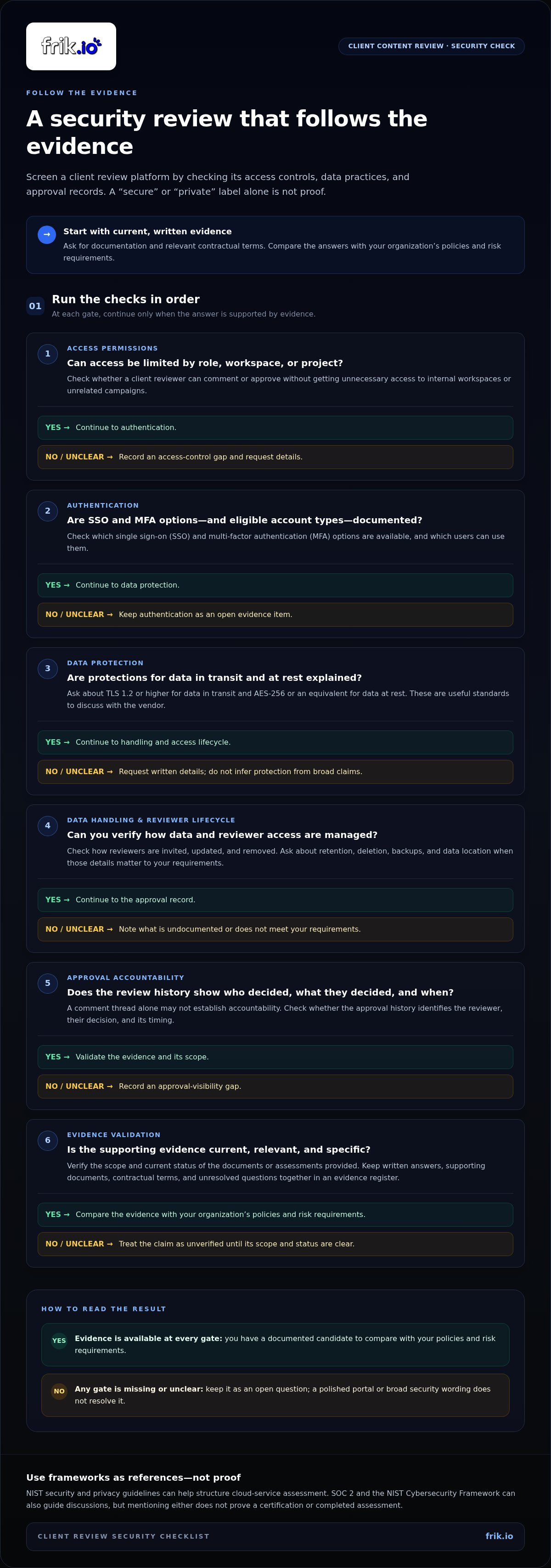
A vendor’s use of words like “secure,” “private,” or “enterprise-ready” isn’t security evidence on its own. For a secure platform for client content review, ask for current documentation explaining how access, authentication, data handling, and review records work. Compare those materials with your organization’s policies and risk requirements.
Use a consistent checklist during evaluation. Request written answers, supporting documentation, and relevant contractual terms, including details about data handling and responsibilities. The NIST security and privacy guidelines offer a useful reference for assessing cloud services. SOC 2 and the NIST Cybersecurity Framework can also help structure discussions, but mentioning either does not prove that a platform holds a certification or has completed an assessment. Verify the scope and current status of any evidence provided.
How should teams assess identity, permissions, and access?
Start with role-based access control. It should let administrators match permissions to responsibilities, so a client reviewer can comment or approve without receiving unnecessary access to internal workspaces. Evaluate whether the platform supports single sign-on (SSO) and multi-factor authentication (MFA), and which account types can use them. Review how invitations are issued, whether guest access can be limited by project, and how promptly access can be removed when a client relationship or team role changes.
- Permissions: Can access be limited by role, workspace, or project?
- Authentication: Which SSO and MFA options are available, and who can use them?
- Lifecycle: How are reviewers invited, updated, and removed?
What should a buyer check about data and review records?
Ask how data is protected in transit and at rest. For SaaS, TLS 1.2 or higher for data in transit and AES-256 or an equivalent for data at rest are useful standards to discuss. Request documentation on retention, deletion, backups, and data location when those details matter to your requirements. Check whether approval history shows who reviewed an item, what decision they made, and when. A comment thread without identifiable decisions may not provide the accountability your workflow needs.
Turn the answers into a short evidence register: record each requirement, the document or contract clause that supports it, and any open questions. Revisit the evidence when your needs or the platform’s terms change. If you’re also assessing how client approvals fit into social publishing operations, explore Frik.io’s client approval portal as part of your workflow review.
How Do Client Review Platforms Compare for Social Content?
Choose a platform category based on the work surrounding each approval, not just where comments appear. A proofing tool may excel at detailed markup, while a social media management platform can connect review to drafting and publishing. In every category, security evidence depends on the vendor’s documented controls and your own assessment. Because any platform adds a third-party relationship, include third-party security risks in your evaluation.
| Platform type | Client usability | Approval visibility | Content context | Workflow fit | Security evidence |
|---|---|---|---|---|---|
| Proofing tool | Can be clear for markup-focused reviews | May support review stages; verify status tracking | Often strong for detailed creative feedback | May require a handoff to social publishing | Assess the vendor’s documentation and controls |
| Website-feedback tool | Useful for visual, on-page comments | May emphasize issue tracking over approvals | Strong for website context, less tailored to social drafts | Fits website changes better than campaign publishing | Verify evidence for the service and your use case |
| General workspace | Familiar if clients already use it | Can depend on how the team configures tasks | Flexible, but social post context may need setup | Connects broad collaboration; publishing may sit elsewhere | Review the specific product documentation and terms |
| Social media management platform | Designed around social content review | May show approval status alongside content | Can keep captions and social creatives together | May connect drafting, adaptation, scheduling, and publishing | Check each security control rather than assuming from category |
When does a specialized proofing tool make sense?
Choose specialized proofing when your team reviews many formats, such as documents, video, and complex creative files, and detailed visual markup is central to revisions. Comments pinned to a precise element can make a creative change easier to interpret. Before committing, map how approved assets and final copy move from proofing into your social calendar. Strong review features don’t automatically provide a complete publishing workflow.
When is a social media platform with client approvals a better fit?
A social media platform with approvals can suit teams that need client feedback close to caption drafting, platform-specific adaptation, and scheduling. One workspace can reduce handoffs between creation, review, and publishing, especially when a campaign spans multiple networks. frik.io connects client review portals with these social content operations. For a broader view of how these capabilities fit together, explore an AI social media management platform strategic guide.
Match the category to your client volume, content formats, reviewer preferences, and existing process. The right fit is one clients can use confidently and your team can manage without rebuilding its workflow around the platform.
How Can You Test a Client Content Review Platform Before Committing?
A focused pilot reveals whether a secure platform for client content review works for your real approval process, not just a polished demo. Use non-sensitive sample content and test the full path from draft to publishing handoff. Track reviewer completion, version clarity, internal coordination, and publishing readiness so you can compare what worked and where the process stalled.
What should an approval workflow pilot include?
Choose one campaign with realistic captions, social creatives, client reviewers, revision requests, and a decision deadline. Assign who drafts, who gathers client feedback, who gives final approval, and who schedules the approved posts. Keep the content representative, but remove confidential details and production data you don’t need for the test.
- Map the workflow. Write down each approval stage, owner, and handoff.
- Invite reviewers. Add the people who would normally review, using the intended access process.
- Test a campaign. Submit sample drafts, request edits, and return revised versions for review.
- Check controls. Review the platform’s documented access and data controls against your requirements.
- Assess adoption. Record completion, confusion, coordination effort, and readiness to schedule.
Keep a simple pilot log. Note where comments were unclear, whether reviewers could identify the current version, and whether the final decision and next owner were visible. This gives you actionable evidence without exposing sensitive campaign material.
How can teams judge usability and rollout readiness?
Ask clients to complete the review without coaching. Watch for hesitation: can they find the right draft, understand how to comment, and submit a decision? Then ask internal users to locate the current version and identify outstanding approvals. If the team has to explain every step or reconcile status elsewhere, the workflow may add coordination instead of removing it.
Before rollout, compare the pilot with your existing process. Did feedback stay attached to the right content? Could the team see who still needed to act? Was the approved post ready for scheduling without another manual transfer? Use these observations to identify training needs and refine responsibilities. Teams building a repeatable content workflow can also explore a guide to scaling authentic content with an AI brand voice tool.
To evaluate client approvals alongside social content operations, explore frik.io’s client review workflow as part of a broader social media workspace.
How Frik.io Connects Client Review With Social Content Operations
Frik.io brings client review into a broader social media management workspace. Teams can create, adapt, review, schedule, and publish social content across multiple networks from one place. For agencies, brands, and growing teams, that connection can reduce handoffs between creating a post, collecting client feedback, and preparing approved content for publishing.
Workflow fit and security evidence are separate questions. Frik.io provides collaborative client review portals and approval workflows, but buyers should assess any platform’s security controls against their own requirements rather than infer protection from the presence of a portal. Use the criteria in this guide to evaluate security documentation alongside day-to-day usability.
What does a connected review-to-publishing workflow look like?
A team can use AI to draft a caption in a brand voice, then adapt the post for the intended social networks before sending it for client review. Reviewers can provide feedback through the client portal, keeping their input connected to the social content under consideration. Once the team has addressed feedback and secured approval, it can schedule and publish the content from the same broader workspace.
This sequence helps keep the work connected:
- Draft: Create a caption with AI assistance and a brand-voice direction.
- Adapt: Prepare versions for individual social platforms.
- Review: Share content through a collaborative client portal and collect feedback.
- Publish: Schedule approved posts and publish across social networks.
The advantage is workflow continuity, not a substitute for security review. Assess the platform’s documented controls, access options, and data practices against your needs before using it for sensitive drafts.
Who benefits most from Frik.io’s client review capabilities?
Frik.io is suited to agencies, growing teams, and brands managing recurring social content approvals. A shared portal gives clients a consistent place to review instead of splitting comments across spreadsheets, email, and messaging threads. Teams can also keep brand-voice drafting and platform-specific adaptation close to review and publishing, making the handoff easier to follow.
If your priority is a social-content workflow that connects client approvals with creation and publishing, explore Frik.io’s client approval portal. Compare its workflow with your evaluation criteria, and assess security evidence separately before deciding whether it fits your review process.
Build a Review Workflow You Can Trust
The right platform should make client approvals easier to follow without treating a polished portal as proof of security. Compare documented access and data controls with your requirements, then test the complete review process using sample content. Clear responsibilities, visible approval status, and easy-to-find versions help reduce confusion as your publishing workflow grows.
For social teams, workflow fit matters too. Frik.io brings collaborative client review portals and approval workflows together with AI-assisted, brand-voice drafting, platform-specific post adaptation, and scheduling and publishing across multiple networks from one workspace. Evaluate those capabilities alongside the security evidence you need, and decide whether the process works for both your team and your clients.
Explore Frik.io’s client review workflow to see how it could fit your social content operations. A secure platform for client content review should support controlled decisions and a usable approval experience. Choose thoughtfully, test it with your real workflow, and move forward with confidence.
Frequently Asked Questions
What is a secure platform for client content review?
A secure platform for client content review is a shared digital workspace where authorized team members and clients can review drafts, comment, and record approval. It should help keep feedback connected to the correct content while making access and decisions manageable. Security depends on documented protections and clear handling practices, not just a polished interface. For social teams, useful content context may include the caption, creative, intended platform, and current approval status.
How do I know if a client approval portal is secure?
Review current security documentation and contractual terms rather than relying on labels such as “secure” or “enterprise-ready.” Look for details about authentication, role-based permissions, encryption, data retention and deletion, and audit records. Ask how access is granted and removed, and whether approval history identifies reviewers and decisions. Compare the evidence with your organization’s requirements. A portal’s appearance or approval features alone don’t verify how it protects information.
Can clients review social media content without creating an account?
Platforms handle guest and account-based review differently. Compare the access process, including how invitations work and what reviewers need to do to participate. Consider the trade-off: fewer sign-in steps may make participation easier, while named accounts can help associate decisions with specific reviewers. Test the client experience, including how access is limited to the right content and revoked when review is complete.
What features should a client content review platform have?
Prioritize features that keep social drafts and decisions easy to follow: comments tied to the content, clear approval status, identifiable reviewers, version history, and a record of decisions. Role-based permissions can help limit access by responsibility. For social operations, consider whether the platform keeps captions and creatives together and connects approval with drafting, platform adaptation, scheduling, or publishing. Evaluate security documentation separately from workflow features, since one doesn’t prove the other.
How can I prevent clients from approving the wrong content version?
Keep revisions in one workflow and make the current draft unmistakable. Use clear version labels or timestamps, attach feedback to the specific caption or creative, and replace or mark older drafts so they can’t be mistaken for the approval copy. Before scheduling, confirm that the recorded approval matches the final content. A short pilot with sample posts can reveal whether clients and internal teams can reliably identify the latest version.
Is a general project management tool enough for client content approvals?
It can be enough if your team can clearly connect each task to the right caption and creative, identify the final approver, track revisions, and record the decision. A general workspace may require extra setup to show social platform context or link approval to scheduling and publishing. Map your current handoffs and test a campaign. If people still reconcile feedback across tools, a social media platform with client review may fit better.


