

Evergreen posts shouldn’t disappear after one publication, but repeating the same message on autopilot can make your brand feel stale. Content scheduling for evergreen posts works best when each post has a purpose, a review date, and a clear recurrence rule.
If useful content has lost visibility or you spend time manually rescheduling posts, a repeatable system can help. The challenge is keeping that system accurate and audience-aware, not simply filling the calendar with familiar captions.
This guide shows you how to build a maintainable library of reusable social posts, set recurrence rules with review safeguards, and use performance and audience feedback to refine each cycle. You’ll also learn how to adapt evergreen ideas for different platforms instead of copy-pasting identical content everywhere. A shared workspace for drafts, approvals, and scheduling, along with brand-voice generation for fresh variations, can help keep valuable content in circulation without making your feed feel repetitive.
Key Takeaways
- Use content scheduling for evergreen posts to extend the reach of durable guidance, while keeping timely announcements and expiring offers out of recurring queues.
- Build a reusable content library with clear ownership, source details, approval status, and review dates so each post has a reliable path from draft to schedule.
- Choose a reposting approach and cadence based on your channel activity, audience response, and content type rather than relying on a fixed rule.
- Review accuracy, links, creative, and audience fit before content cycles again, then use relevant performance signals to guide updates.
- Bring drafts, approvals, scheduling, and performance checks into a shared workflow to reduce handoff friction and keep evergreen publishing manageable.
What content scheduling for evergreen posts means, and when to use it
Content scheduling for evergreen posts is the planned, repeated distribution of social posts that remain accurate and useful beyond the moment they were first published. A post isn’t ready to reuse just because it performed well once; it must still serve its audience when it appears again.
Evergreen content answers lasting questions or shares guidance that stays useful over time, while timely content depends on a particular date, trend, event, or offer. The Evergreen content concept in media offers a useful foundation, but social posts need an additional editorial check: does this claim still hold true for your brand and audience now?
A thoughtful repeat schedule gives strong posts more opportunities to be seen, eases pressure to fill every calendar slot with something new, and supports a consistent publishing rhythm. It extends distribution, not guaranteed reach, engagement, or growth. Each post still needs to earn attention and remain relevant.
Which social media posts qualify as evergreen?
Start with explainers, foundational tips, answers to recurring FAQs, and repeatable brand principles. For example, a general guide to preparing for a first consultation may stay useful, while a post naming a current product feature may not. Before adding a post to a recurring schedule, ask:
- Would the advice remain accurate without its original date or surrounding campaign?
- Does it rely on changing product details, policies, statistics, or platform features?
- Would someone encountering it for the first time still find it clear and useful?
Flag posts that depend on details likely to change. They may still be reusable, but only after someone verifies and refreshes those details.
When does evergreen scheduling help, and when does it not?
Use evergreen scheduling to keep foundational information discoverable between campaigns and provide a dependable base for your publishing calendar. It’s most useful when a post addresses an ongoing audience need rather than a temporary moment.
Keep launches, event notices, news reactions, and limited-time offers out of automatic cycles. Their value depends on timing, and resurfacing them after the moment has passed can confuse or frustrate people. Trends also have a short shelf life, so review them manually instead of treating them as durable content.
Evergreen posts should complement timely content, not replace it. Pair reusable guidance with fresh updates, campaign posts, and current conversations. That balance keeps your calendar consistent without making your feed feel disconnected from what’s happening now.
How to build an evergreen content library ready for scheduling
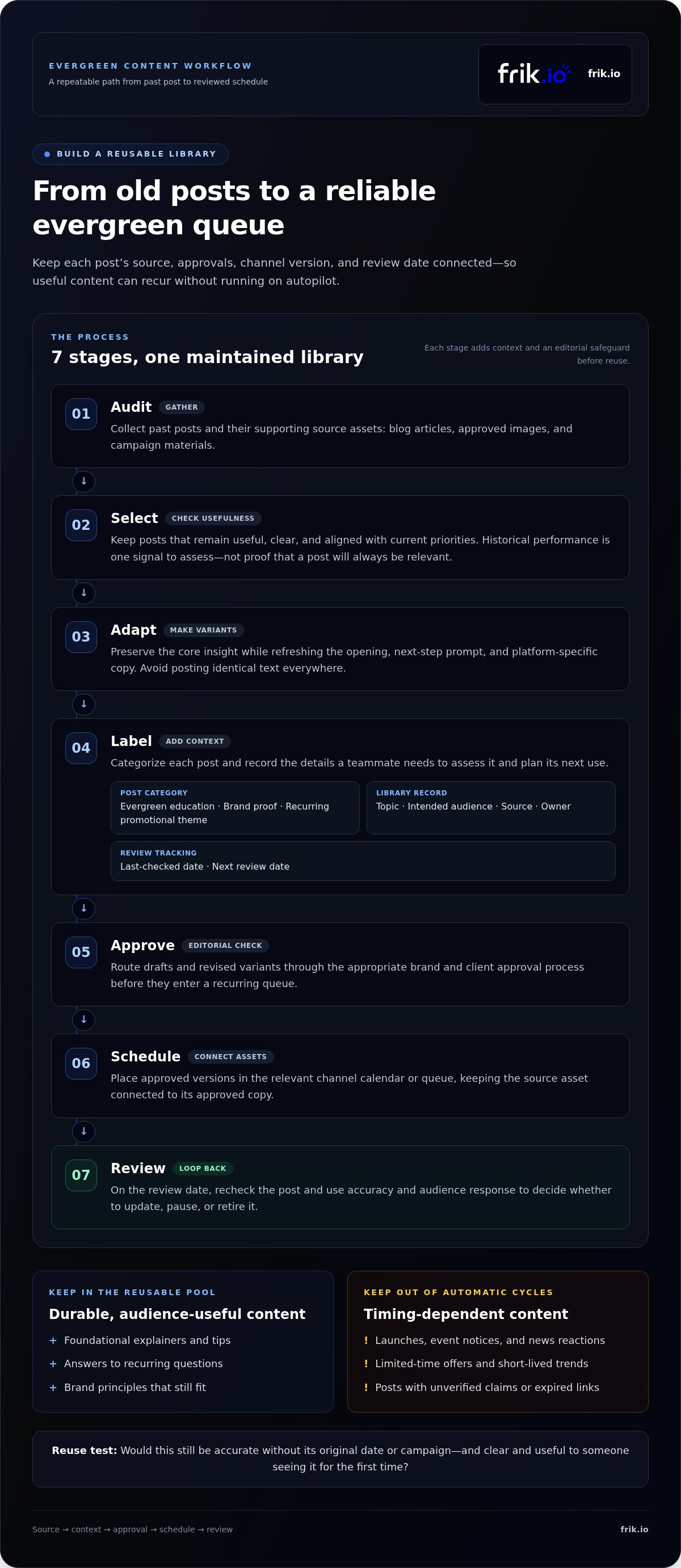
A useful library is more than a folder of old captions. It’s a maintained collection of approved posts, supporting assets, and context that helps your team decide what can be reused, where, and when. Use this workflow to build one with clear editorial safeguards.
- Audit: Gather past posts and related source assets, such as blog articles, approved images, and campaign materials.
- Select: Keep posts that remain useful, clear, and aligned with current priorities. Treat past performance as one signal to assess, not proof that a post will always be relevant.
- Adapt: Refresh the opening, call to action, and platform-specific copy while preserving the core insight.
- Label: Categorize each post as evergreen education, brand proof, or a recurring promotional theme. Record its topic, intended audience, source, owner, last-checked date, and next review date.
- Approve: Route drafts and revised variants through the appropriate brand and client approval process before they enter a recurring queue.
- Schedule: Add approved versions to the relevant channel’s calendar or queue, keeping the source asset and approved copy connected.
- Review: Recheck posts on their review date, then update, pause, or retire them based on accuracy and audience response.
How do you choose posts for an evergreen library?
Look for posts that explain a foundational idea, answer a recurring question, or express a principle that still reflects the brand. Strong historical reach or engagement can help prioritize what to assess, but it shouldn’t determine eligibility on its own. Exclude posts with unverified claims, expired links, or references that only make sense during a past launch or event. If a claim depends on changing product details or policies, flag it for review before reuse.
How should you prepare posts before scheduling them again?
Keep the core insight, but refresh how it’s introduced and what you’re asking the audience to do next. A tip can become a concise caption for one channel and a more detailed explanation for another. Avoid copying identical text everywhere. Brand-voice generation and platform-specific tailoring can help create distinct variants, while a person checks accuracy, tone, and context before approval.
Store each approved variant alongside its source asset and review details. A shared workspace can bring drafts, collaboration, approvals, and scheduling together, reducing version confusion as the library grows. For teams organizing this workflow, a shared social media workspace can keep evergreen content and its publishing steps connected.
How often should evergreen posts recur without creating audience fatigue?
There’s no universal reposting interval that fits every account. A useful cadence depends on audience size, how often you publish on the channel, the type of post, and how people respond. Start conservatively: give each post room between appearances, then adjust based on audience feedback and available analytics.
Choose a method that matches the level of oversight the content needs:
| Approach | How it works | Best suited to |
|---|---|---|
| One-time scheduling | Publish the post once, with no automatic repeat. | Content you want to test before deciding whether it belongs in a cycle. |
| Recurring queue | Approved posts return to the schedule under set spacing and eligibility rules. | Stable content with clear review safeguards and low sensitivity to timing. |
| Manually reviewed reposts | A person checks the post and its context before each new appearance. | Content that needs a fresh accuracy, timing, or audience-fit check. |
Repetition feels stale when context, copy, or timing gets ignored, not simply because an idea appears again. Choose a cautious spacing rule, monitor the post’s performance and audience response, then widen or shorten the gap. Treat any sample cadence as illustrative, not a standard to apply across every channel or post.
How can you vary a post without changing its core value?
Keep the insight consistent while changing its presentation. Rotate the opening hook, format, visual, or call to action. For example, a foundational tip might appear as a concise text post on one channel and a step-by-step visual on another. Adapt the length and framing to each platform’s audience and format rather than copying identical text everywhere. Link each variation to the same approved source so the message stays consistent.
What safeguards reduce repetition and outdated posts?
Set a minimum spacing rule and prevent a recently published version from entering the next cycle. Then define clear pause conditions. Hold a post if it receives negative feedback, circumstances change, or a relevant announcement makes its message confusing. These checks keep automation from overriding editorial judgment.
Before each repeat, confirm the content still fits the moment and the channel. Check current platform publishing guidance before relying on platform-specific requirements, since those details can change. If performance declines or audience responses signal fatigue, revise the variation, widen the gap, or remove the post from rotation. A recurring queue should make distribution more consistent, not make review optional.
How to review, refresh, and measure scheduled evergreen content
A recurring schedule needs a recurring review. Set a review date for each post and assign an owner to verify the message before it returns to the calendar. This keeps a durable idea from carrying outdated facts, broken links, or an old call to action into a new publishing cycle.
What should an evergreen post review include?
Use a short checklist at every review:
- Accuracy: Recheck claims, product details, dates, and supporting information against current sources.
- Links and calls to action: Test links and confirm the next step is still relevant.
- Creative and brand fit: Review visuals and copy for current brand alignment and audience relevance.
- Ownership and outcome: Record who reviewed the post, when it was checked, and whether it was approved, refreshed, paused, or retired.
Refresh an evergreen post when its core idea remains useful but its details or presentation need updating; pause it when context is uncertain, and retire it when the message no longer serves the audience.
How can results improve the next scheduling cycle?
Track relevant available measures, such as reach, engagement, clicks, and conversions, but verify how each platform defines and reports them before comparing results. A number without consistent context can mislead. Compare variations of the same idea while noting differences in timing, format, audience, and distribution. A stronger result can suggest what to test next, but it doesn’t prove the post will perform the same way in another cycle.
Use the findings to decide whether a topic merits another version, needs a different format, or should leave the library. For a broader measurement framework, see the Social Media Analytics: 2026 Agency ROI Guide. To connect those checks with a broader publishing process, explore the AI Social Media Management Platform: The 2026 Strategic Guide.
Keep the loop simple: review, record what changed, then use the evidence to shape the next cycle. A shared workspace can help teams keep scheduled content, approvals, and performance checks together. Manage your evergreen publishing workflow with scheduling and review in one workspace.
How to run evergreen scheduling in a shared social media workflow
Reliable content scheduling for evergreen posts depends on clear ownership as much as a calendar. A shared workflow helps teams keep the current draft, approval status, recurrence rules, and review history together, reducing fragmented calendars and version confusion.
Launch the process in a few deliberate steps:
- Assign owners: Name the person responsible for checking accuracy and, where needed, a separate approver.
- Approve content: Confirm the copy, creative, and channel-specific versions before anything enters a recurring schedule.
- Set recurrence: Document spacing rules, exclusions, and the next review date alongside the approved post.
- Review results: Check audience response and available performance data, then update, pause, or continue the post’s cycle.
Keep the human review step for sensitive claims, fast-changing information, and high-impact messages. Document what should happen if a post becomes inaccurate or a new announcement changes its context. This gives every teammate a clear next action instead of leaving decisions buried in chat threads or someone’s memory.
How can teams keep evergreen scheduling accountable?
Store the post, source material, owner, approval status, recurrence rules, exclusions, and review dates in one workspace. Make escalation steps visible too, such as who can pause a post if circumstances change. That shared record gives the team a reliable reference when someone edits a caption, approves a new version, or takes over a review.
What should you look for in an evergreen scheduling workflow?
Prioritize a shared calendar, organized reusable content, and visible approval status. Brand-voice drafting and platform-specific tailoring also help teams create distinct variations without losing the message’s consistency. frik.io brings content creation, brand-voice generation, platform tailoring, approvals, scheduling, publishing, and analytics into one workspace. For more on maintaining voice consistency as content scales, read the AI Brand Voice Content Generator: The 2026 Strategy for Authentic Scale.
With owners assigned and review safeguards in place, teams can reduce manual handoffs while keeping people involved in the decisions that matter. Explore frik.io’s AI social media management platform to bring evergreen content creation, approvals, and scheduling into a connected workflow.
Build a system that keeps valuable posts working
Evergreen scheduling works best as a managed publishing cycle, not a set-it-and-forget-it queue. Choose posts that stay useful, keep their sources and review dates visible, and vary the copy and format for each platform. Start with a cautious recurrence, then use audience feedback and performance data to decide what to refresh, pause, or keep circulating.
That structure makes content scheduling for evergreen posts more consistent without sacrificing accuracy or making your brand sound repetitive. Clear ownership and approvals help every post stay aligned as your library grows.
frik.io brings brand-voice generation, platform-specific tailoring, scheduling, collaboration, client approvals, and analytics into one workspace. Its AI-generated captions can reflect your brand voice and style guide, while your team retains a review step before content goes live.
Explore frik.io’s social media workspace to bring your evergreen workflow into one shared space. Start with a few strong posts, set thoughtful safeguards, and build a system your team can maintain with confidence.
Frequently Asked Questions
What is content scheduling for evergreen posts?
Content scheduling for evergreen posts is the planned distribution and possible reuse of social posts that remain accurate and helpful over time. Examples include foundational tips, explainers, and answers to recurring questions. A post should qualify only if its claims and context still make sense when it appears again. Add an owner and review date so useful content doesn’t keep circulating after details change.
How do I schedule evergreen content without repeating myself?
Keep the central idea, but refresh how you present it. Write different opening lines, use varied creative formats, and tailor the wording and call to action to each platform. For example, turn one practical tip into a short caption and a more detailed visual sequence. Track each approved version back to its source so variations stay consistent and don’t introduce unsupported claims.
How often should evergreen posts be reposted?
There isn’t one ideal interval for every post or account. Consider how often you publish, the size and response of your audience, the channel, and the sensitivity of the topic. Start with generous spacing, then adjust using audience feedback and available analytics. Treat sample intervals as starting points, not universal rules. If people respond negatively or engagement weakens, pause, revise, or widen the gap.
What content should not be scheduled as evergreen?
Keep launches, event notices, news reactions, limited-time offers, and posts tied to fast-changing trends out of automatic evergreen cycles. Their meaning depends on timing, so they can confuse people once the moment has passed. Also hold posts with expired links or claims you can’t verify. Some content can become reusable after an update, but it needs a human review before it returns to the calendar.
Can evergreen posts be scheduled across multiple social media platforms?
Yes, but adapt the post for each platform rather than publishing identical copy everywhere. Adjust the length, opening, creative format, and call to action to suit the channel and its audience. Keep the main insight consistent, and connect each version to the same approved source. Check current platform guidance before scheduling, since publishing options and requirements can differ and change over time.
How do I know when to refresh or retire an evergreen post?
Review claims, links, product information, dates, visuals, and calls to action before a post reappears. Refresh it if the underlying idea still serves the audience but its details or presentation need work. Pause it if accuracy or context is uncertain. Retire it if the message no longer reflects your brand or audience needs. Record the decision and next review date in your content library.
Can a social media scheduler automatically recycle evergreen content?
Yes, a scheduler with recurring queues can automatically publish approved posts according to set recurrence rules. Automation can reduce manual rescheduling, but it shouldn’t replace editorial oversight. Set spacing rules, exclude recently published versions, and assign an owner to check accuracy and audience fit. Pause posts when circumstances change or feedback signals a problem. Keep sensitive or fast-changing content on a manual review path.


