

What if your social media calendar could do more than hold dates? A social media planner should connect each post to a goal, an owner, and a clear path from draft to approval and publishing. When ideas, feedback, and deadlines live in separate tools, even a full calendar can leave your team guessing what happens next.
Consistency matters, but building it shouldn’t mean adding more coordination work or forcing the same post to fit every platform. A practical plan gives your team one view of upcoming content, responsibilities, deadlines, and approval status, while helping each post stay relevant to its channel.
This guide shows you how to turn audience and business goals into a repeatable publishing workflow. You’ll learn how to organize ideas, assign owners, set review steps, and adapt content for different social platforms. You’ll also see how frik.io connects planning with brand-voice AI drafting, platform-specific adaptations, client approvals, and scheduling in one workspace, helping planned ideas move toward publication with fewer manual handoffs.
Key Takeaways
- Use a social media planner to organize goals, themes, ideas, owners, and publishing dates in a workable system.
- Build a content plan by connecting an objective to an audience need, then choosing themes and formats that support it.
- Compare spreadsheets, calendar templates, general workspaces, and social management platforms by how well they support your team’s workflow.
- Make weekly reviews useful by checking deadlines, drafts, approvals, and platform-specific edits before posts go live.
- Connect planning to drafting, review, scheduling, and publishing to reduce handoffs and keep content aligned with your brand voice.
What Is a Social Media Planner, and What Should It Help You Do?
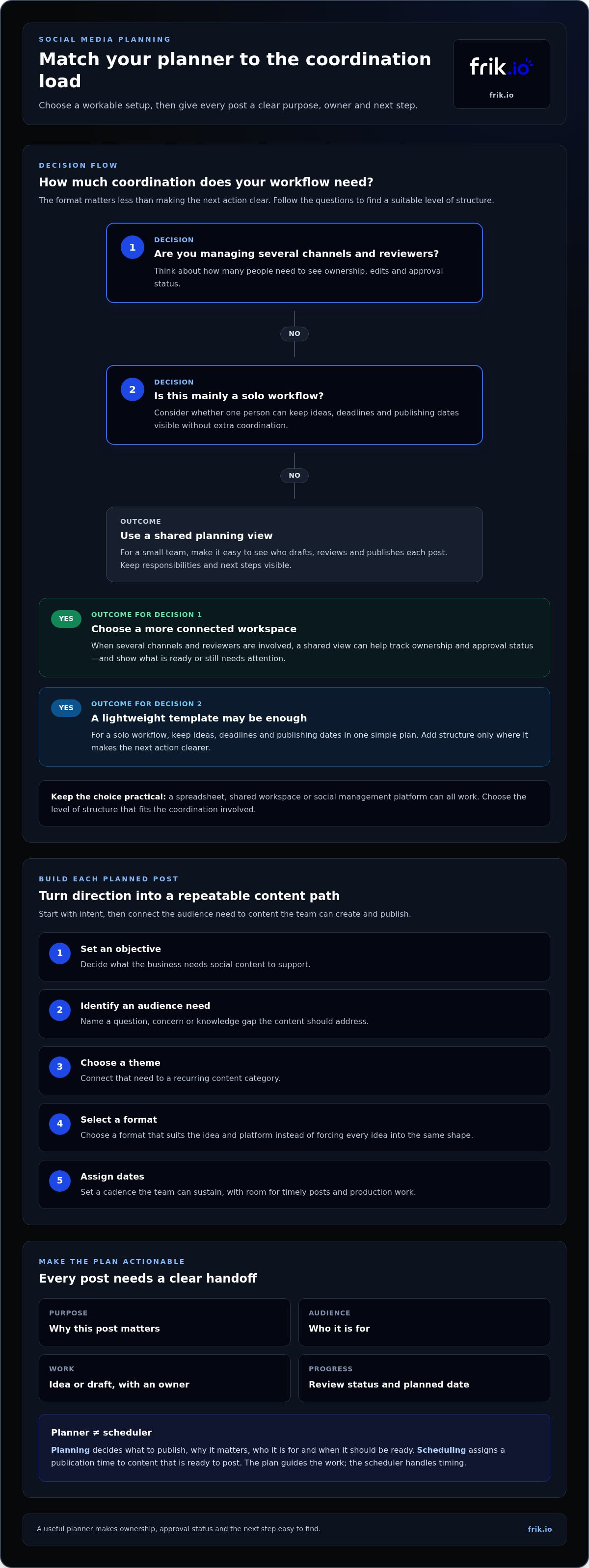
A social media planner is the working system that turns marketing goals into coordinated posts. It brings together the purpose of each post, its intended audience, the idea or draft, its owner, review status, and planned publishing date. The system might be a spreadsheet, a shared workspace, or a social management platform. The format matters less than making the next action clear.
Keep related terms distinct. A marketing strategy sets the broader direction: who you want to reach and what you want social content to achieve. A content calendar maps planned content to dates, much like an editorial calendar organizes publication across media. A scheduler assigns prepared posts to publication times. A planner connects these pieces, helping your team decide what to create and coordinate how it moves toward publishing.
Planning improves clarity and follow-through, but it can’t guarantee reach or engagement. Performance still depends on the content, audience response, and platform environment. Use the plan to make deliberate choices, then review results and adjust.
Example: A campaign goal is to introduce a new product feature. The planner records the audience question the post should answer, assigns a short demonstration post to a team member, sets a draft deadline, and marks the post for review before its planned publishing date. The campaign idea now has a purpose, an owner, and a clear next step.
How Is a Social Media Planner Different From a Scheduler?
Planning answers what to publish, why it matters, who it’s for, and when it should be ready. Scheduling handles a narrower task: assigning a publication time to content that’s ready to post. The functions work best together, but they aren’t interchangeable. A queue of scheduled posts can still lack a clear link to audience needs or business goals.
A connected workflow carries approved content from the plan into scheduling. For example, a team can adapt a core campaign idea for each platform, review the versions, and then assign publication times. The plan guides the work; the scheduler handles timing.
Who Benefits From a Social Media Planning System?
Solo marketers can use a simple plan to keep ideas, deadlines, and publishing dates visible. Small teams can clarify who drafts, reviews, and publishes each post. Brands and agencies coordinating multiple stakeholders can use a shared view to track ownership and approval status, making it easier to see what’s ready and what still needs attention.
Not everyone needs dedicated software. A lightweight template may suit a solo workflow, while teams managing several channels and reviewers may benefit from a more connected workspace. Choose a level of structure that fits the coordination involved, then make responsibilities and next steps easy to find.
How to Build a Social Media Planner Around Goals and Content Themes
A useful plan starts with intent, not a list of dates. Connect each post to a business objective and an audience need, then choose themes and formats that help deliver the message. This keeps the calendar coherent without making every post feel the same.
How Do Goals and Audience Needs Shape the Plan?
Translate a broad business objective into a specific role for social content. If the objective is to introduce a new service, a social content objective might be to explain how it solves a common customer problem. Before brainstorming, identify the questions people ask, the objections they may have, and the information they need to make a decision.
Then choose a simple success signal that fits the objective. For an educational post, you might track saves or thoughtful questions. For a post intended to prompt action, you might review clicks or inquiries. These signals help you assess whether content is serving its purpose, but they don’t guarantee a particular outcome.
How Should You Choose Themes, Formats, and Posting Cadence?
Group audience needs into a manageable set of recurring themes. A service business, for example, might plan around practical advice, customer questions, and behind-the-scenes expertise. These themes create continuity while leaving room for timely announcements or relevant conversations. For a deeper look at how recurring themes can anchor a plan, explore what a content pillar is.
Use this sequence to turn direction into planned content:
- Set an objective: Decide what the business needs social content to support.
- Identify an audience need: List a question, concern, or knowledge gap.
- Choose a theme: Connect that need to a recurring content category.
- Select a format: Pick a format that suits the idea and platform instead of forcing every idea into the same shape.
- Assign dates: Set a cadence your team can sustain, with room for timely posts and production work.
For instance, if customers often ask how to prepare for a first consultation, the theme might be practical guidance. A concise carousel could break the answer into steps on one platform, while a short talking-head video could deliver the same core idea elsewhere. The purpose stays consistent, while the execution adapts.
Keep the schedule realistic. Start with the time and creative capacity your team actually has, then adjust as you learn what’s manageable. A steady, purposeful cadence is more useful than a packed calendar that leaves drafts unfinished. A connected workflow such as frik.io’s social publishing workspace can carry selected ideas from planning into platform-specific drafts and scheduling.
Social Media Planner Options: Calendar, Spreadsheet, Template, or Platform?
The right format depends on how much coordination your publishing workflow requires. A calendar shows timing, a spreadsheet tracks details, and a template gives you a repeatable structure. A general workspace can connect tasks and notes, while a social management platform can bring planning closer to drafting, approvals, and publishing.
Use this comparison to identify where each option fits. Capabilities vary by setup and tool, but the trade-offs are consistent:
| Option | Setup effort | Visibility and collaboration | Adaptation, approvals, and publishing |
|---|---|---|---|
| Spreadsheet | Low; customize columns to your process. | Clear shared rows, though updates depend on contributors. | Platform versions, review, and scheduling are usually managed separately. |
| Calendar template | Low; start with a ready-made layout. | Dates are easy to scan; ownership and review details may need extra fields. | Useful for planning, but adaptation and publishing often happen elsewhere. |
| General workspace | Moderate; build linked pages, tasks, or databases. | Can connect briefs, owners, and feedback in one shared space. | Social-specific adaptation, approvals, and publishing may require separate tools or processes. |
| Social management platform | Moderate; configure channels and team workflows. | Can centralize content and collaboration across contributors. | May connect platform-specific drafts and approvals with scheduling and publishing. |
For a closer look at the capabilities and role of this category, read the AI social media management platform guide.
When Is a Spreadsheet or Calendar Template Enough?
A solo marketer or small team with a straightforward publishing plan may have everything they need in a spreadsheet or template. Keep the structure simple: include the post idea, platform, owner, deadline, and status. Agree on one owner for updates and use consistent labels such as “drafting,” “in review,” and “approved.” Manual updates or scattered feedback can create friction as work grows, but clear conventions help a lightweight system stay useful.
When Does a Team Need a Connected Planning Platform?
Consider a more connected workflow when you’re coordinating multiple brands, contributors, platforms, or client reviewers. Look for repeated handoffs: Are drafts copied between systems? Do approvals happen in separate messages? Does someone manually transfer approved content into a scheduler? If coordination takes as much attention as maintaining the calendar, connecting those steps may reduce workflow overhead.
A social media planner works best when it matches your actual process, not when it adds complexity for its own sake. If planning, review, and publishing need to stay connected, frik.io’s social content workspace brings those activities together.
How to Keep a Social Media Planner Useful During Weekly Execution
A plan stays useful when someone checks it against the work in progress. Set a recurring weekly review to scan upcoming posts, confirm owners and deadlines, spot drafts that need attention, and update approvals or dates when priorities shift. This maintenance pass turns the calendar into an active workflow instead of a record of old intentions.
How Can Teams Manage Drafts, Changes, and Approvals?
Give every post one accountable owner, a due date, and a visible review status. Keep feedback with the draft it refers to, whether that’s in a shared workspace or an approval portal, so edits don’t get lost across chat threads and email. Before a post is approved, run a final check:
- Platform fit: Does the format and wording suit the intended channel?
- Brand voice: Does the post sound consistent with the brand?
- Accuracy: Are details, dates, and claims correct?
- Links and assets: Do links work, and are the right creative files attached?
- Approval: Is the required reviewer’s decision recorded?
Start with one core idea, then tailor its expression for each platform. A useful insight might become a concise text post on one channel and a visual explanation on another. Keep the central message consistent, but adjust the hook, length, format, and call to action to fit the audience and platform. Copying identical posts everywhere can overlook those differences.
How Should You Review and Improve the Plan?
During the weekly review, compare recent posts with their intended themes, formats, and objectives. Note the audience response you observe, such as recurring questions or stronger interaction with a particular format. Treat each result as a signal, not a verdict: one post alone doesn’t prove that a topic or format will always perform better.
Capture the learning beside the relevant content, then use it to shape future ideas and workflow priorities. If a format consistently takes longer to produce, adjust the schedule or assign more lead time. If a topic prompts useful audience questions, consider developing it further while keeping it connected to the broader content direction. For a structured approach to interpreting performance, see this social media analytics guide for agencies.
Keep planning, collaboration, and publishing connected with frik.io’s social content workflow, including platform-specific adaptation and shared review.
Turn Your Social Media Planner Into a Connected Publishing Workflow
A plan becomes easier to execute when the steps after ideation are visible too. Frik.io connects social content drafting, platform-specific adaptation, team collaboration, client review, scheduling, and publishing in one workspace. Instead of treating the calendar as a handoff point, teams can use it as the starting layer for preparing approved content to go live.
How Does AI Support a Planner Without Replacing Editorial Judgment?
AI can help turn a brief into a first draft and reshape a core message for different platforms. It can speed up production, but it shouldn’t decide the strategy or replace a person’s final review. A style guide gives AI clearer context about your brand’s voice, helping generated drafts reflect the language and guidance your team uses.
Before publishing, a team member should check the facts, tone, platform fit, and required approvals. Treat AI output as a starting point, not a finished post. That distinction keeps the workflow efficient while leaving decisions and accountability with people.
What Does a Connected Team Workflow Look Like?
Picture a planned theme about answering a common customer question. A contributor drafts a post, adapts it for the intended platforms, and submits the versions for client review. The reviewer leaves feedback alongside the relevant content. After revisions and approval, the posts move to scheduling and publishing.
With the steps in one shared workspace, contributors can see who owns each task and whether a post is in draft, awaiting review, approved, or scheduled. A client approval portal helps organize feedback within the content workflow rather than scattering decisions across separate messages. This is useful for teams coordinating multiple contributors, platforms, or client stakeholders.
A connected social media planner is most valuable when coordination matters as much as the calendar. It links the original idea to platform-ready content and makes the next action clear, while the team remains responsible for the message and its final approval.
Explore frik.io’s social media workflow to see how planning, drafting, review, and publishing work together in one workspace.
Make Your Content Plan Easier to Put Into Practice
A social media planner works best when every post has a purpose, an owner, and a clear next step. Build your schedule around business goals and audience needs, then keep it current with regular reviews of drafts, approvals, and performance signals. Choose a simple calendar or a connected platform based on how much coordination your workflow requires.
When planning connects directly to creation and publishing, teams can spend less time chasing updates and more time refining the work. AI drafting can draw on your team’s style guide, posts can be adapted for different platforms in one workspace, and client approval portals can keep review organized.
Explore frik.io’s social media workflow to bring these steps together in one workspace. Start with the process your team needs now, then build a clearer, more consistent publishing rhythm over time.
Frequently Asked Questions
What is a social media planner?
A social media planner is a system for organizing the goals, topics, formats, owners, and publishing dates behind social content. It can take the form of a spreadsheet, calendar, template, or software platform. The purpose is to make work visible and repeatable, so ideas move into drafting and review instead of remaining disconnected notes. A useful planner also helps each contributor see what needs attention next.
Is a social media planner the same as a social media scheduler?
No. A planner helps decide what to publish, why it matters, who owns it, and when it should be ready. A scheduler assigns prepared posts to publishing times. Some social platforms support both functions, connecting planning with publishing. But a calendar alone may not include drafting, approvals, or scheduling. Knowing which steps your current system handles makes it easier to spot gaps and choose the right workflow.
How do I create a social media planner?
Start with a clear objective and the audience you want to serve. Identify audience questions, then choose a manageable set of themes and match post ideas to suitable platforms and formats. Assign an owner and due date to each item, and add review steps plus a simple success measure. Review the plan regularly. Adjust it to your team’s capacity and audience response instead of treating every planned post as fixed.
What should a social media content calendar include?
Include the planned date, platform, topic or theme, format, objective, owner, draft status, and approval status. Add copy, creative requirements, links, or performance notes when they help the team act. Keep the calendar easy to update and scan. A clear, maintained view is more useful than a long list of fields nobody checks. Use consistent status labels so everyone understands whether a post is in progress, under review, or ready to publish.
Can I use a spreadsheet as a social media planner?
Yes. A spreadsheet can work well for an individual or a small team with a straightforward review process. Use consistent fields and status labels, and assign someone to keep the information current. As the number of platforms, brands, contributors, or client approvals grows, updates and feedback may become harder to coordinate manually. At that point, a connected workflow can bring drafts, review, and publishing into a shared view.
How far ahead should I plan social media content?
There’s no single planning timeline that suits every brand. Plan far enough ahead to coordinate production and approvals, while leaving room for timely updates and changing priorities. Consider your team’s capacity, campaign deadlines, and the type of content involved. Review the calendar regularly so upcoming work stays realistic. Treat scheduled dates as useful guideposts, not unchangeable commitments when circumstances or priorities shift.
How can a social media planner help an agency manage client approvals?
A planner can show each client’s upcoming content, draft status, owner, and review deadline in one organized view. Keep feedback attached to the relevant post and make clear who gives final approval. For agencies coordinating multiple accounts, a shared workspace and client approval portal can organize review and reduce scattered comments or unclear handoffs. The team can then see which drafts need revisions and which are approved to move forward.
Does AI make a social media planner more effective?
AI can assist with drafting and adapting content, but it doesn’t replace audience understanding, strategy, or editorial judgment. Provide useful brand guidance, such as a style guide, to give AI clearer context for drafting in your team’s voice. Then review each post for accuracy, tone, platform fit, and approval before publishing. The value comes from connecting AI assistance to a clear planning and review process, not simply generating more content.


